POS Hourly Sales Report
See which hours of the day and which days of the week your Point of Sale sells most, in the time zone you work in.
Request a live demo · Odoo.sh or On-Premise only, not Odoo Online (SaaS).
Free
App Store price, per Odoo version
19 · 20
Odoo versions, each sold on its own page
Odoo.sh
or On-Premise; not Odoo Online (SaaS)
1.0.1
version of mh_pos_hourly_sales
Odoo's Orders Analysis groups Point of Sale sales by date, from day up to year. It cannot fold all your days onto the 24 hours of one day, or onto the 7 days of one week, and that is the view that shows a peak hour or a quiet weekday. On Odoo 20 the Order Date has an Hour option, but it lists every hour of every date one by one. This app adds the two missing group-bys to Orders Analysis, and a Sales by Hour menu that opens them as a grid.
How it works
What the grid shows
Open Point of Sale > Reporting > Sales by Hour. Hours of the day run down the side, weekdays across the top, and every cell holds the number of orders and the total sales. Switch to the chart view for a bar chart of sales by hour.
Your hours, not UTC
Odoo stores every order time in UTC. The hour and the weekday are worked out in the time zone set in your own user Preferences when you open the report, the same way Odoo works out days when it groups by Order Date. A sale at 18:40 UTC on a Monday shows as 00:10 on Tuesday for a user in India, and summer time is applied for the date of each sale.
Odoo's own figures
The grid reads Odoo's own Orders Analysis, so the totals are the ones you already trust, with the same Not Cancelled filter. A refund is an order of its own with negative amounts and counts in the hour it was made, as it does in Orders Analysis. Filter by Point of Sale, period, product, product category or customer exactly as there.
Also in Orders Analysis
Hour of Day and Weekday are added to the Group By menu of Odoo's own Orders Analysis, so you can combine them with any other grouping, such as hour by Point of Sale.
Who it is for
Shops, cafes and counters that roster staff, plan deliveries or time promotions around the hours that sell. Works for retail as well as restaurants.
Screenshots
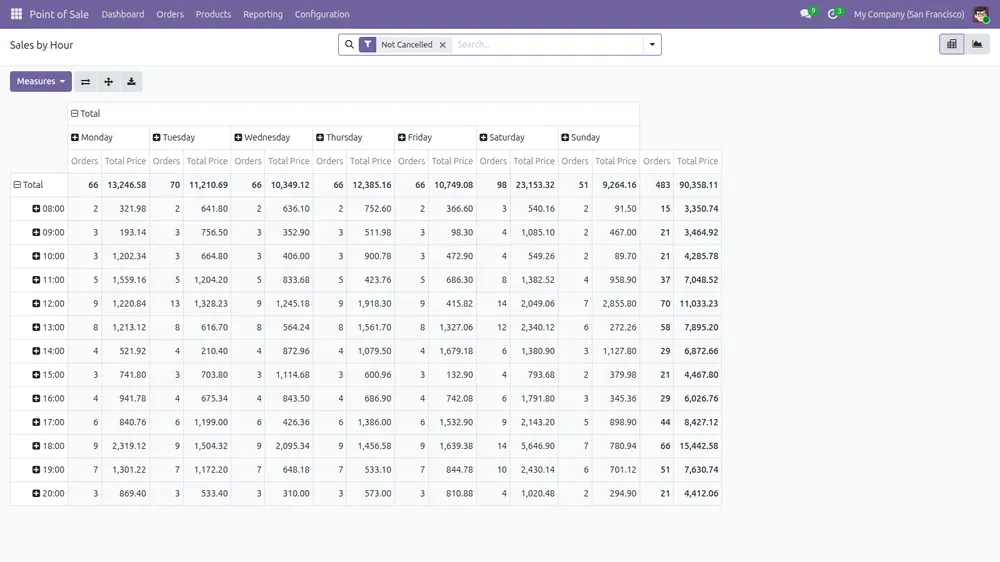
What it does not do
- It stores nothing and adds no table: it reads Odoo's own order report. It shows no average basket, because a pivot cannot divide one figure by another, so orders and sales sit side by side. Hours follow the time zone of whoever reads the report, so a chain with shops in several time zones sees every shop in one zone. It has no PDF of its own; the grid exports to Excel with the download button Odoo puts on every pivot. It adds nothing to the Point of Sale screen. Sales by cashier and by payment method, and profit by product, are in the paid POS Sales Reports.
Requirements
- Odoo 19.0 or 20.0. The App Store sells each version separately, so buy the one that matches your database.
- Odoo.sh or On-Premise only. Third-party apps cannot be installed on Odoo Online (SaaS) databases. Check your hosting before buying.
- Odoo 19 or 20, Community or Enterprise, with Point of Sale installed. Nothing else is needed. Third-party apps install on Odoo.sh or On-Premise only - they cannot be installed on Odoo Online.
- Module
mh_pos_hourly_sales, version 19.0.1.0.1, licensed OPL-1.