POS Payment Reference
Ask the cashier for the card slip, UPI or bank transfer reference when a payment is added, and keep it on the receipt and on the order.
Request a live demo · Odoo.sh or On-Premise only, not Odoo Online (SaaS).
Free
App Store price, per Odoo version
19 · 20
Odoo versions, each sold on its own page
Odoo.sh
or On-Premise; not Odoo Online (SaaS)
1.0.1
version of mh_pos_payment_reference
Odoo's Point of Sale already has a payment reference field on every payment, but only a payment terminal integration can fill it. When a cashier takes a card on a standalone machine, a UPI payment or a bank transfer, the payment screen has nowhere to type the reference, so it never reaches Odoo and nobody can find the payment later.
This app adds one setting to each payment method, Ask for Reference: No, Optional or Required. It writes into Odoo's own payment reference field, so there is no new column to maintain.
How it works
Asked when the payment is added
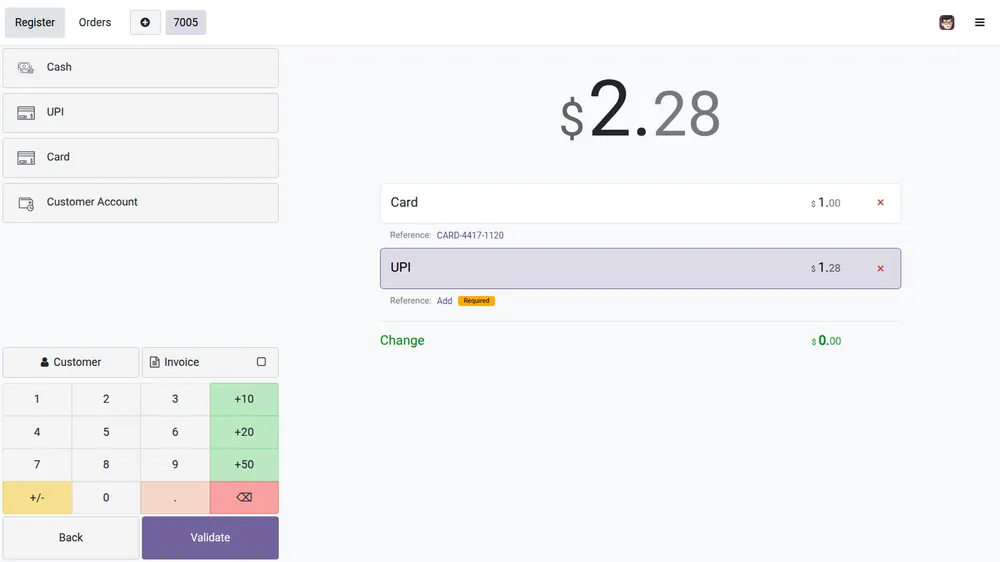
Add a Card, UPI or Bank payment on the payment screen and a popup asks for the reference. It then sits under the payment line, and a click on it changes it until the order is validated. Payment methods set to No never ask.
On the receipt
The reference prints under its payment line on the receipt.
Findable in the backend
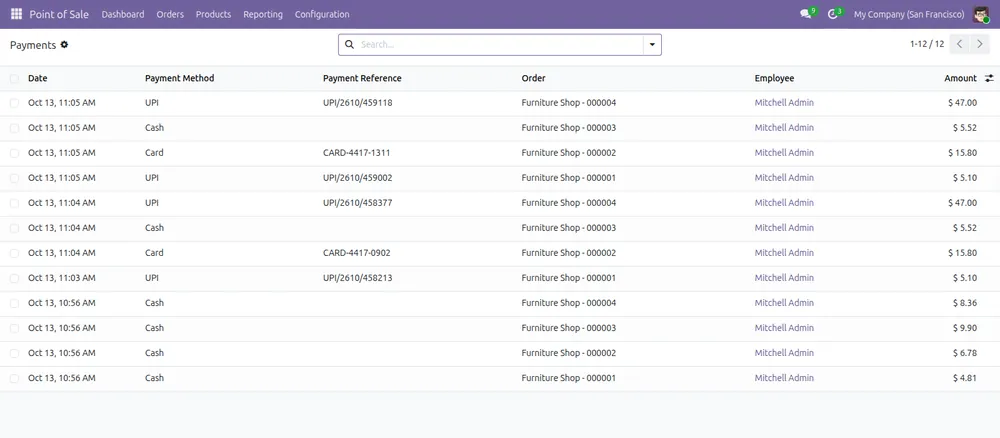
The reference is a column in Point of Sale > Orders > Payments and in the order's Payments tab. Search Payments by it, search Orders by the reference of any of their payments, or use the Reference Missing filter on Payments to list payments whose method asks for one but has none.
Terminal payments are left alone
A payment line run by a payment terminal or QR integration is not prompted when added, and a reference that integration already wrote is shown read-only and never replaced.
Who it is for
Shops that take card, UPI or bank transfer payments outside Odoo's terminal integrations and need to match a payment to a slip, a bank statement line or a customer query.
Validation can be blocked
With Required, the order cannot be validated while the reference is empty: validation asks again and stops, with a message naming the payment method, if it is not given. Optional never blocks.
Screenshots
What it does not do
- It does not check a reference with a bank, card network or UPI provider; it stores what the cashier types. Payments added by hand in the backend order form are not checked. It does not prompt for payment lines run by a terminal or QR integration. It adds no card charge or fee and changes no accounting entry.
Requirements
- Odoo 19.0 or 20.0. The App Store sells each version separately, so buy the one that matches your database.
- Odoo.sh or On-Premise only. Third-party apps cannot be installed on Odoo Online (SaaS) databases. Check your hosting before buying.
- Odoo 19 or 20, Community or Enterprise, with Point of Sale; nothing else to install. Third-party apps install on Odoo.sh or On-Premise only - they cannot be installed on Odoo Online.
- Module
mh_pos_payment_reference, version 19.0.1.0.1, licensed OPL-1.