POS Reorder
Repeat a past POS order into a new one: all of its lines or only the ones you pick, with the same customer, from the order list in the till.
Request a live demo · Odoo.sh or On-Premise only, not Odoo Online (SaaS).
Free
App Store price, per Odoo version
19 · 20
Odoo versions, each sold on its own page
Odoo.sh
or On-Premise; not Odoo Online (SaaS)
1.0.1
version of mh_pos_reorder
A regular customer buys the same basket every week and the cashier scans all of it again. Odoo's Point of Sale can reprint or refund a past order, but it has no way to repeat one.
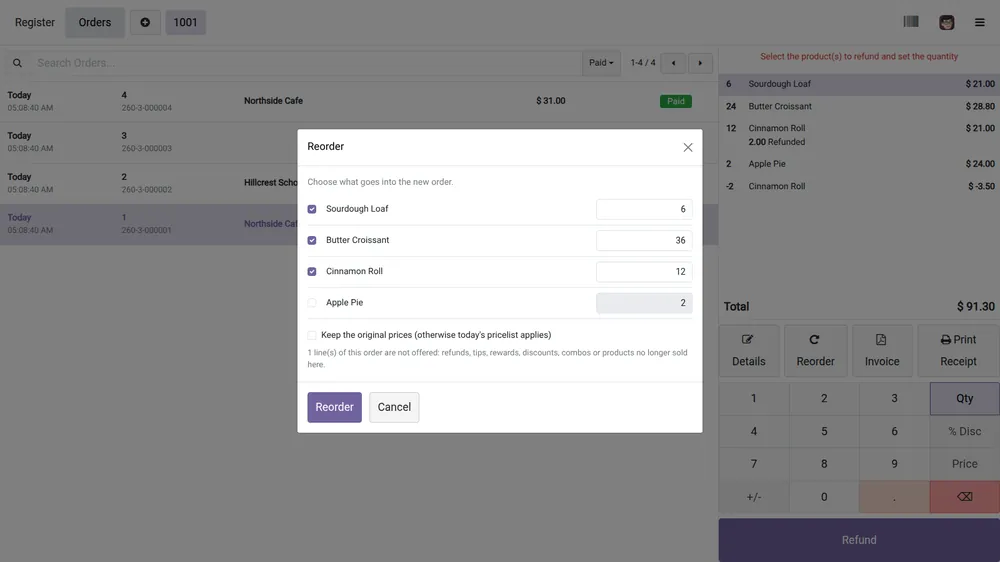
This app adds a Reorder button, beside Details and Invoice, on a paid order in the POS order list (the Orders screen, or Refund on the product screen). It opens the lines of that order, each ticked with its quantity. Untick what you do not want, change a quantity, press Reorder: a new order opens on the product screen with the same customer and those products.
How it works
Pick lines and quantities
Every offered line is ticked and shows the product and the quantity it was sold at. Untick a line to leave it out, or change its quantity; a quantity of 0 leaves the line out as well. Reorder stays disabled until at least one line is chosen.
Today's prices or the original ones
By default each product is priced as if you had just rung it up: from the pricelist that applies to the new order, so a price that changed since the first sale is the new price. Tick Keep the original prices to carry over each line's unit price and discount exactly as it was sold.
Same customer
The new order has the customer of the old one, set the way you would set it yourself, so the customer's pricelist and fiscal position apply to the new order.
Only what was bought
Refund lines, tips, discount lines, reward lines, combo lines and products no longer sold in this Point of Sale are not offered, and the dialog says how many lines were left out. An order with nothing to offer has its Reorder button disabled.
Who it is for
Counters with repeat customers: bakeries and cafes with a standing order, trade counters, and any shop where a customer asks for the same as last time.
Screenshots
What it does not do
- It copies the product, the quantity and, if you ask, the unit price and discount. It does not copy lot or serial numbers, line notes, customer notes or custom attribute values, and it does not copy payments or the order's own pricelist or fiscal position (they come from the customer, as for any new order). It works from the till's order list: it adds no backend screen, no report and no setting. Tested on a retail Point of Sale, not on restaurant floors.
Requirements
- Odoo 19.0 or 20.0. The App Store sells each version separately, so buy the one that matches your database.
- Odoo.sh or On-Premise only. Third-party apps cannot be installed on Odoo Online (SaaS) databases. Check your hosting before buying.
- Odoo 19 and 20, Community or Enterprise; installs Odoo's own Point of Sale app (point_of_sale). Third-party apps install on Odoo.sh or On-Premise only - they cannot be installed on Odoo Online (SaaS).
- Module
mh_pos_reorder, version 19.0.1.0.1, licensed OPL-1.