POS Sales Reports
Point of Sale sales by cashier, by session and by product, with a profit and loss that never counts a missing cost as margin.
The video below shows POS Sales Reports running on a real Odoo 19 database. Want it driven against your own data, or a question answered first? Ask and we will set up a session.
Odoo 19 already prints a Sales Details report and ships an Orders Analysis pivot. Sales Details has no Excel export and no margin. Orders Analysis files an order paid partly in cash and partly by card under its first payment method only, and counts a line with no recorded cost as all margin.
This app reads the same records Odoo keeps and lays them out for the questions a shop manager asks at the end of the day, the week and the month: who sold what, what came in by each payment method, which sessions came up short, and what the shop actually made.
What it does
Every cashier, side by side
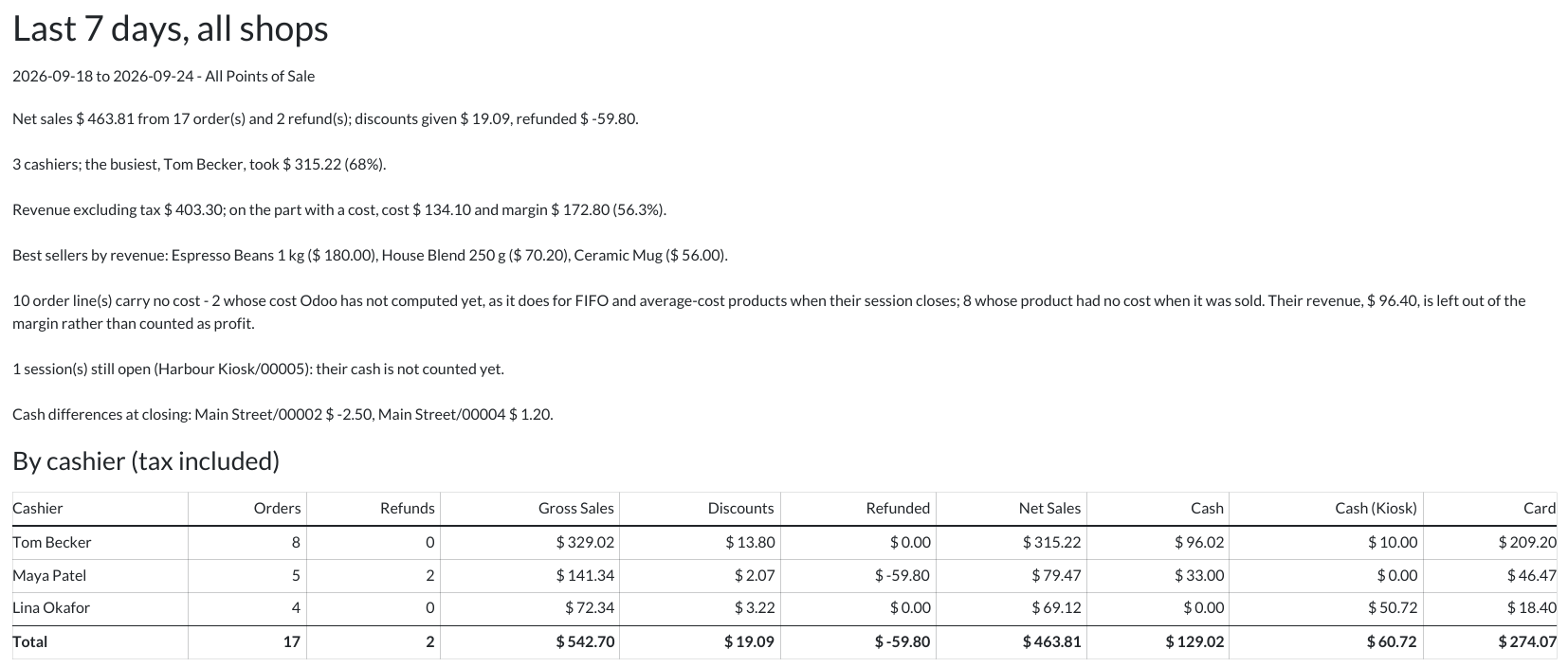
Orders, refunds, gross sales, discounts, refunded and net sales for each cashier, across any date range and any number of Points of Sale, next to what each one took by payment method. An order paid half in cash and half by card is split exactly as it was paid.
The person who rang it up
With Point of Sale employee login, the cashier is the employee Odoo records as Cashier on the order, so employees sharing one Odoo user each get a row of their own. Without employee login, it is the logged-in user.
A session report in one click
A Sales Report button on the session form prints that session’s report; select several sessions in the list to print one report per session. Each session shows who opened it, its orders and net sales and, once it is closed, the expected cash, the counted cash and the difference Odoo recorded at closing.
Profit and loss by product and category
Revenue excluding tax, the cost Odoo stored on each order line, margin and margin percentage, per product and per product category. Products are ranked by revenue, so the best sellers come first. A refund takes back both its revenue and its cost.
No margin on a cost that was never recorded
A line with no cost — a product that has none, or a FIFO or average-cost product whose cost Odoo computes only when its session closes — has its revenue shown in a column of its own and left out of the margin. The report counts those lines and says why they have no cost.
Odoo’s own figures
Order totals, payment amounts, the discount measure Odoo’s Sales Details uses, the cost stored on each line and the session’s own cash count — nothing is recalculated, so a session’s net sales and payments by method agree with Odoo’s Sales Details for the same session.
Your day, your currency
Periods run from midnight to midnight in your time zone. A Point of Sale that sells in another currency is converted to the company’s at the rate Odoo stored on each order.
PDF and Excel for every report
Print a landscape PDF that opens with a short summary of what stood out, then cashiers, sessions, categories and products; or export the same figures to an Excel workbook with a sheet for each.
Screenshots
Requirements
- Odoo 19.0, Community or Enterprise.
- Odoo.sh or On-Premise only. Third-party apps cannot be installed on Odoo Online (SaaS) databases — check your hosting before buying.
- Odoo 19 Community or Enterprise with Point of Sale; nothing else to install. Third-party apps install on Odoo.sh or On-Premise only — they cannot be installed on Odoo Online (SaaS).
- It only reads: it posts nothing and changes no order, session or cost. Cash is counted per session, not per cashier, so cash differences are reported per session. Discounts are line discounts; a global discount is a product line of its own and is reported as one. Sales figures include tax; profit and loss figures exclude it. Only Point of Sale Administrators can run it, because it shows cost and margin. It adds nothing to the Point of Sale screen itself.
- Module
mh_pos_sales_reports, version 19.0.1.0.1, licensed OPL-1.
Related apps
Commission for salespeople and external agents, earned on the invoice or on the payment, and paid out on one vendor bill per person per period.
Split one order into several deliveries, confirm many quotations at once, duplicate lines in place, and add custom fields to quotations without code.
See whose turn it is to reply on a Lead or Sales Order, without opening the thread