POS Waiter Table Lock
Lock a restaurant table to the waiter who opened it: other waiters cannot take that table's order, a manager can override with a PIN and transfer the table
Request a live demo · Odoo.sh or On-Premise only, not Odoo Online (SaaS).
4
waiters and managers on one made-up restaurant register in the real till sessions shown here: three waiters, one manager, two tills
28
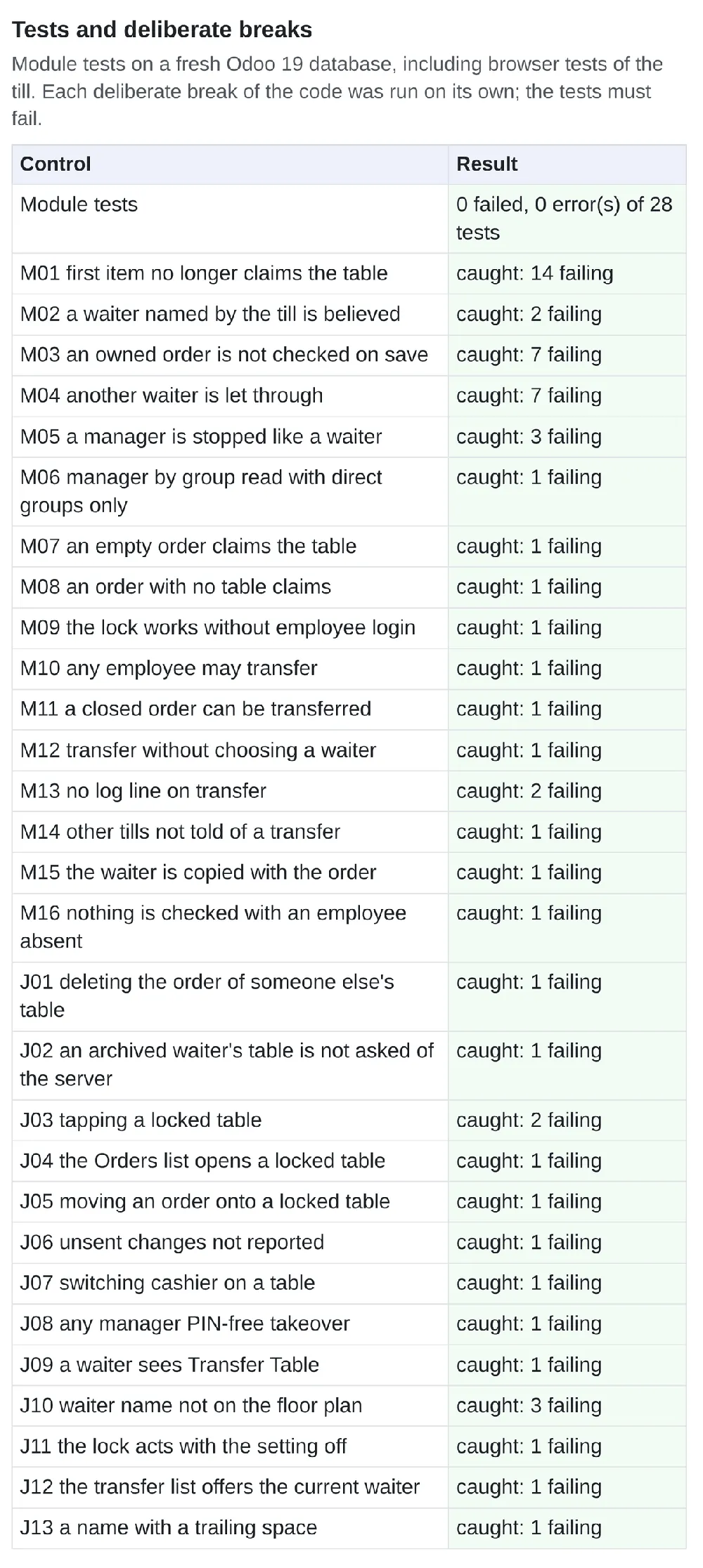
tests in the run, none failing, including browser tests of the till (10 added in this release)
0
deliberate breaks of the code, each caught by a failing test
0
network calls, scheduled actions, or changes to prices, taxes, payments and the floor plan layout
3
defects fixed in this release: a waiter could delete another waiter's table order, an archived waiter's table was not locked at the till, and a name ending in a space showed as undefined on the floor plan (section 7)
Not
checked: Enterprise, Odoo.sh, several companies in real use, kitchen displays and printers, QR self-order, split bills (see Before you install)
In Odoo's restaurant point of sale any employee at any till can open any table, add to its order and take its payment. With this app the waiter whose till first saves an item on a table owns it: the floor plan shows the waiter's name on the table, another waiter who taps the table, picks its order from the Orders list, moves an order onto it or deletes its order is stopped, a manager can open it with a PIN or hand it to another waiter, and the server checks every save as well. This page walks through it with screenshots of real cashier sessions on an Odoo 19 database holding a made-up restaurant, with readings taken from the server, and with the limits found when it was tested.
A table lock decides who may touch an open bill, so this page also says what the app changes, what it keeps, what it does not do, and where it is a control on the shop floor rather than a security boundary.
Install it and the point of sale's Settings gain Lock Tables to Waiter (restaurant section), the floor plan shows the waiter on each open table, a manager gets a Transfer Table button, and the order gains a Table Waiter field, search field and group-by. It needs Odoo's own Point of Sale, Restaurant and Employees login (pos_hr), and nothing else.
How it works
1 Switch it on for one point of sale
Use it when you run a restaurant register with employee login.Writes settings
Any employee can open any table, so the bill of a table can be changed by someone who did not serve it.
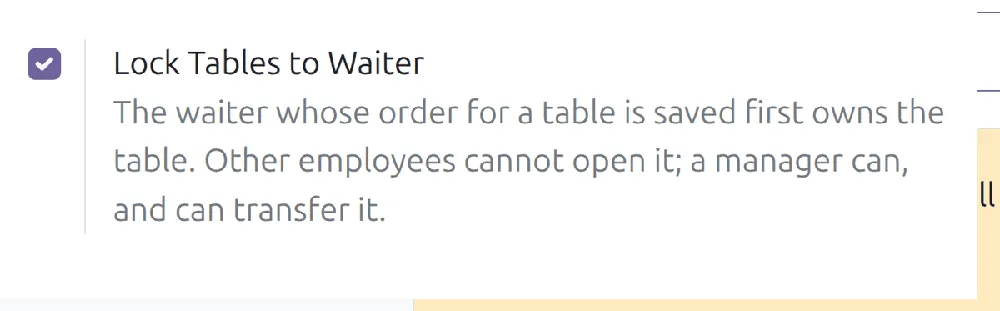
Open Point of Sale > Configuration > Settings and pick the point of sale. In the restaurant section a new line Lock Tables to Waiter appears once Restaurant and Employee login are both on. It is a plain tick box of the point of sale: with it off, or with employee login off, the till behaves as Odoo does and no waiter is recorded.
It does not lock tables on a point of sale that has no employee login: without it the till does not know who is serving.
The switch in the restaurant section of the settings.
2 The floor plan shows who has each table
Use it when everyone sees at a glance whose table it is.Writes the waiter
A waiter cannot tell from the floor plan whose table is whose.
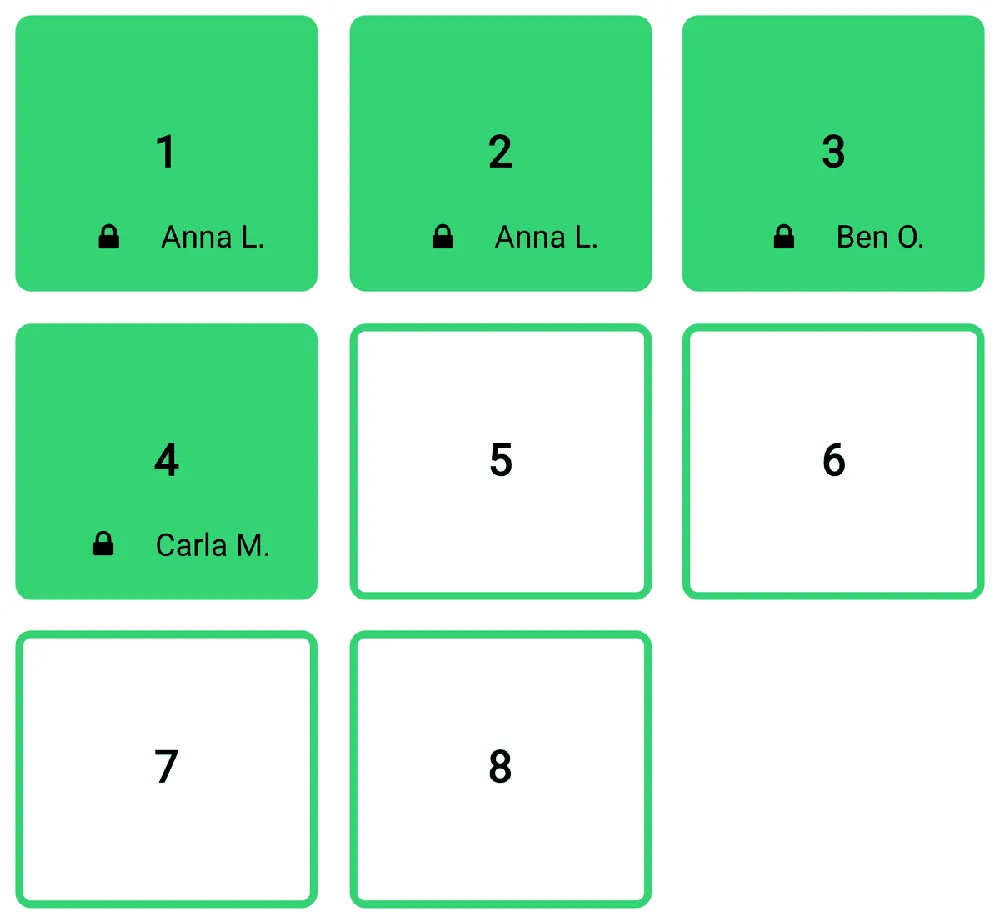
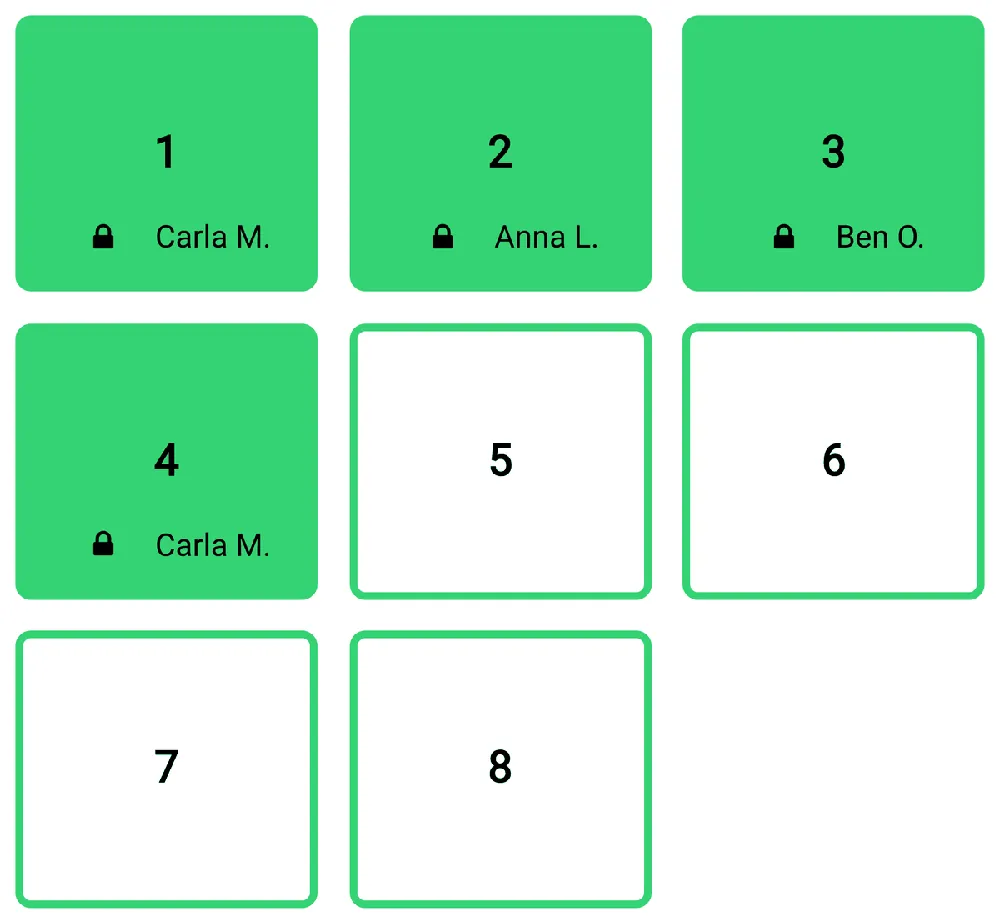
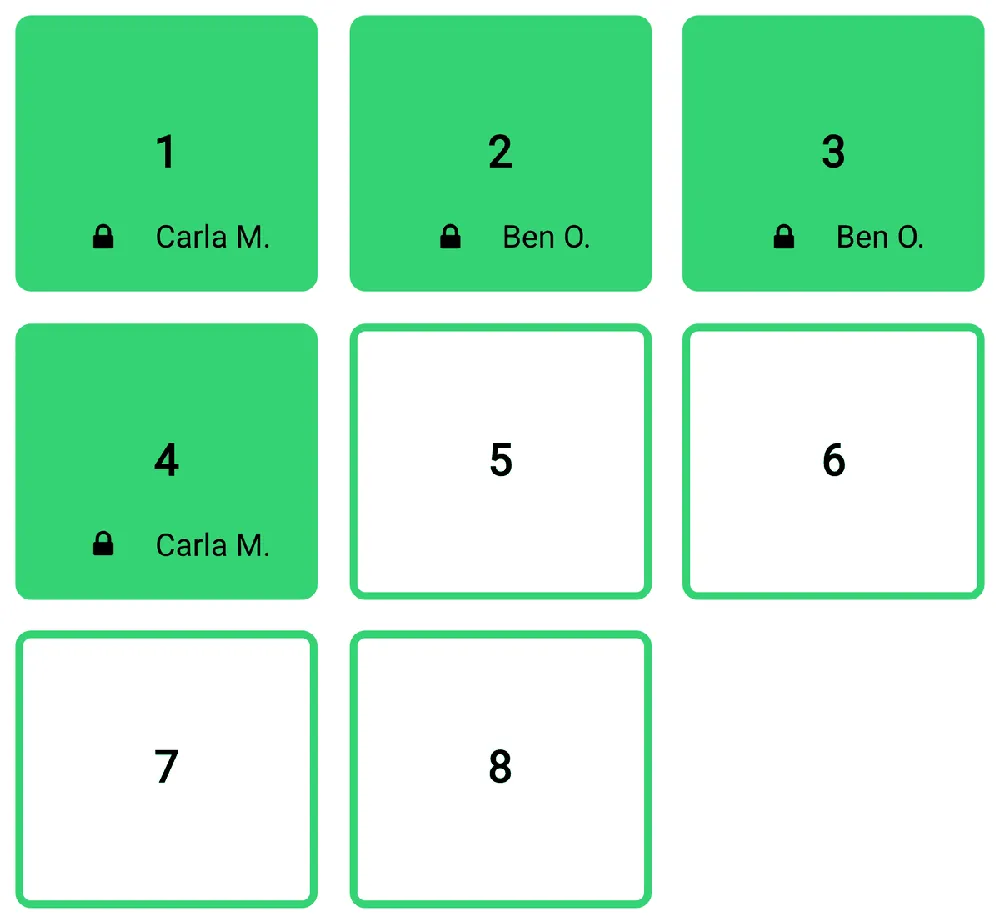
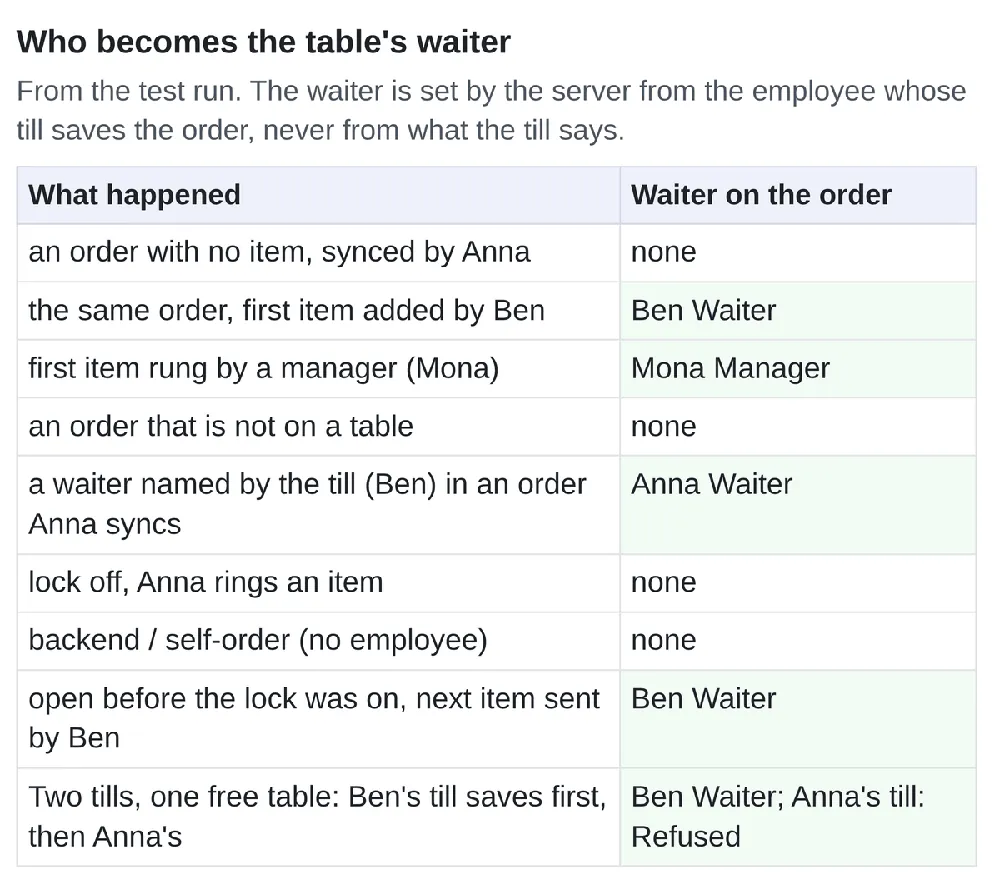
The waiter is the employee whose till first saves an order with at least one item on the table (Odoo saves the order when the waiter leaves the table). From then on the floor plan shows a lock and the name as the first name and the initial of the last word (Anna L.), with the full name as the tooltip. An empty order does not claim the table, and the till cannot name a waiter: the server sets it. In the demo three waiters each opened tables; the screenshot is the floor plan of the next waiter to come on.
The floor plan editor is Odoo's own. Linking tables there is not locked.
The floor plan: four tables with a waiter, four free.
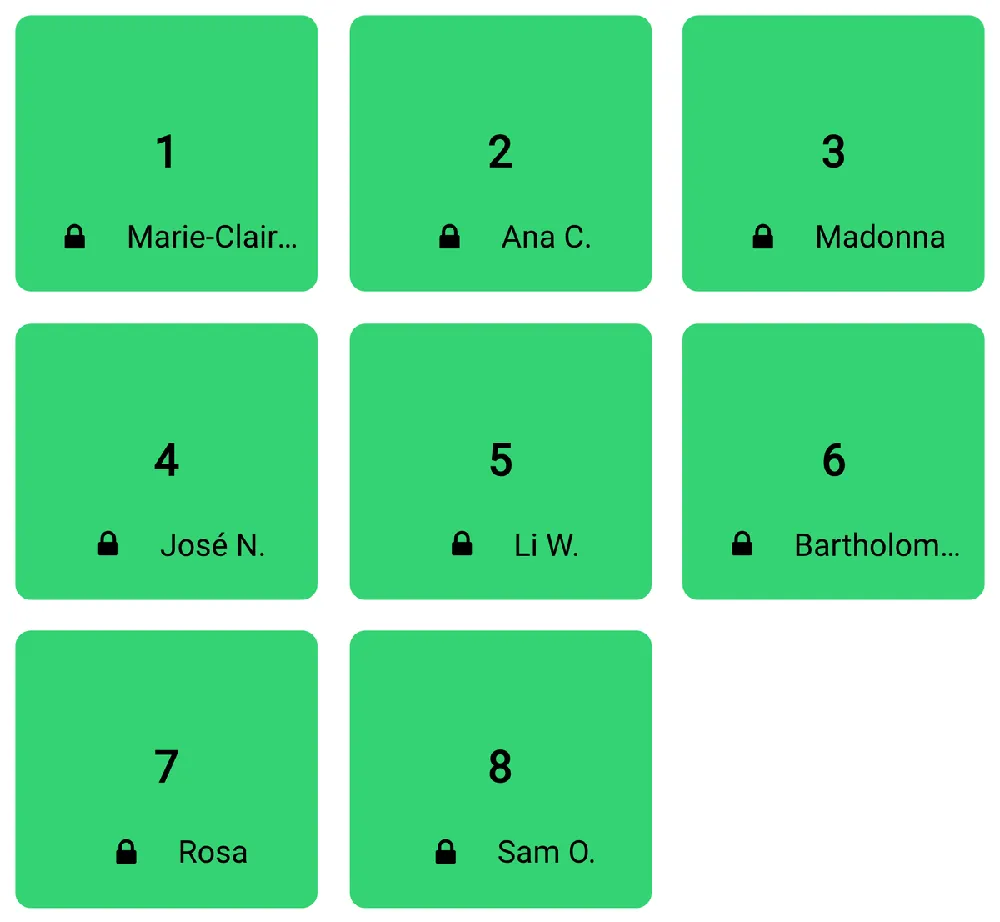
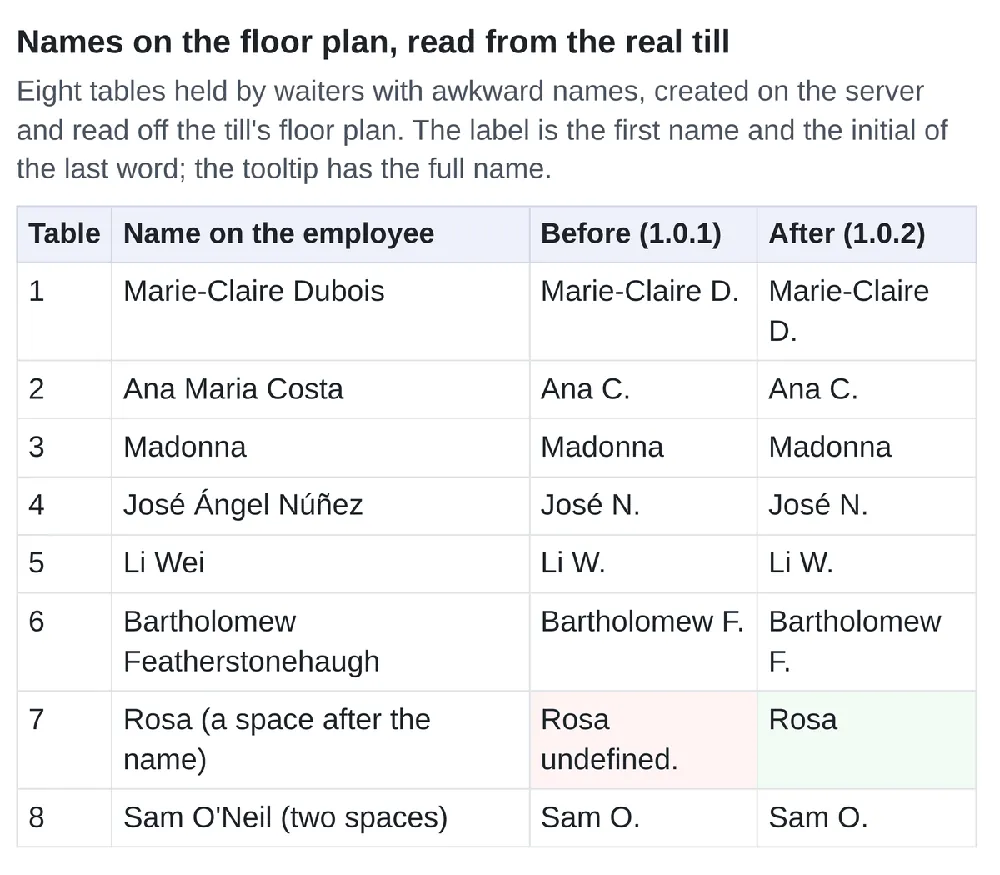
Eight tables held by waiters with awkward names, read from the real till.
What the label shows for hyphenated, three-word, one-word, accented and very long names, and for a name with a space after it, before and after the fix. Generated from the till's readings, not a live screen.
3 Another waiter is stopped at the till
Use it when nobody takes over a table by accident.Reads the order
Waiters tap the wrong table, pick someone's order from the list, or delete it.
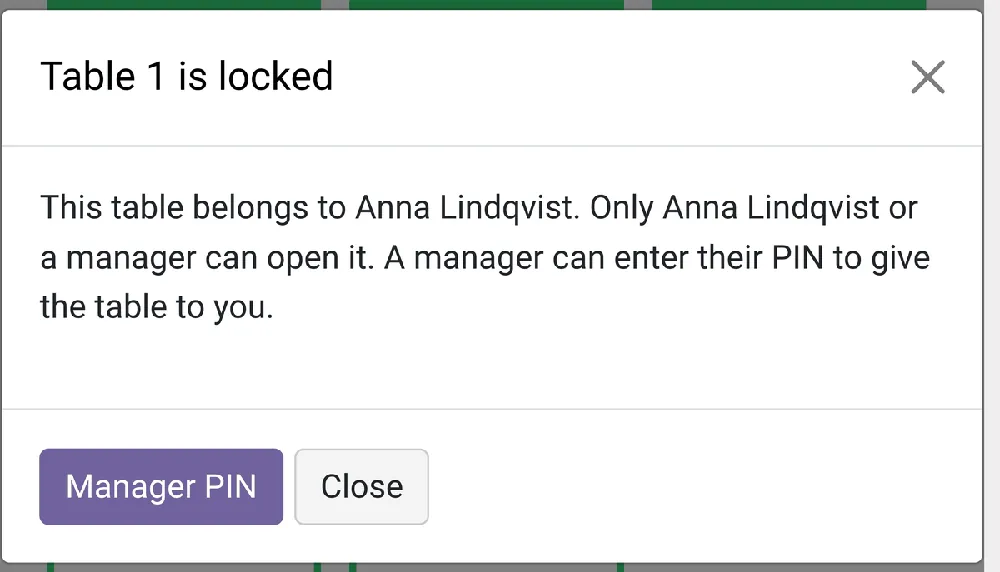
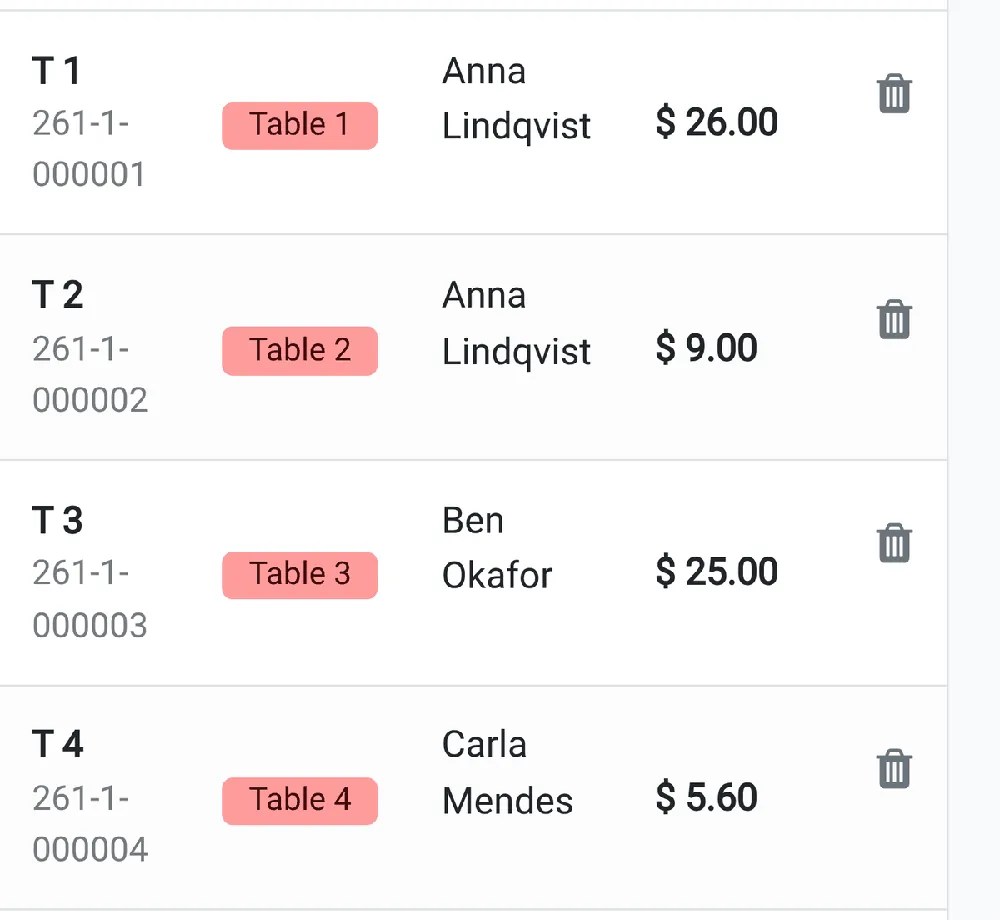
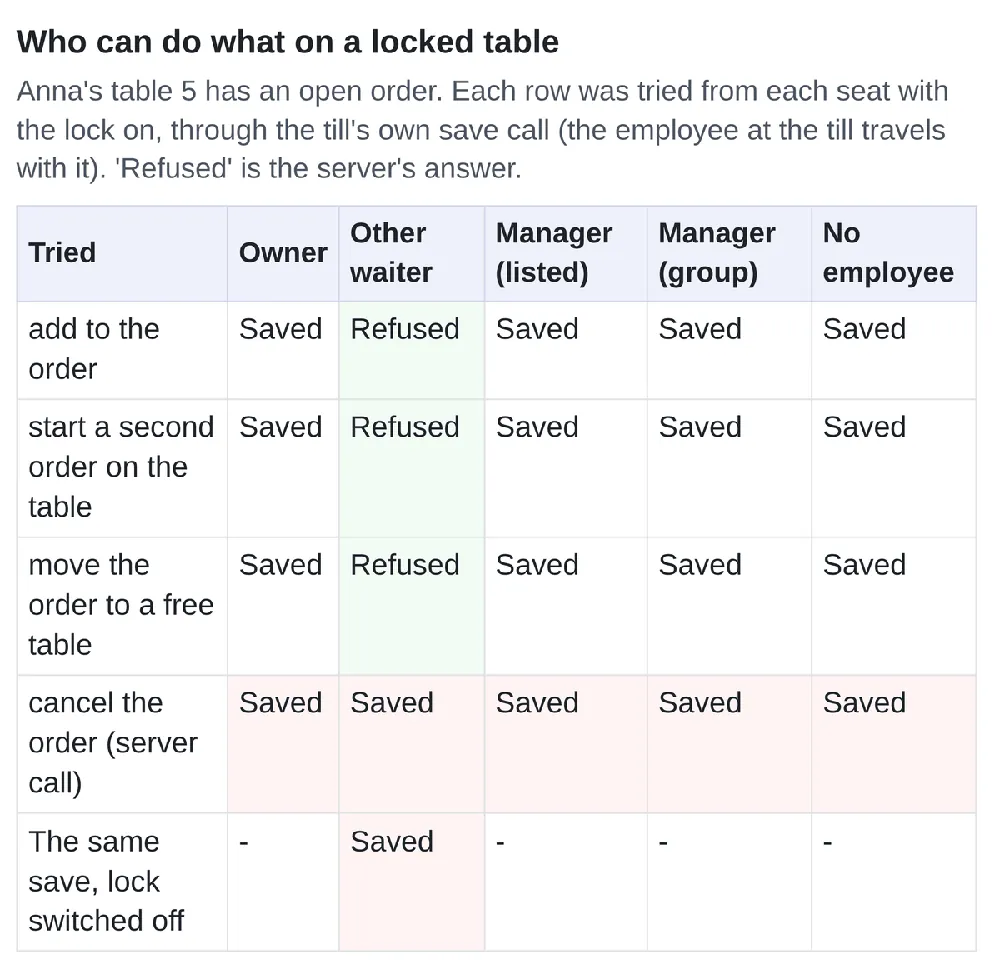
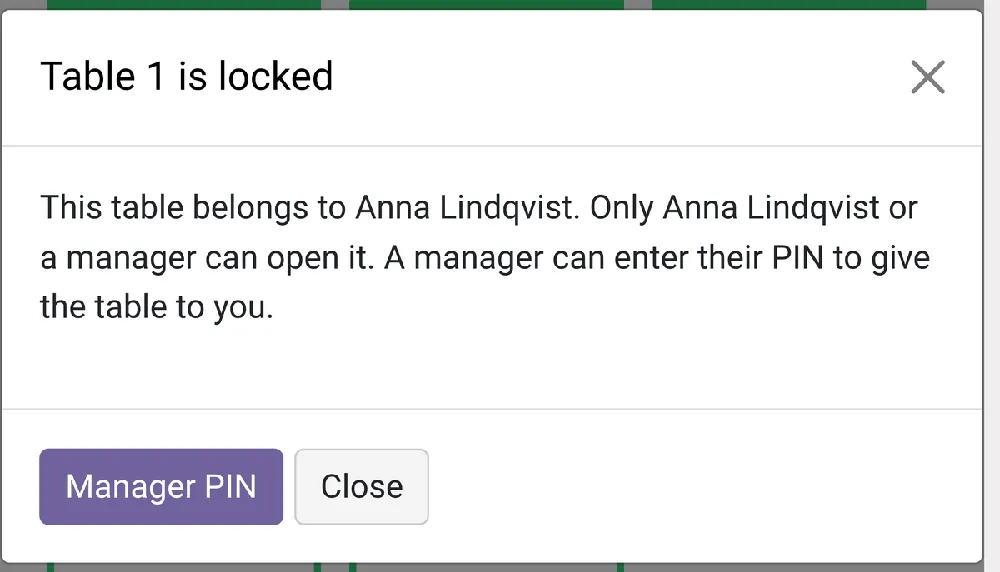
A waiter who is not the table's waiter and not a manager and who taps the table gets a dialog saying whose table it is, with Manager PIN and Close . Closing keeps them on the floor plan. The same stop applies to picking the table's order from the Orders list, to moving an order onto the table with Transfer / Merge (the destination is not opened afterwards), and to deleting the order from the Orders list or the cart: a notification says the table is locked and the order stays. Before this release the delete was not stopped (section 7).
A server call that cancels an order carries no employee, so the guard on deleting is at the till only (section 8).
Carla taps Anna's table 1.
The Orders list shows every open table order, with a bin on each.
Carla presses the bin on Anna's order (version 1.0.2).

4 A manager can open it, and hand it over
Use it when the busy manager can fix a table in seconds.Writes the waiter
Someone has to be able to take a table over when the waiter is off, busy or gone.
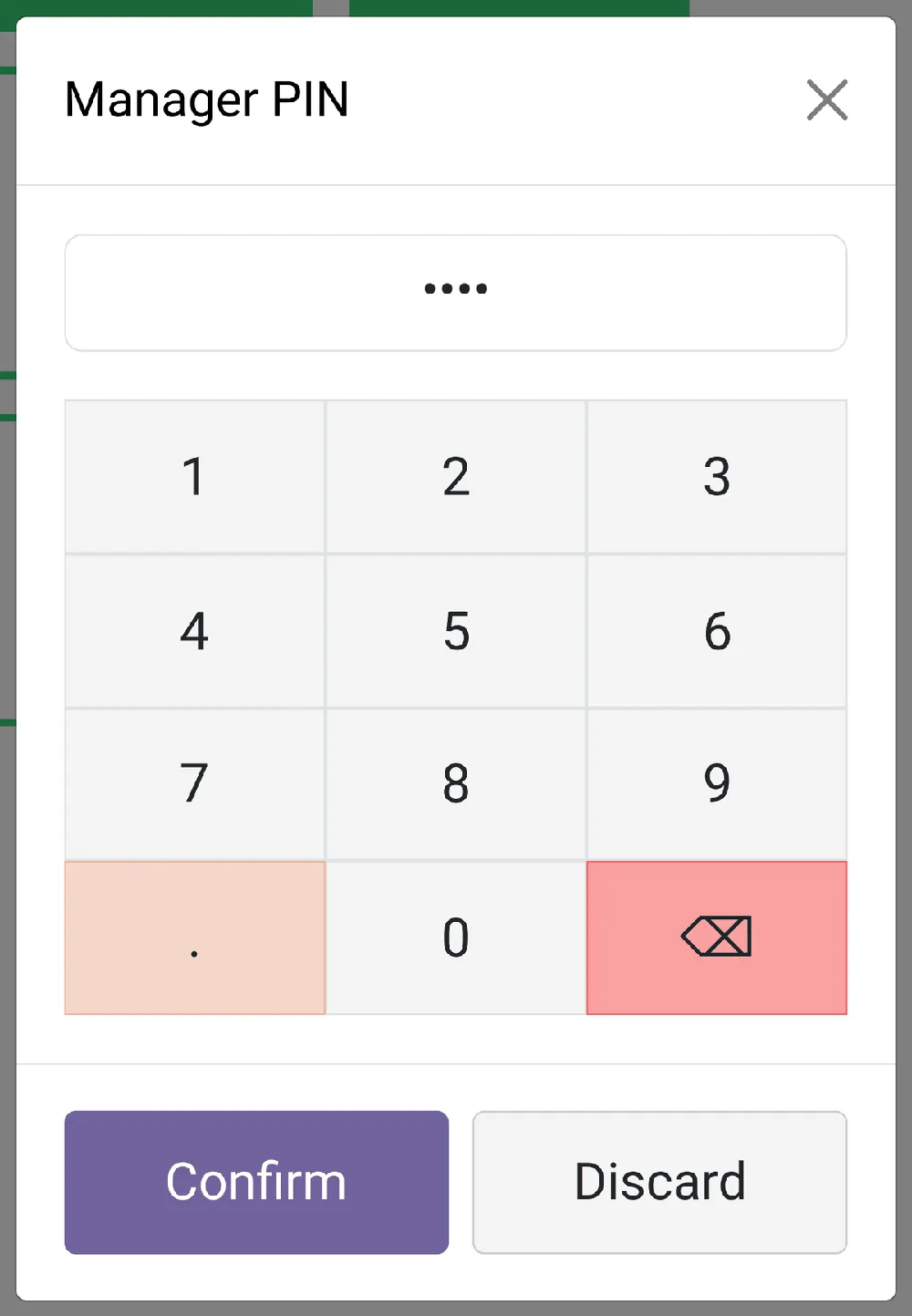
Manager PIN. In the dialog a manager's PIN, typed by the waiter at the till, gives the table to the waiter at the till: the table then belongs to that waiter and its order opens. A wrong PIN, or a waiter's own PIN, does not open it. The PIN is compared at the till, with the hash Odoo's employee login already loaded; the server does not see it (section 8).
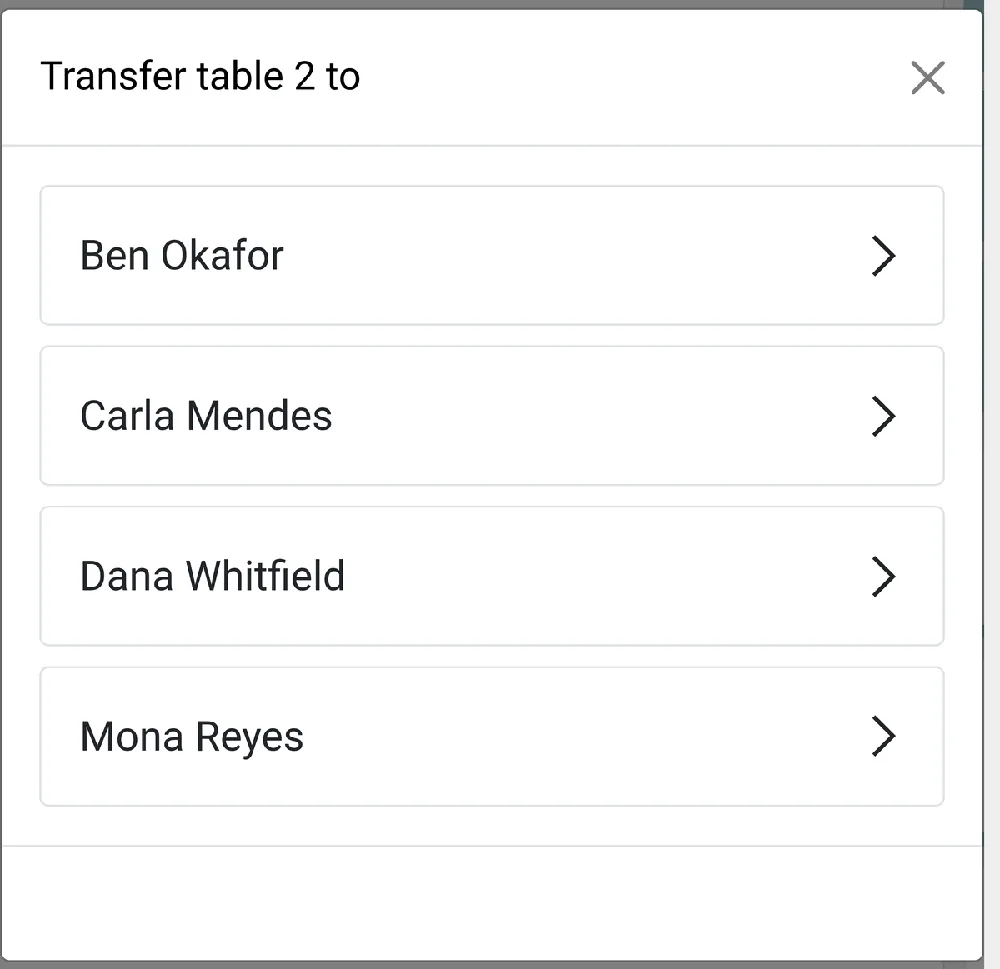
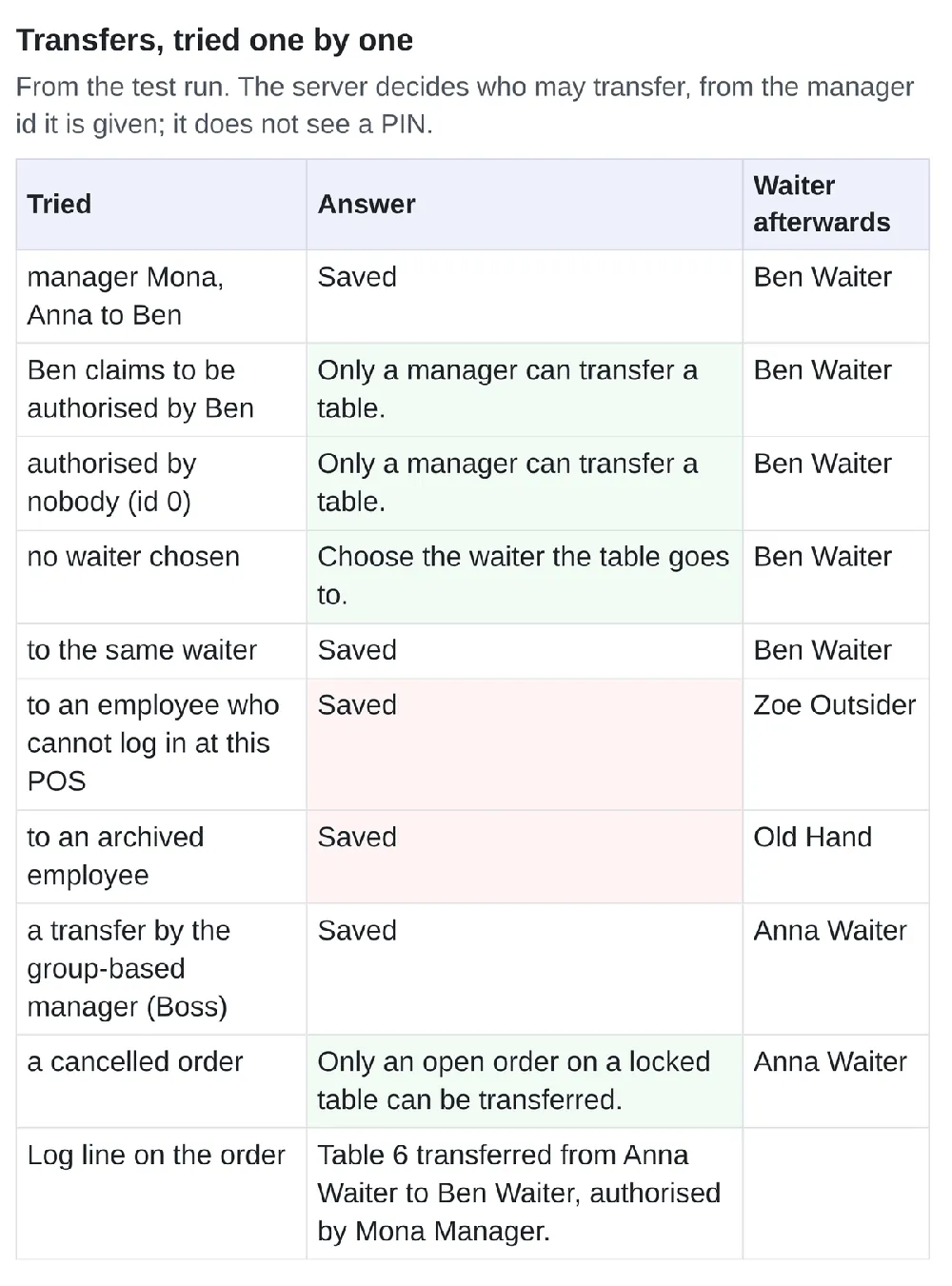
Transfer Table. A manager at the till sees a Transfer Table button in the actions of a table's order, picks another employee (the current waiter is not offered), and the table is handed over. The other tills are told. A waiter has no such button, and an order that is not on a table has none. The manager working on the table does not take it from the waiter.
A manager is an employee listed as a manager of the point of sale (advanced_employee_ids) or whose user holds the Point of Sale Manager group, including through another group that implies it. The group-based case was tested on the server; at the till the listed manager was tested.
The PIN pad, after four digits.
A wrong PIN does not open the table.
Mona's PIN gave table 1 to Carla.
The manager's Transfer Table button, next to Odoo's Transfer / Merge.
The manager picks the new waiter.
The result.
Table 2 now shows Ben O.


5 The server checks every save
Use it when a stale till or a second till cannot get round the lock.Refuses saves
A check in the browser alone would miss a second till, a stale screen or a call that does not come from the screen.
Every save the till sends carries the employee at the till. If the order's table has a waiter and that employee is neither the waiter nor a manager, the server refuses with Table 5 is locked to Anna Waiter. Ask a manager to open or transfer it. This covers adding to the order, starting a second order on the table (Odoo merges it into the open order) and, because a payment is a save of the same order, taking payment (not run as a separate case). Saves from the back office or a self-order screen carry no employee and are not checked.
Two tills, one free table. Two waiters can open the same free table before either has sent an item. The till that reaches the server first gets the table; the other is told on its next save with a notification that stays until closed, and its items are not saved. In the real session Anna's till was refused for table 7 and its item was never saved.
A cancel or a delete is not a save and is not checked on the server (section 8).
Each save tried from each seat, from the test run. Generated from the test's readings, not a live screen.
Who owns the table after each case. Generated from the test's readings, not a live screen.
The second till is told, and the notification stays until closed.

6 In the back office
Use it when you check who served what.Reads orders
Afterwards nobody can say who served a table, or who gave it away.
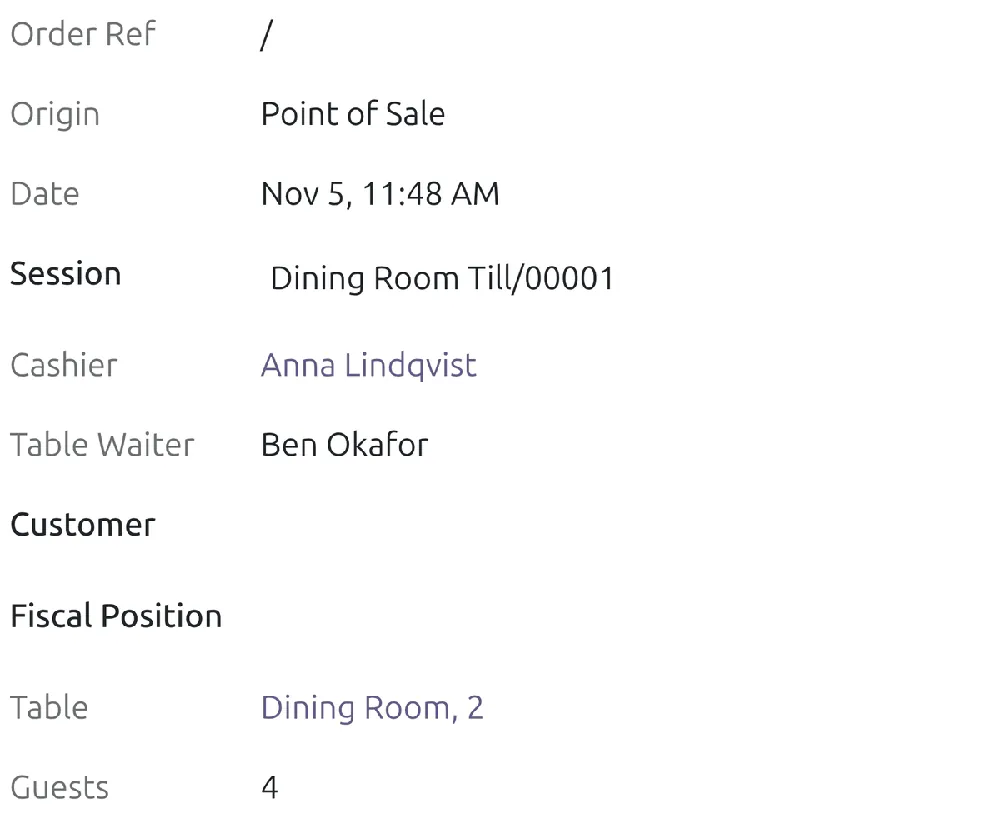
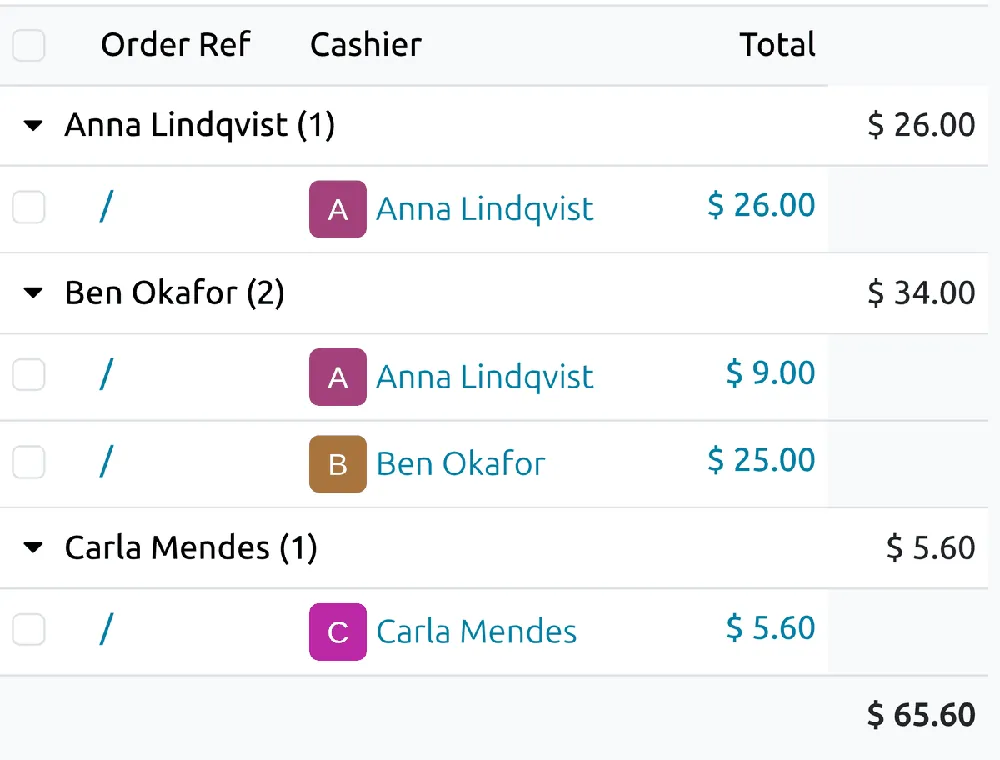
The order form shows Table Waiter (read-only, shown once set), and the order list has a search field and a group-by Table Waiter . A transfer writes a line in the order's chatter: who it went from and to and which manager authorised it. A cancelled order still names its waiter.
The waiter is not copied when an order is duplicated, and switching the lock off does not clear it.
The order form.
The chatter line left by the transfer.
Orders grouped by Table Waiter.
Each transfer tried, from the test run. Generated from the test's readings, not a live screen.

7 Three defects found and fixed in this release
Use it when you can see what was wrong and what changed.Till code only
All three were found by driving the real till in a browser against version 1.0.1.
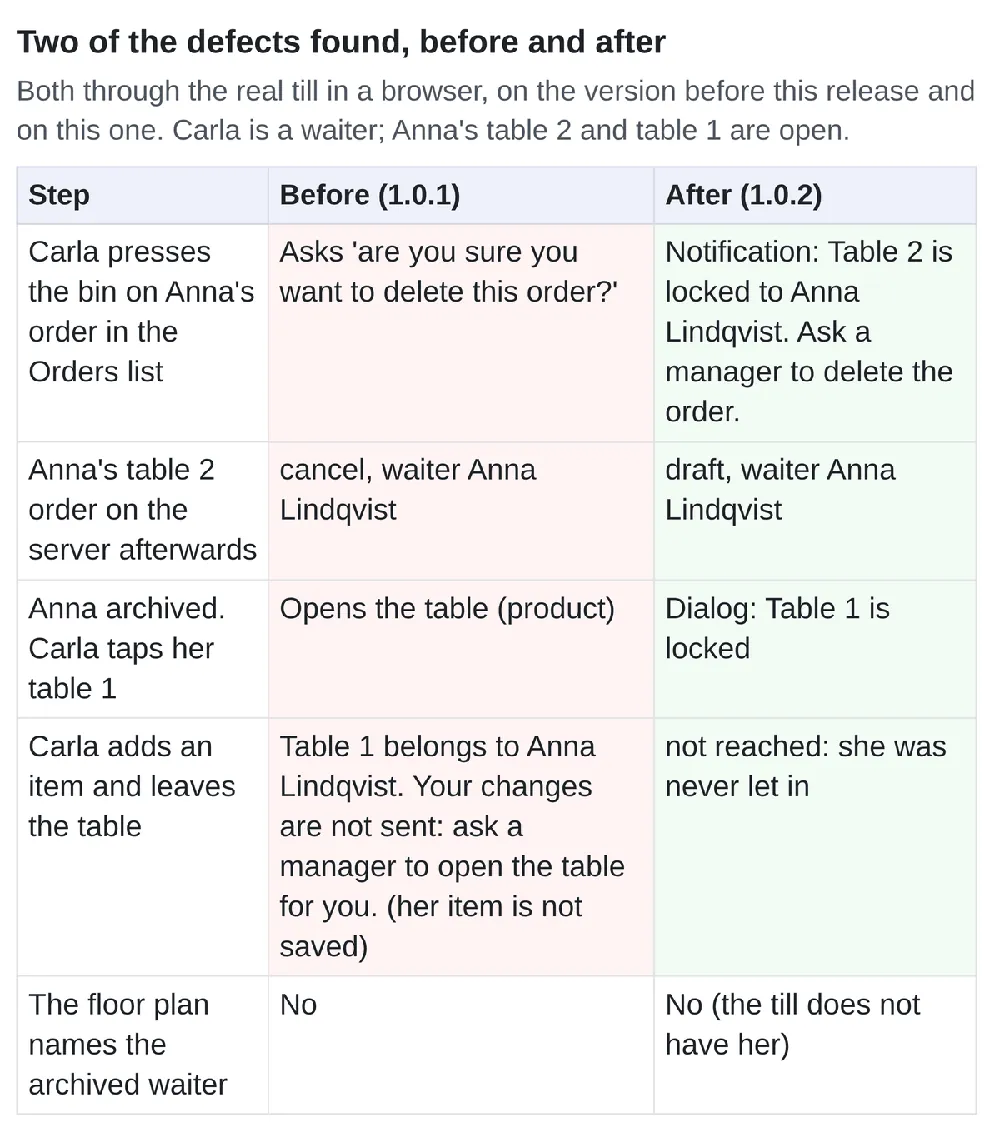
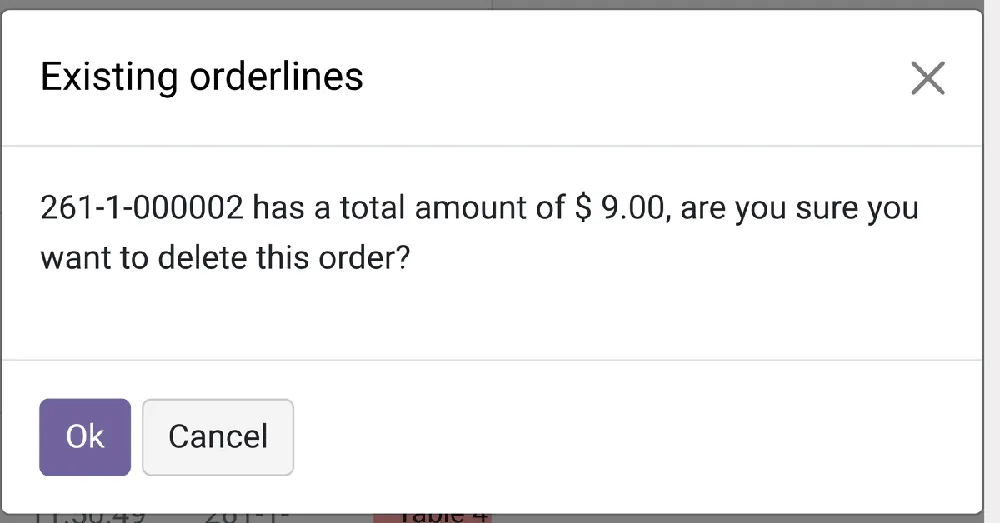
1. Deleting another waiter's table order. A waiter could open the Orders list, press the bin on another waiter's table order, answer Ok to the usual question, and the order was cancelled on the server. The lock only covered opening and saving, not deleting. Now a waiter who is not the table's waiter and not a manager is told the table is locked and the order stays; the waiter and managers delete as before. Money did not change; an open bill was lost.
2. An archived waiter's table. The till does not load an archived employee, so for such a table the till saw no waiter: no label on the floor plan, and any waiter could open the table, add items and only on leaving the table be told they were not sent. Now the till asks the server who the waiter is when it does not have the employee, and shows the locked dialog. The floor plan still shows no name for that table.
3. A name ending in a space. The label on the floor plan is built from the name's words. An employee name typed with a space at the end ("Rosa ") read Rosa undefined. on the table. The label now ignores spaces at the ends and between words (section 2 shows eight awkward names before and after).
All three tests drive the real till and failed on 1.0.1 at the step where the fix shows. The server did not change.
Before (1.0.1) and after (1.0.2), read from the real till and the server. Generated from the readings, not a live screen.
Before: the till asks for a confirmation and deletes Anna's order.
Before: the archived waiter's table opens for another waiter.
After: the table is locked.

8 Odd cases and limits
Use it when you know what the app leaves alone.Nothing written
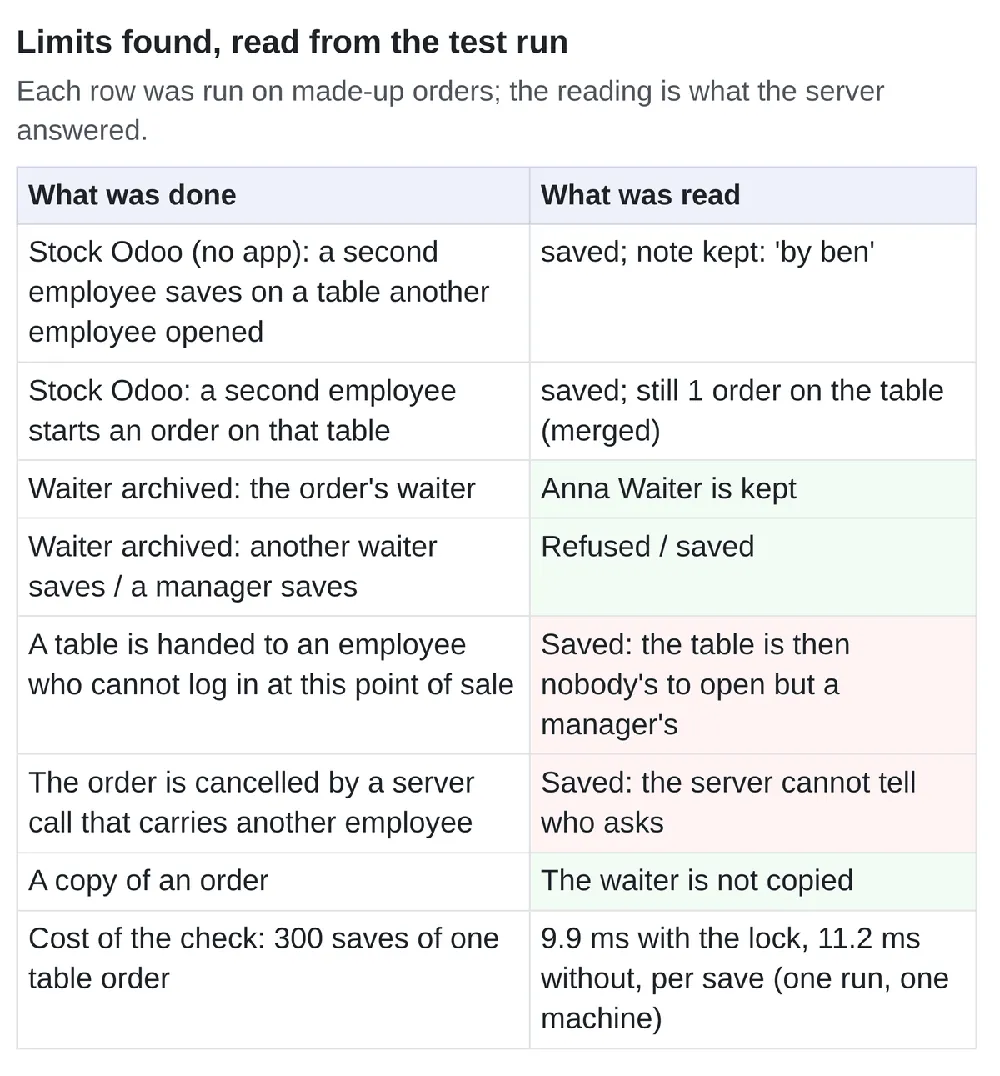
A lock on open bills should say where it stops.
Readings from the test run. Generated from the test's readings, not a live screen.
Screenshots
What it does not do
- This is the part to read before buying. Each line was tested on a throwaway Odoo 19 Community database.
- The test run and the deliberate breaks, rendered as a table. Generated from the test logs, not a live screen.
Questions buyers ask
Does it change prices, taxes or payments?
No. Orders and payments are Odoo's own. The app adds a waiter to the order and checks who may save it.
Who owns a table?
The employee whose till first saves an order with at least one item on it. A transfer by a manager changes it.
Can a manager override the lock?
Yes. A manager can open any table, a waiter can take a table over by having a manager type a PIN at the till, and a manager can transfer a table with the Transfer Table button.
Is it a security boundary?
No. Odoo identifies the employee in the browser and the app trusts that identity; a transfer is authorised by the manager id in the call and the server never sees a PIN.
Can a waiter delete another waiter's order?
Not at the till (fixed in 1.0.2). A server call that cancels an order carries no employee and was not checked.
What if two waiters open the same free table?
The till that reaches the server first gets the table. The other is told with a notification and its items are not saved.
Does it work on Odoo Online or Enterprise?
Not on Odoo Online (SaaS): third-party apps cannot be installed there. Enterprise and Odoo.sh were not tested.
Is anything sent outside Odoo?
No. The app makes no network call and has no scheduled action.
Requirements
- Odoo 19.0 or 20.0. The App Store sells each version separately, so buy the one that matches your database.
- Odoo.sh or On-Premise only. Third-party apps cannot be installed on Odoo Online (SaaS) databases. Check your hosting before buying.
- Module
mh_pos_table_lock, version 19.0.1.0.1, licensed OPL-1.