Print Script Check
Print script check: list contacts, products and company names in Devanagari, Thai, Tamil or other scripts the PDF layout font cannot print
Request a live demo · Odoo.sh or On-Premise only, not Odoo Online (SaaS).
Free
App Store price, per Odoo version
19 · 20
Odoo versions, each sold on its own page
Odoo.sh
or On-Premise; not Odoo Online (SaaS)
1.0.1
version of mh_print_script_check
A customer called in Devanagari, a product named in Thai: the invoice PDF prints empty boxes where the name should be, and nothing in Odoo warns you. The font chosen under Settings > Document Layout is one of eight files Odoo ships, and each covers only some scripts. This app reads that font file and lists every name it cannot print, before a customer receives the PDF.
Open Settings > Print Script Check. You get an ordinary list for the current company: the script, the type of record, the name and the exact characters the font has no glyph for. Group it by script or type, search by name, open the record.
How it works
Reads the real font file
The coverage is read from the Regular face of the layout font that Odoo ships on your version (Lato, Roboto, Open Sans, Montserrat, Oswald, Raleway, Tajawal, and the monospace font of Odoo 19 or 20), not from a table of guesses. Tajawal, for example, contains Arabic and Lato does not, so the same name is listed under one layout and not the other.
Contacts, products and the company
Contact names, product names in every language they are translated into, and the company name are checked. Only letters, marks and digits count: a symbol or a punctuation mark is not reported. One row is written per name and script, so a name mixing Devanagari and Thai appears twice.
Per company
The scan covers the company selected in the company switcher, against that company's own layout font. Records of other companies are left out; records shared by all companies are included. Switch company and scan again to check the next one.
Read only
A scan never changes a contact, a product or a company. The results are temporary and are replaced by the next scan.
Screenshots
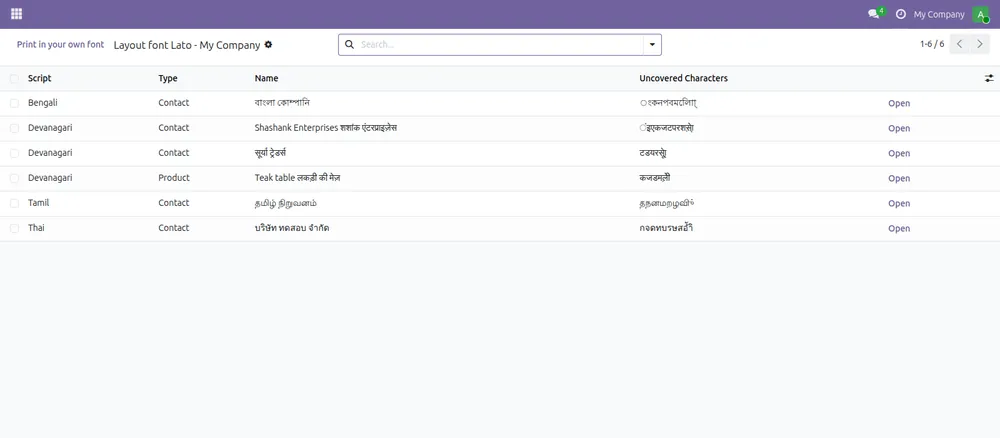
What it does not do
- It does not install or upload a font, change the document layout or render a PDF. It tells you the layout font has no glyph for a character, not what your server prints instead.
- That depends on the fonts installed on the machine that makes the PDF. We rendered invoices with wkhtmltopdf on the stock Odoo 19 Docker image: a Devanagari name printed as empty boxes in the Lato, Tajawal and Fira Mono layouts, while an Arabic name printed through DejaVu Sans and a Chinese name through Noto Sans CJK in the Lato and Roboto layouts. Your server may differ, so print one invoice for a listed name to see.
- Names that are plain ASCII are not examined. Only contact, product and company names are read: not addresses, descriptions or product variants' attribute values. Only the Regular face is read, so a bold or italic face with different coverage is not checked. A layout font that other apps add, with no file in Odoo's own font folders, stops the scan with a message instead of showing an empty list.
Requirements
- Odoo 19.0 or 20.0. The App Store sells each version separately, so buy the one that matches your database.
- Odoo.sh or On-Premise only. Third-party apps cannot be installed on Odoo Online (SaaS) databases. Check your hosting before buying.
- Odoo 19 and 20, Community or Enterprise, with the Product module (installed with Sales, Invoicing or Inventory). Third-party apps install on Odoo.sh or On-Premise only - they cannot be installed on Odoo Online.
- Module
mh_print_script_check, version 19.0.1.0.1, licensed OPL-1.