Project Commitment Check
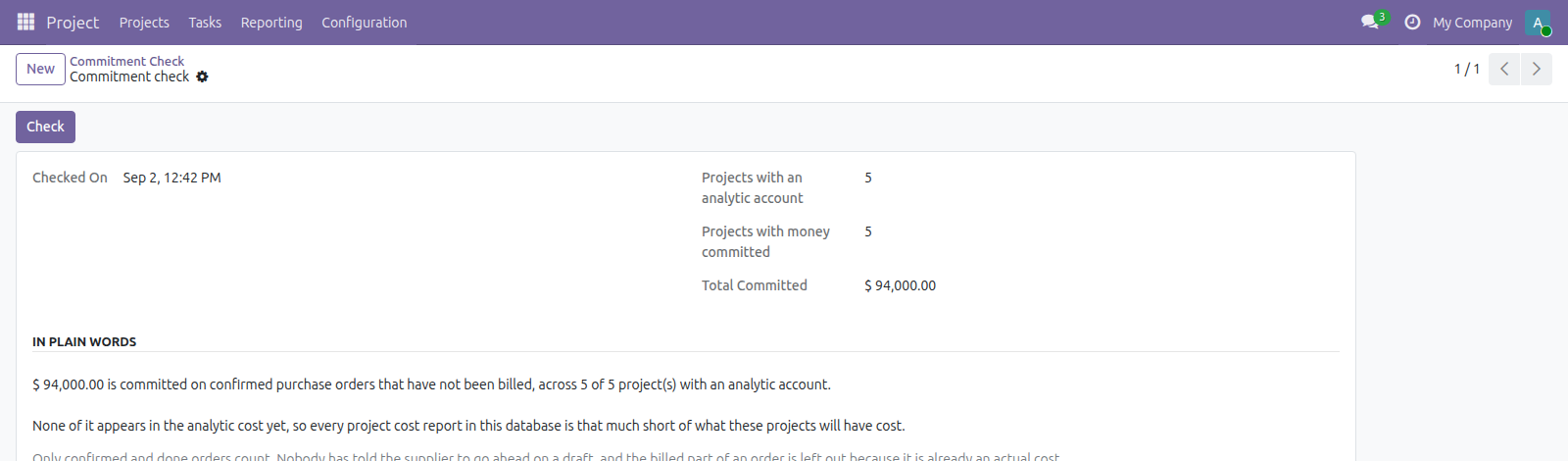
One number: how much you have committed on confirmed purchase orders that no project report shows yet, because the supplier has not invoiced
The video below shows Project Commitment Check running on a real Odoo 19 database. Want it driven against your own data, or a question answered first? Ask and we will set up a session.
Analytic accounting records what a project has cost. A purchase order confirmed last week is a real obligation, and it appears nowhere in any project cost report until the supplier gets round to invoicing.
So the cost reports are accurate, and still not the whole story. Press the button and see by how much.
One check, one figure, and a sentence saying what it means.
A draft order is not a commitment
Only confirmed and done orders count. Nobody has told the supplier to go ahead on a draft, and a figure that treated quotes as obligations would be ignored within a week.
Nothing is counted twice
The billed part of an order drops out, because it has already become an actual cost. Counting it here as well would report a commitment twice the size of the real one.
It says when the answer is nothing
A company with no projects says so rather than reporting a clean zero - a zero reads as good news, and having nothing to measure is a different fact.
Requirements, and where it stops
Odoo 19 Community or Enterprise with Project and Purchase. Free, and deliberately one figure per company - it does not name the projects or break the total down. Reads only; nothing is written back.
Screenshots
Requirements
- Odoo 19.0, Community or Enterprise.
- Odoo.sh or On-Premise only. Third-party apps cannot be installed on Odoo Online (SaaS) databases — check your hosting before buying.
- Module
mh_project_commitment_check, version 19.0.1.0.14, licensed OPL-1.
Related apps
Project timesheets that have been worked and never invoiced, aged by how long they have been sitting, with the cost and the sale value of each bucket
See what each project has already cost plus what you have committed on open purchase orders, and which projects only look profitable because the bills have not landed yet
Cap how many tasks a Project stage can hold, and flag the column red once it's over