Unbilled Work Report
Billable timesheets that were never invoiced, by project and by how long they have been waiting
Request a live demo · Odoo.sh or On-Premise only, not Odoo Online (SaaS).
4
age buckets per project: 0-30, 31-90, 91-180 days and over six months
294 h
unbilled hours in the example run, 119 of them older than ninety days
20
automated tests, none failing
0
timesheets or invoices written: the report only reads
Snapshot
a report shows the day you pressed Run; press it again for new work
Hourly only
sale value is put on lines sold per hour; fixed-price, milestone and manual lines show hours and cost only
Odoo knows which timesheets are billable and which were invoiced. This app adds the missing question: how long has the rest been waiting? You press Run and get one line per project and age, with the hours, what they cost and a sale value worked out from the sales order line. This page walks through it with screenshots of an Odoo 19 database seeded with made-up data, and says plainly what the sale value covers and what it leaves out.
How it works
Why an aged list
Work invoiced a fortnight late is a nuisance. Work invoiced half a year late is harder to defend. The report puts the age on every unbilled hour so you can start with the oldest.
1 Run a report
Use it when month-end, or any time you want to know what has not been invoiced.Project Managers only
Odoo marks timesheets as invoiced or not, but nothing shows how old the unbilled ones are, project by project.
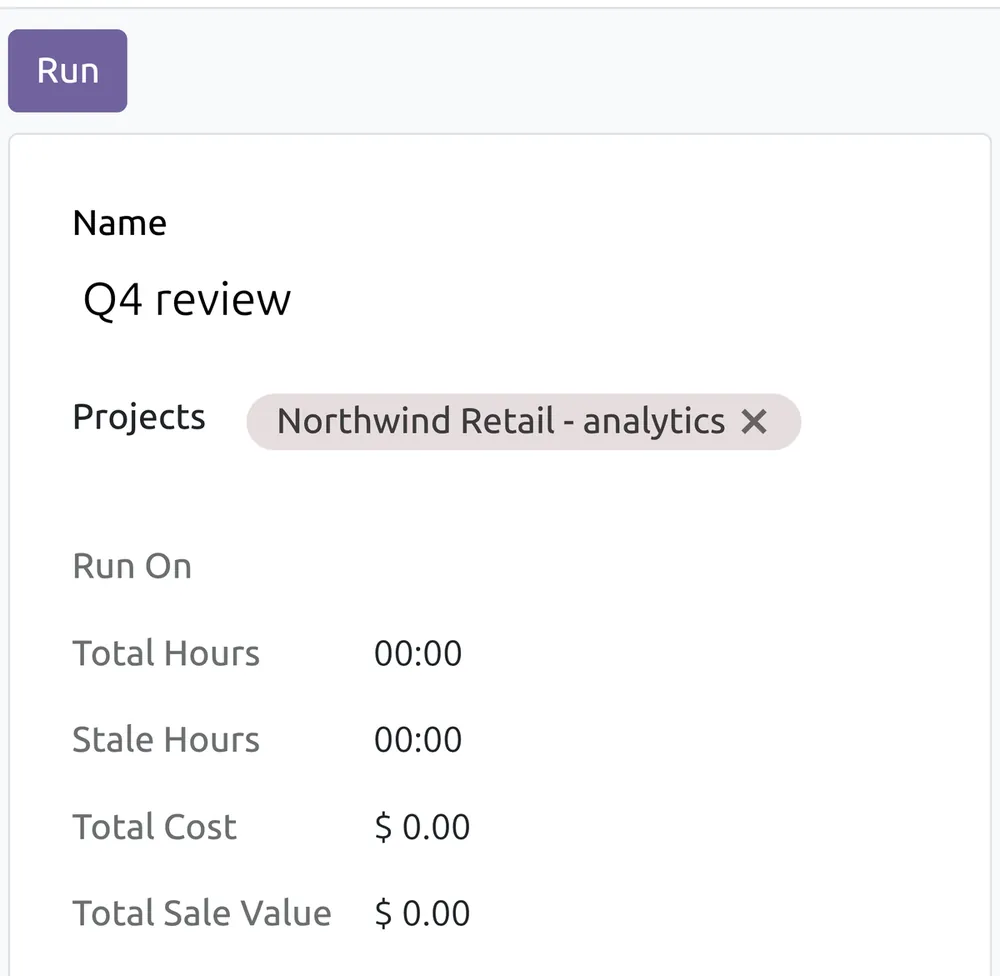
Under Project > Configuration > Unbilled Work a Project Manager creates a report: a name and, optionally, the projects to cover. Leave Projects empty to cover every project in the company. Press Run . Pressing it again replaces the lines, it does not add to them.
A report that has not been run yet: a name, the projects to cover, and Run.
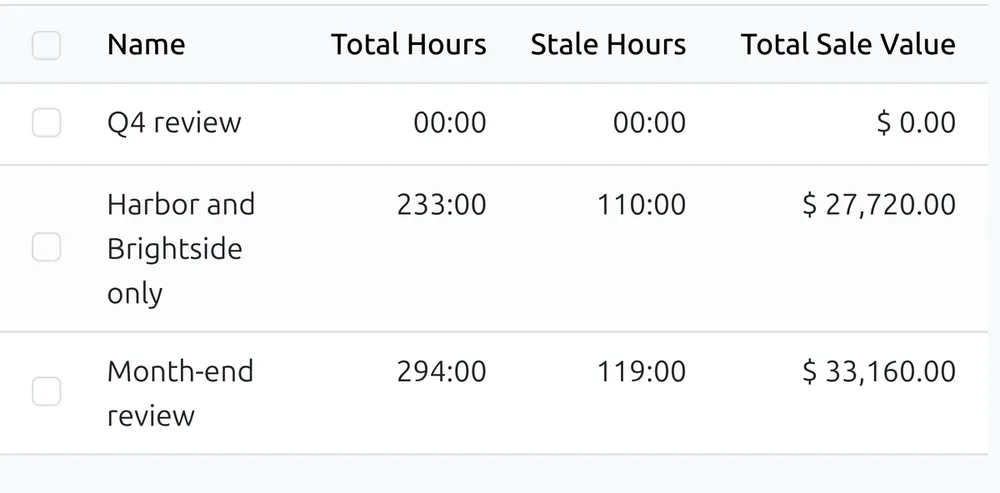
The list of reports: total hours, stale hours and sale value.
The seeded database has five projects and timesheets from 3 to 262 days old. The report Month-end review covers all of them and finds 294 hours of unbilled billable work, 119 of them more than ninety days old.
Only Project Managers can open the report; an ordinary internal user or a project user without the manager role is refused. It is a snapshot: work logged after Run is not in it until you press Run again, and the ages are counted from the day you press it.
2 Read it by project and age
Use it when you want to see which project is carrying the oldest work.One line per project and age
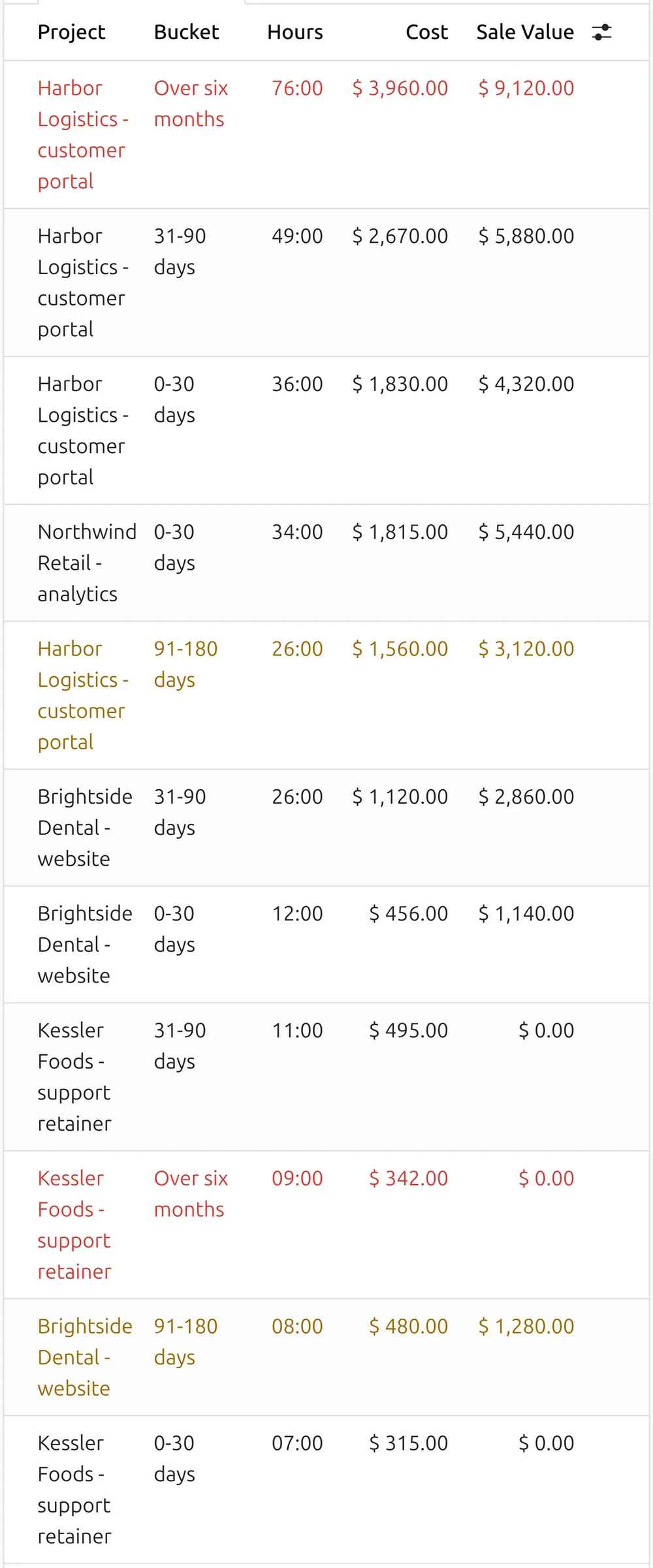
The table By project and age has one line per project and age bucket: the bucket, the date of the oldest entry, the hours, the cost, the sale value and a count of entries with no price. A 91-180 days line is shaded as a warning and an over-six-months line in red. A project appears once for each age it has work in.
The lines of the example run. The oldest, in red, is 76 hours on Harbor Logistics.
On Harbor Logistics - customer portal the report found 76 hours older than six months, 26 hours at 91-180 days, 49 hours at 31-90 days and 36 hours under 30 days. The oldest buckets are the ones to chase first. Age is measured in whole days: 30 days old is in the first bucket, 31 in the second, 90 in the second, 91 in the third, 180 in the third and 181 in the last.
The report shows hours, cost and sale value per project and age. It does not break a line down into the individual timesheets or the people who logged them.
3 What stood out, and the old ones
Use it when you want the headline and a list of only the oldest work.Reads only
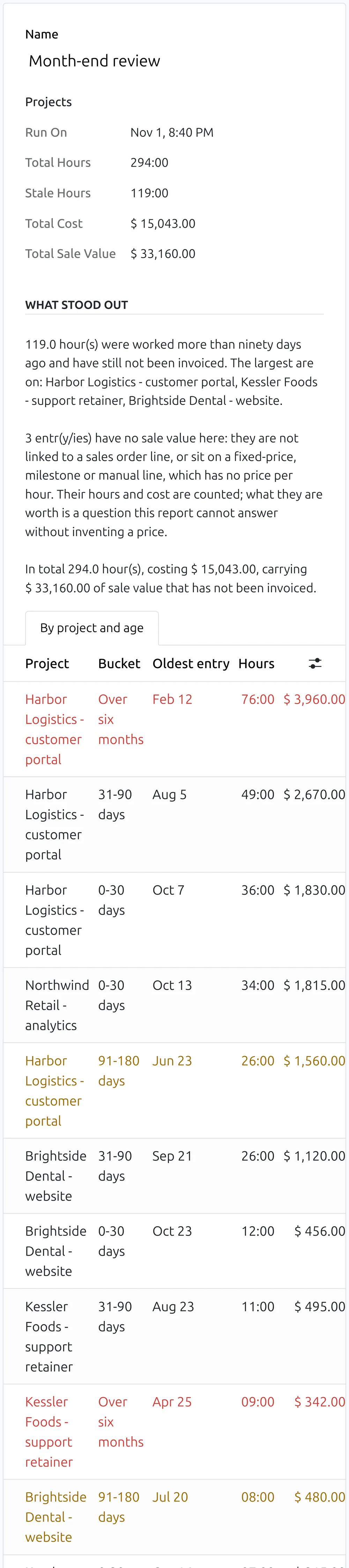
Under the totals, What stood out says in plain sentences how many hours are older than ninety days, names up to five projects carrying most of them (each once), says how many entries have no price, and ends with the total hours, cost and sale value. When there are stale hours, a button Only the ones over ninety days opens just those lines.
The totals and the findings for the example run.
The button opens only the lines that are 91 days or older.
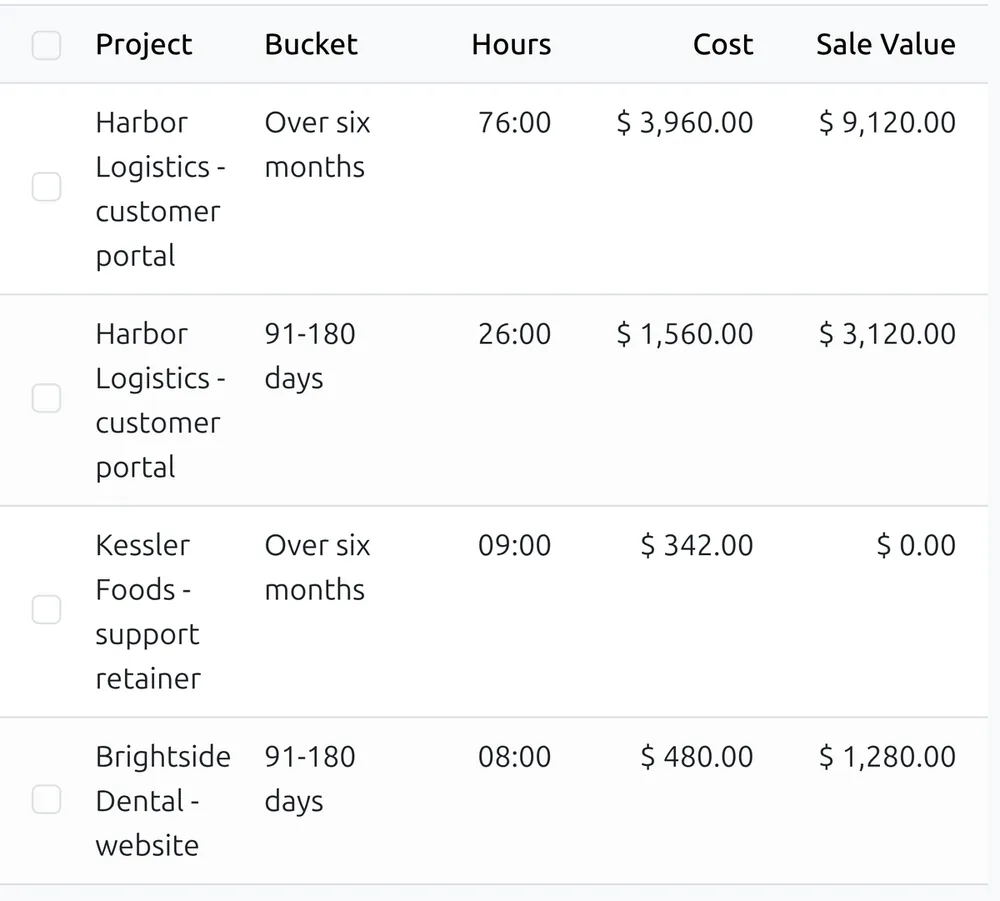
The example run named Harbor Logistics, Kessler Foods and Brightside Dental as holding the most work older than ninety days. The 31-90 days bucket is not counted as stale.
It reads and reports. Nothing is invoiced, reminded or written back to the timesheets.
4 What is left out, and what has no price
Use it when you need to know which hours are in the figure and which are not.Counted but not priced
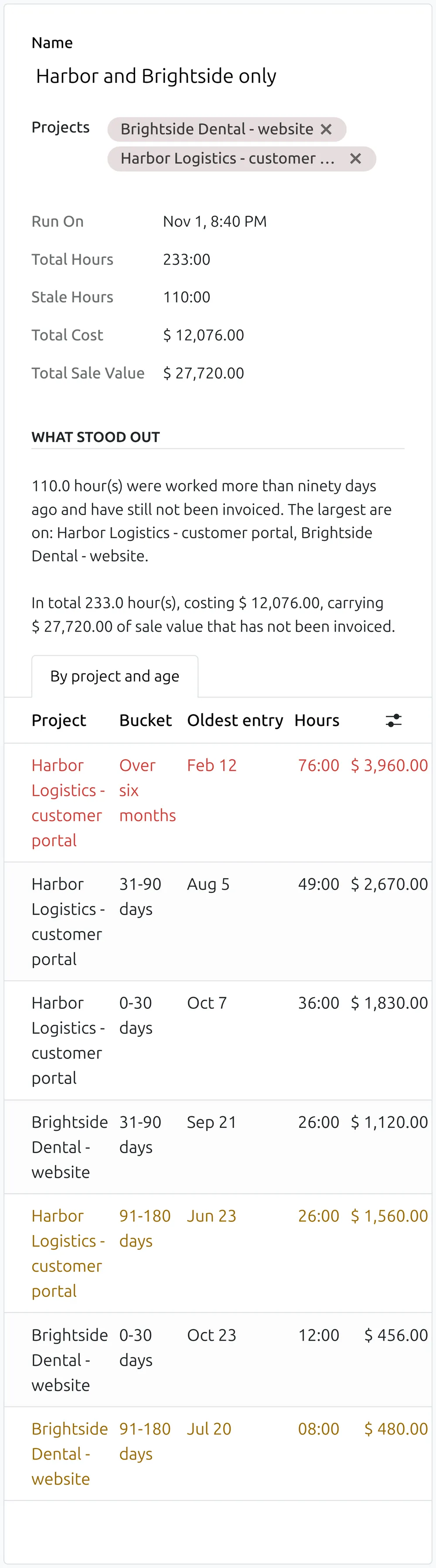
Timesheets linked to a posted invoice are left out, and so are non-billable hours. Billable means billed on timesheets, at a fixed price, on milestones or manually. A timesheet that has no sales order line (for example on a project billed manually), or sits on a fixed-price, milestone or manual line, is counted in the hours and the cost but not in the sale value, and the report counts how many there are instead of inventing a price. Pick projects to narrow the report.
A report narrowed to two projects.
The seeded Internal - training project is non-billable, so its 20 hours are not in the 294. Forty design hours on Brightside Dental were invoiced through the real invoicing screen and are not in it either. Kessler Foods is billed manually: its 27 hours and 1,152.00 of cost are counted, its sale value is 0 and the report says 3 entries have no price.
If a project you picked is archived later, the report keeps covering it (the Projects field on the form hides archived projects, so it can look empty while the report is still scoped). An unscoped run includes timesheets of archived projects.
Only a posted invoice counts as invoiced. Hours on an invoice that is still a draft, or was cancelled, stay in the report until the invoice is posted. If a posted invoice is later reset to draft or cancelled, its hours count as unbilled again at the next Run. Measured through the real invoicing wizard.
5 Where the sale value is not right
Use it when you are deciding how far to trust the sale value column.Check before quoting it
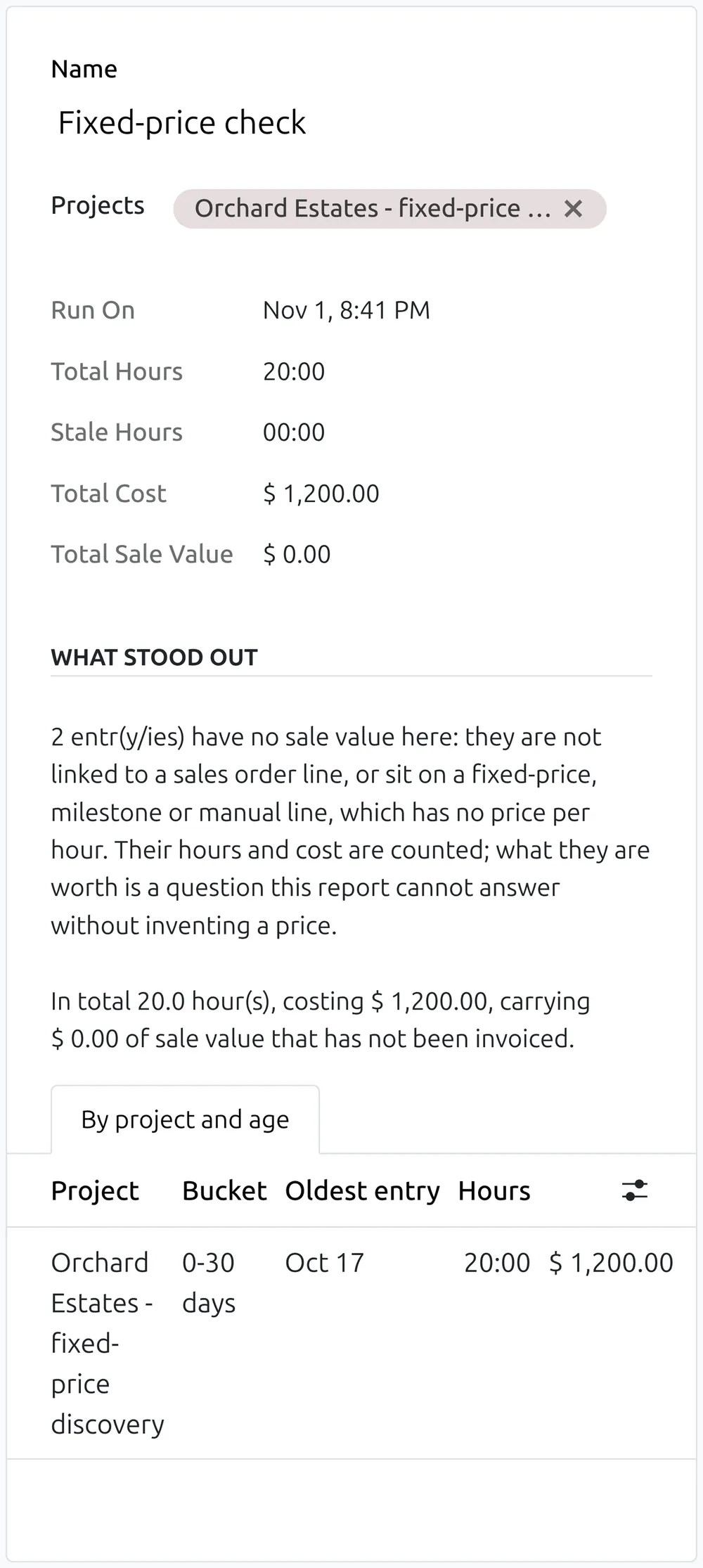
The sale value is only put on lines sold per hour: hours times the sales order line's unit price, less the line discount, before tax, converted from the order currency to the company currency at the rate Odoo holds for the day you press Run. Lines that are not sold per hour have no price per hour, so they carry no sale value here.
Verified: 20 automated tests pass on Odoo 19 Community, and the example runs on this page were measured on a throwaway Odoo 19 Community database. Not verified: Odoo Enterprise, Odoo.sh, multi-company databases, credit notes, units other than hours.
A fixed-price package of 3,000 with 20 hours logged: the hours and cost are counted and the sale value is 0.00.
Treat the sale value as the hourly value of unbilled work, not as an amount to invoice. The report never promises an amount that can be recovered.
Questions buyers ask
Does it create invoices?
No. It reads timesheets and writes only its own report records.
Can I trust the sale value?
For hourly lines at the order price, yes. Fixed-price, milestone and manual lines carry no sale value (hours and cost only); discounts and currency are applied. See section 5.
Do hours leave the report when I create an invoice?
Only when the invoice is posted. A draft or cancelled invoice leaves them in.
Does it update by itself?
No. A report is a snapshot of the day you pressed Run.
Requirements
- Odoo 19.0 or 20.0. The App Store sells each version separately, so buy the one that matches your database.
- Odoo.sh or On-Premise only. Third-party apps cannot be installed on Odoo Online (SaaS) databases. Check your hosting before buying.
- Module
mh_unbilled_work, version 19.0.1.0.18, licensed OPL-1.