Report PDF Appendix
Merge PDF attachments with invoice, purchase order and delivery slip reports: your terms and conditions or a certificate added at the end when you print or email.
Request a live demo · Odoo.sh or On-Premise only, not Odoo Online (SaaS).
Free
App Store price, per Odoo version
19 · 20
Odoo versions, each sold on its own page
Odoo.sh
or On-Premise; not Odoo Online (SaaS)
1.0.2
version of mh_report_pdf_appendix
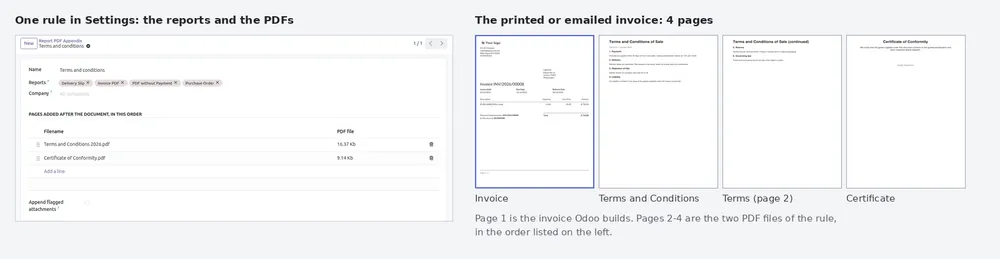
Odoo can add a header, a footer and product PDFs to a quotation. Invoices, purchase orders and delivery slips have nothing like it: the terms and conditions or the certificate that belongs behind them has to be attached to every email by hand, or it never gets sent. This app lets you say once that a PDF follows a report. Every printed or emailed copy of that report then carries its pages at the end.
How it works
Pick the reports, upload the PDFs
In Settings, Report PDF Appendix, a rule lists the reports it applies to (Invoices, Purchase Order, Delivery Slip, or any other PDF report you choose) and the PDF files whose pages follow the document, in the order you set. An optional company limits the rule to one company, and a rule can be archived without losing it.
Print, email and Send and Print
Odoo builds the PDF for the print button, for the email attachment and for Send and Print on invoices through the same step, and the appendix is added there, so all three carry it. Printing several documents of one of Odoo's standard reports in one go puts each document's own appendix right behind it, so the pages of one document are never separated from its appendix.
PDFs attached to the document itself
A rule can also append the document's own PDF attachments that you have ticked Append to printed PDF, for example a certificate uploaded to one delivery. The tick is on the attachment form (Settings, Technical, Database Structure, Attachments, in developer mode).
Safe by default
Only real PDF files can be uploaded. An appended PDF that cannot be read, because it is damaged or password protected, is skipped and a warning is logged, and the document still prints. Files embedded in the document itself, such as e-invoicing XML, are kept. The copy Odoo stores on a document (the invoice PDF saved on a posted invoice) stays without the appendix, so a reprint never gets it twice.
Who it is for
Companies that must send their terms and conditions with every invoice or purchase order, suppliers who send a conformity or quality certificate with every delivery, and anyone tired of attaching the same PDF to emails by hand.
Screenshots
What it does not do
- It adds pages from PDF files only. Images, Word and Excel files are rejected on upload, and a flagged attachment that is not a PDF is ignored. The appendix is the same for every language and every customer: a rule is chosen by report and company, not by customer, language or any condition on the document. Files embedded in an appended PDF are not carried over. It does not stamp, number or sign pages. When you print 30 invoices in one PDF you get 30 copies of the appendix.
Requirements
- Odoo 19.0 or 20.0. The App Store sells each version separately, so buy the one that matches your database.
- Odoo.sh or On-Premise only. Third-party apps cannot be installed on Odoo Online (SaaS) databases. Check your hosting before buying.
- Odoo 19 and Odoo 20, Community or Enterprise. It depends only on the Odoo base apps; Sales, Purchase, Invoicing and Inventory are optional and their reports can be chosen once installed. Third-party apps install on Odoo.sh or On-Premise only - they cannot be installed on Odoo Online (SaaS).
- Module
mh_report_pdf_appendix, version 19.0.1.0.2, licensed OPL-1.