RFM Customer Segments
Score every customer on recency, frequency and net sales from your own invoices, tag the Champions and the At risk, and fill a mailing list per segment
Request a live demo · Odoo.sh or On-Premise only, not Odoo Online (SaaS).
5
segments: Champions, Loyal, Potential, At risk, Lost, from three scores of 1 to 5
0.3 s
to score 3,000 customers from 5,982 invoices in the test run
30
automated tests in the app, none failing
0
emails sent and network calls made: it fills a mailing list and stops
Rank
scores compare customers with each other inside one run, they are not absolute
No
undo: Apply Tags and Refresh Mailing Lists change tags and lists, and nothing puts them back
You want to write to your best customers differently from the ones who stopped buying, but the invoices sit in Odoo and the segments end up in a spreadsheet that is stale the day after. RFM Customer Segments reads the posted customer invoices and credit notes of a period you choose, scores each customer from 1 to 5 on how recently, how often and how much, and puts them into five segments. This page walks through it with screenshots of an Odoo 19 database holding a made-up tea wholesaler, and with readings from real runs.
It writes contact tags and mailing list members, so this page also says exactly what it changes, what it keeps, and what it cannot undo.
Install it and an RFM Segments menu appears for users in the Invoicing (Billing) group, with Runs and Customer Scores. It needs Odoo's Accounting and Email Marketing apps.
How it works
1 Create a run and compute
Use it when you want every customer scored from the same period of invoices.Scores only
Odoo has no customer scoring: in a database without this app the test found no model, module or contact field for it. Exporting invoices into a spreadsheet gives a list nobody refreshes.
Open RFM Segments > Runs , create a run, pick the period (it starts as the last twelve months) and press Compute . The run reads the posted customer invoices and credit notes whose invoice date is in the period, both end dates included, for the run's company. Drafts, cancelled invoices and vendor bills are not read. Invoices and credit notes sent to a contact count for the company that contact belongs to. Each customer gets days since the last invoice, number of invoices, net sales (untaxed, invoices minus credit notes, in the company currency) and three scores.
Compute again after new invoices arrive: the rows are replaced, and nothing else changes until you press the other buttons.
It does not choose the date field (invoice date only), filter by product, team, country or tag, or let you rename the segments or move their thresholds.
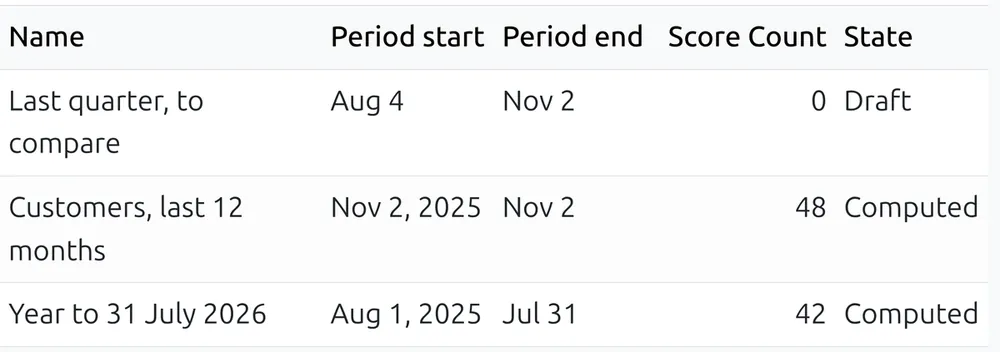
The runs list: each run keeps its period, its customer count and its state.
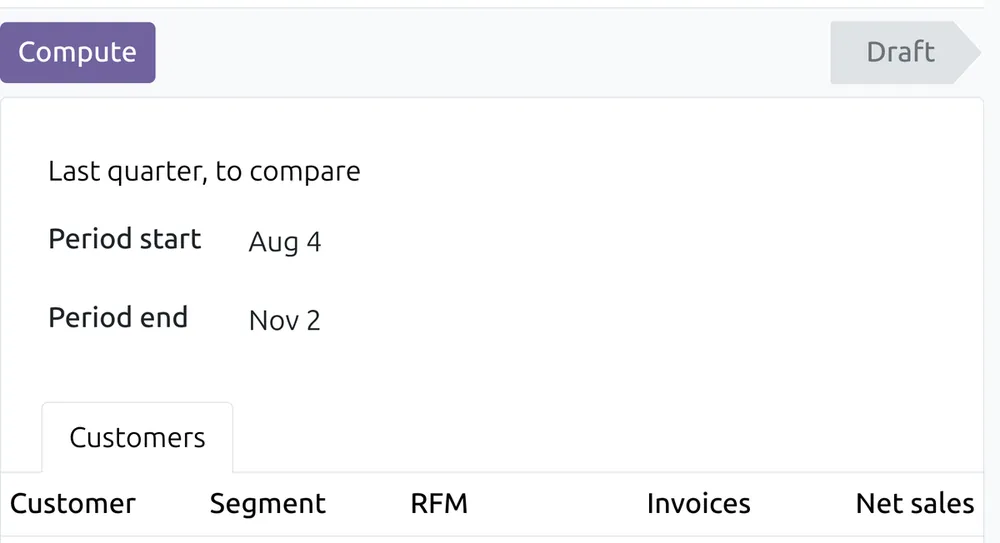
A new run in Draft. Nothing has been read yet.
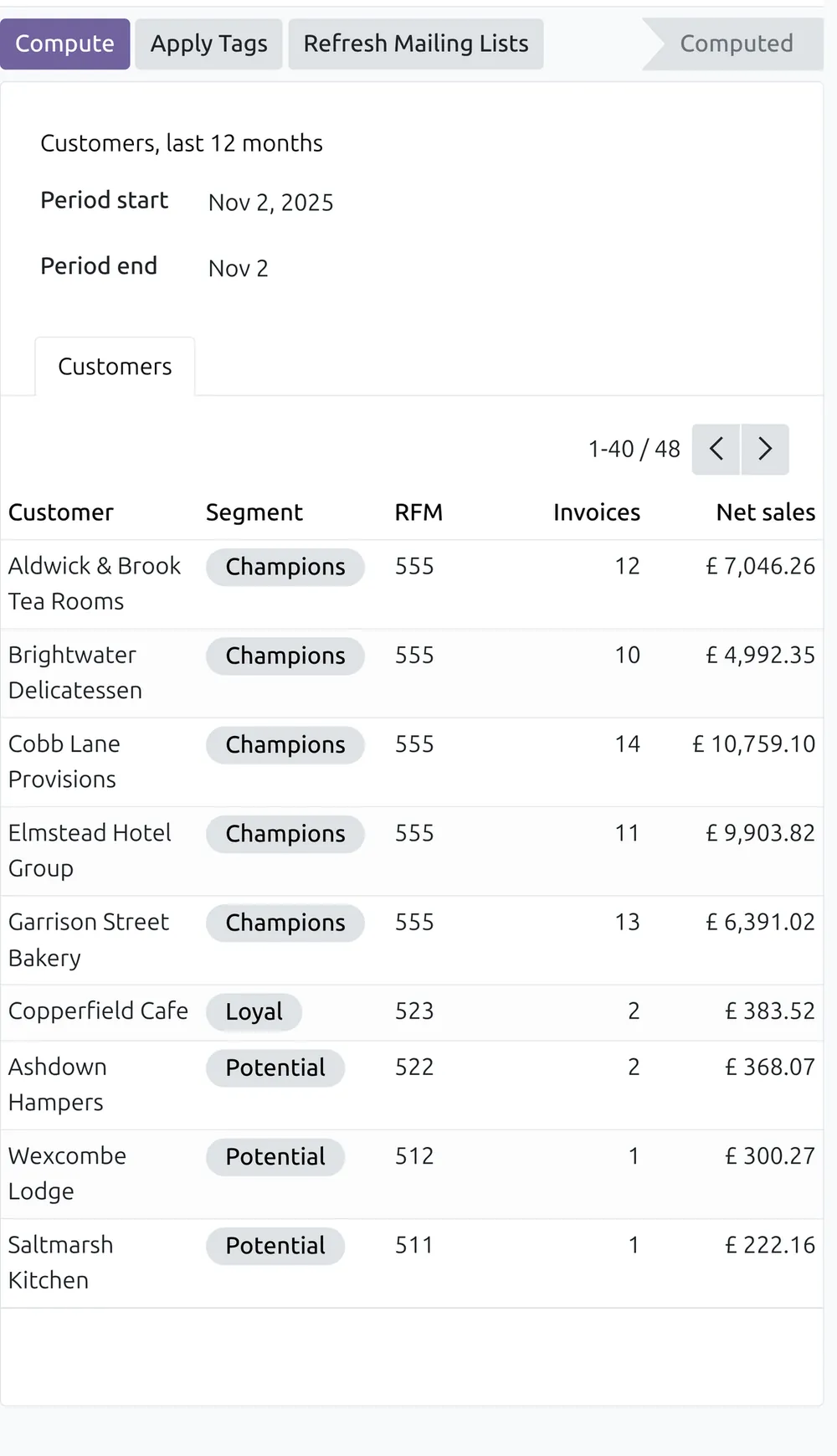
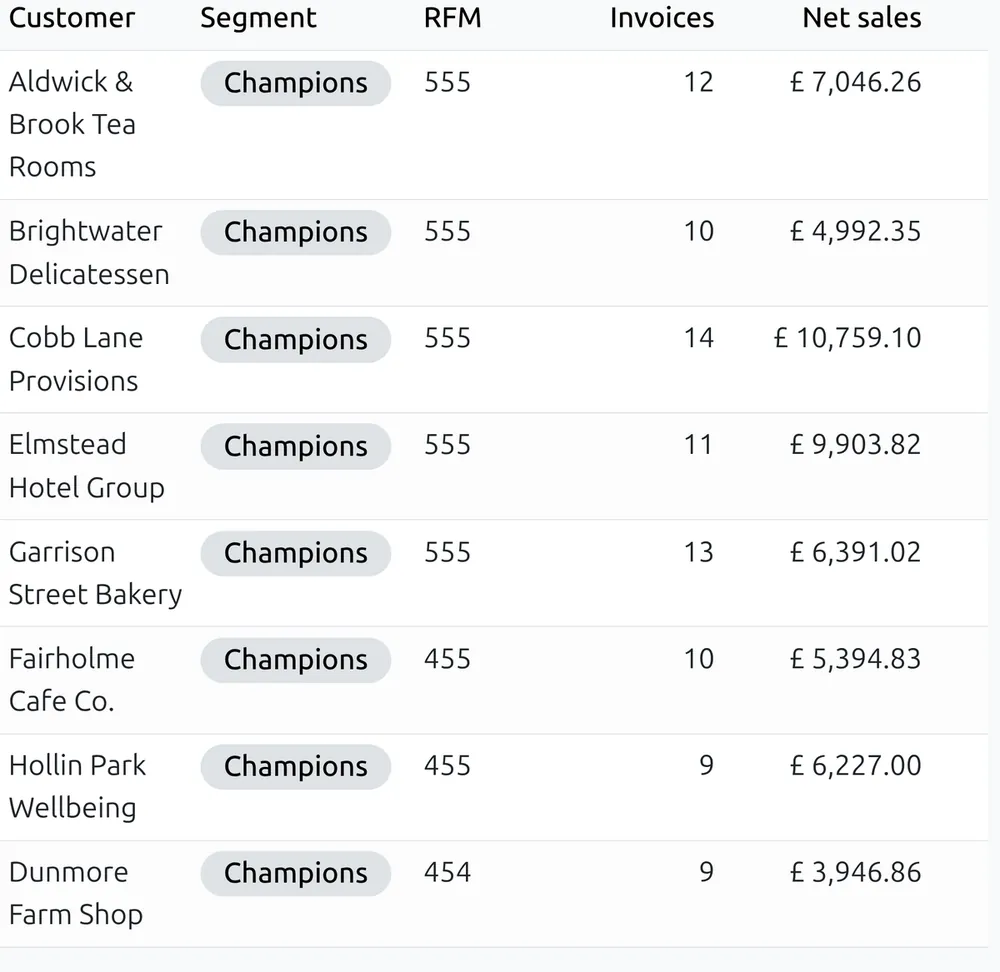
A computed run: the first rows of 48 customers, sorted by score. Net sales are in pounds because the made-up company is in GBP.
2 What the scores and segments mean
Use it when you want to know why a customer landed in a segment.Read-only
A segment nobody can explain gets ignored by the people who have to act on it.
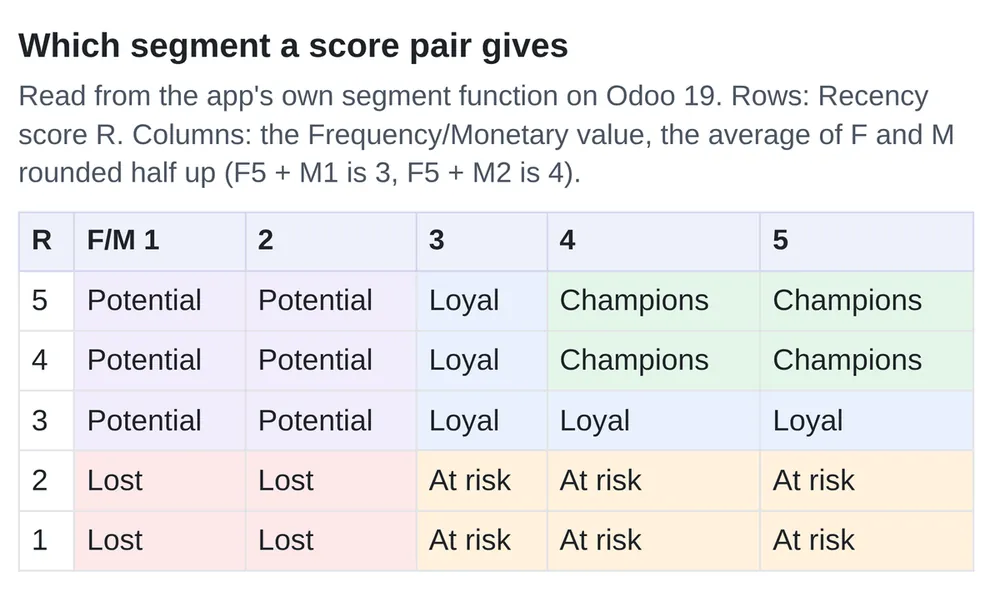
Recency, frequency and net sales are each scored 1 to 5 by rank among the customers of this run, five equal steps, higher is better (fewer days is better for recency). Customers with equal values get equal scores. Frequency and net sales are then folded into one value, their average rounded half up, and that value with recency picks the segment: Champions when recency is 4 or 5 and the folded value is 4 or 5; Loyal when recency is 3 to 5 and the folded value is 3 or more; Potential when recency is 3 to 5 and the folded value is 1 or 2; At risk when recency is 1 or 2 and the folded value is 3 or more; Lost when both are low. The RFM code on each row is the three scores side by side, for example 555.
The table shows the whole rule. A customer with frequency 5 and net sales 1 folds to 3, the same as 3 and 3, so the segment cannot tell a frequent small buyer from an occasional big one.
It does not weigh the three scores, learn from your data, or predict anything. The thresholds are fixed.
The segment for every pair of recency score and folded value, read from the app's own function. Generated, not a live screen.
Customer Scores, filtered to Champions and to one run: the RFM code explains the segment.
3 Scores are relative, so read small sets with care
Use it when your customer base is small, or everyone buys alike.Read-only
A score that always spreads customers over five steps will find Champions in any list, even one where nobody buys much.
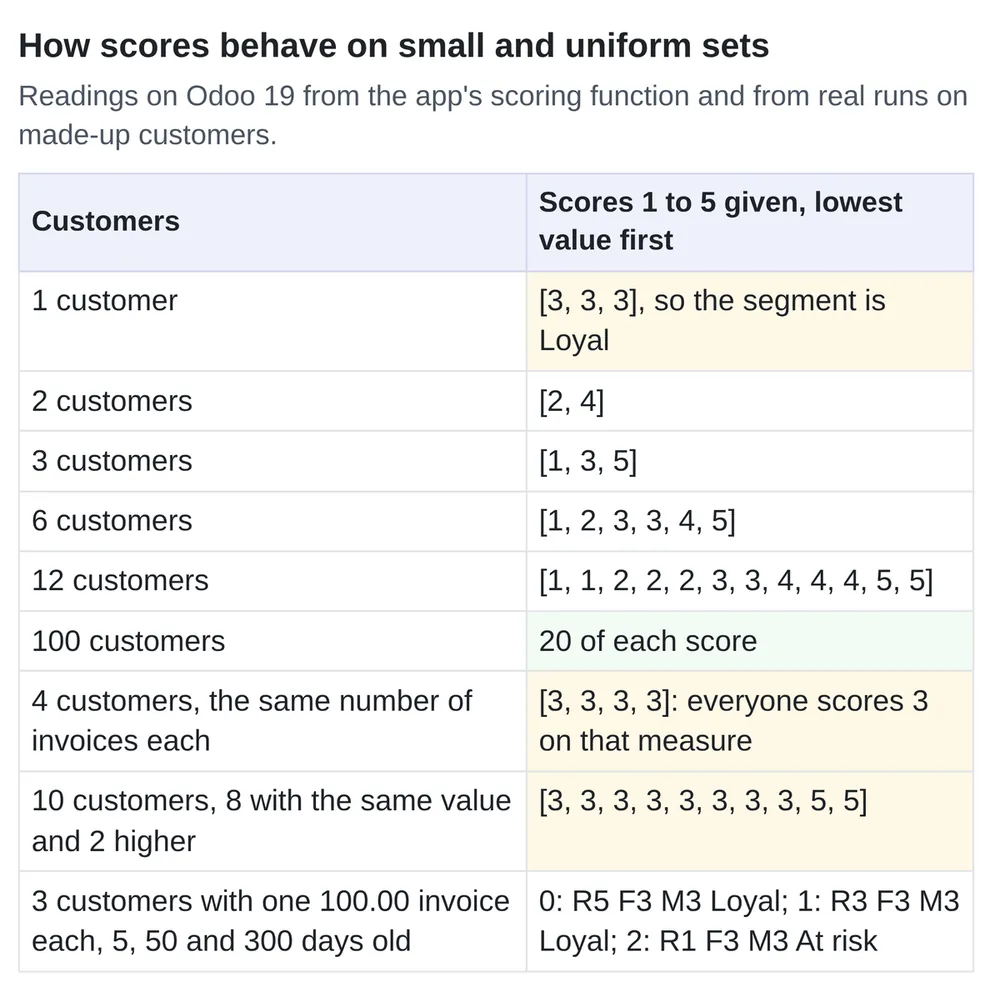
Ranks are taken inside the run. One customer alone scores 3, 3, 3 and is Loyal. Two customers score 2 and 4; three score 1, 3 and 5. If every customer has the same number of invoices, everyone scores 3 on frequency. A hundred different values give twenty customers to each score. A segment therefore says better than the others in this run, not good in itself, and a short period or a small base gives coarse results.
Compare runs over the same length of period; a run over a different period ranks a different crowd.
Readings on small and uniform sets. Generated from the real scoring function and real runs, not a live screen.
4 Apply tags
Use it when you want a segment visible on the customer and usable in filters.Writes tags
A segment that lives only on the run is invisible where people work: on the contact, in lists and in filters.
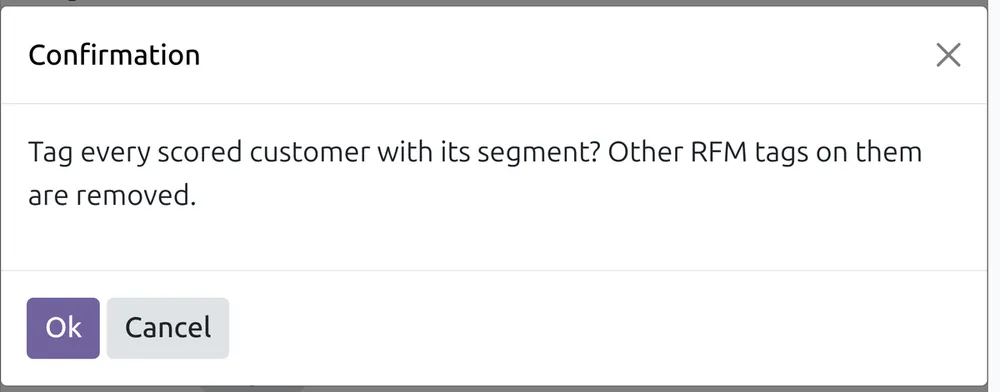
Press Apply Tags and confirm. Each scored customer receives the tag of its segment (RFM - Champions, RFM - Loyal, RFM - Potential, RFM - At risk, RFM - Lost) and loses the other four. Tags it has from elsewhere stay. The tags go on the company, not on the contact that was invoiced. Archived customers with invoices in the period are tagged too.
Only customers that are in the run are touched. A customer with no invoice in the period is not in the run, so an old tag stays on it until you change it by hand; it never turns into Lost on its own.
It cannot remove a tag it gave earlier. A Billing-only user was refused here: tagging needs the right to edit contacts.
The confirmation before tags are written.
The message after Apply Tags. It counts customers, with no singular form for one.

5 Fill a mailing list per segment
Use it when you want to email each segment from Email Marketing.Writes lists
Copying a segment into a mailing list by hand takes an afternoon and is out of date by Friday.
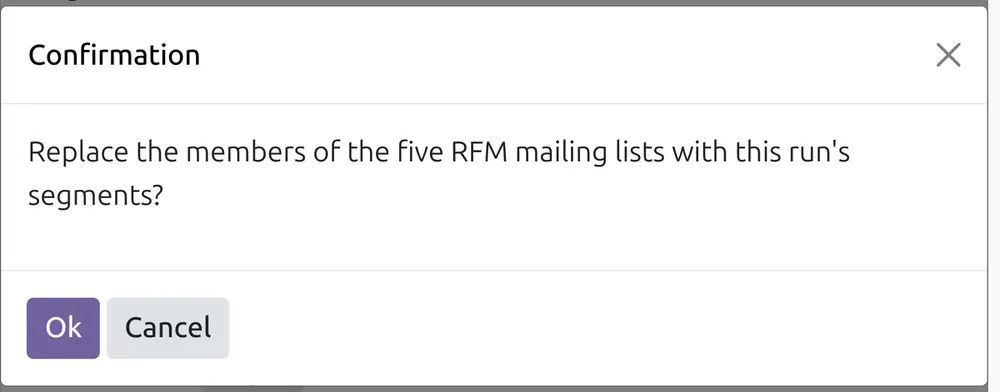
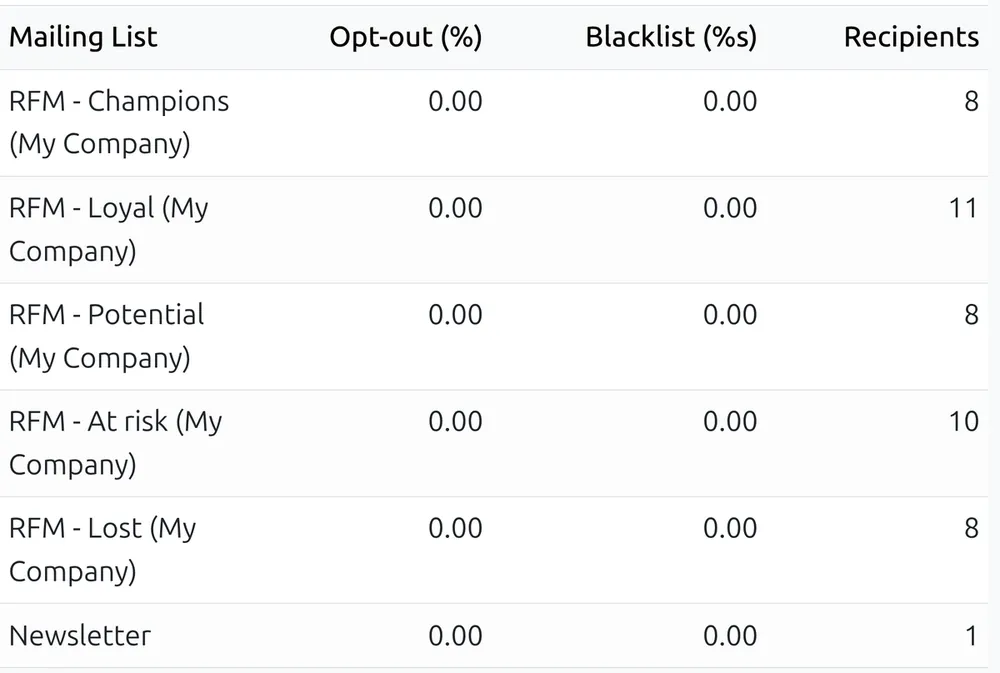
Press Refresh Mailing Lists and confirm. For each segment the app finds or creates a list called "RFM - Champions (your company name)" and so on, and makes it hold exactly that segment, matched by email address. An address that is already a mailing contact is reused and its opt-out on the list is kept; a new one is created from the customer. Customers without an email are skipped and counted in the message. Nothing is sent.
Refresh makes the list equal to the run. Anyone on the list who is not in the segment is taken off it, including someone you added by hand. The app finds each list by its name: rename a list and the next refresh creates a new one with the original name. A run that finds no customers, for example a period without invoices, empties all five lists. A blocklisted address is still placed on the list and marked by Odoo as blocklisted; what a later mailing does with it was not tested. One address on two customers in two segments puts one contact on both lists.
It does not send mail, build a campaign, or keep the lists in step by itself: refresh when you want them to match a new run.
The confirmation before the lists are changed.
The five lists after a refresh, with the recipients each holds (the made-up data has three customers without an email).
Screenshots
What it does not do
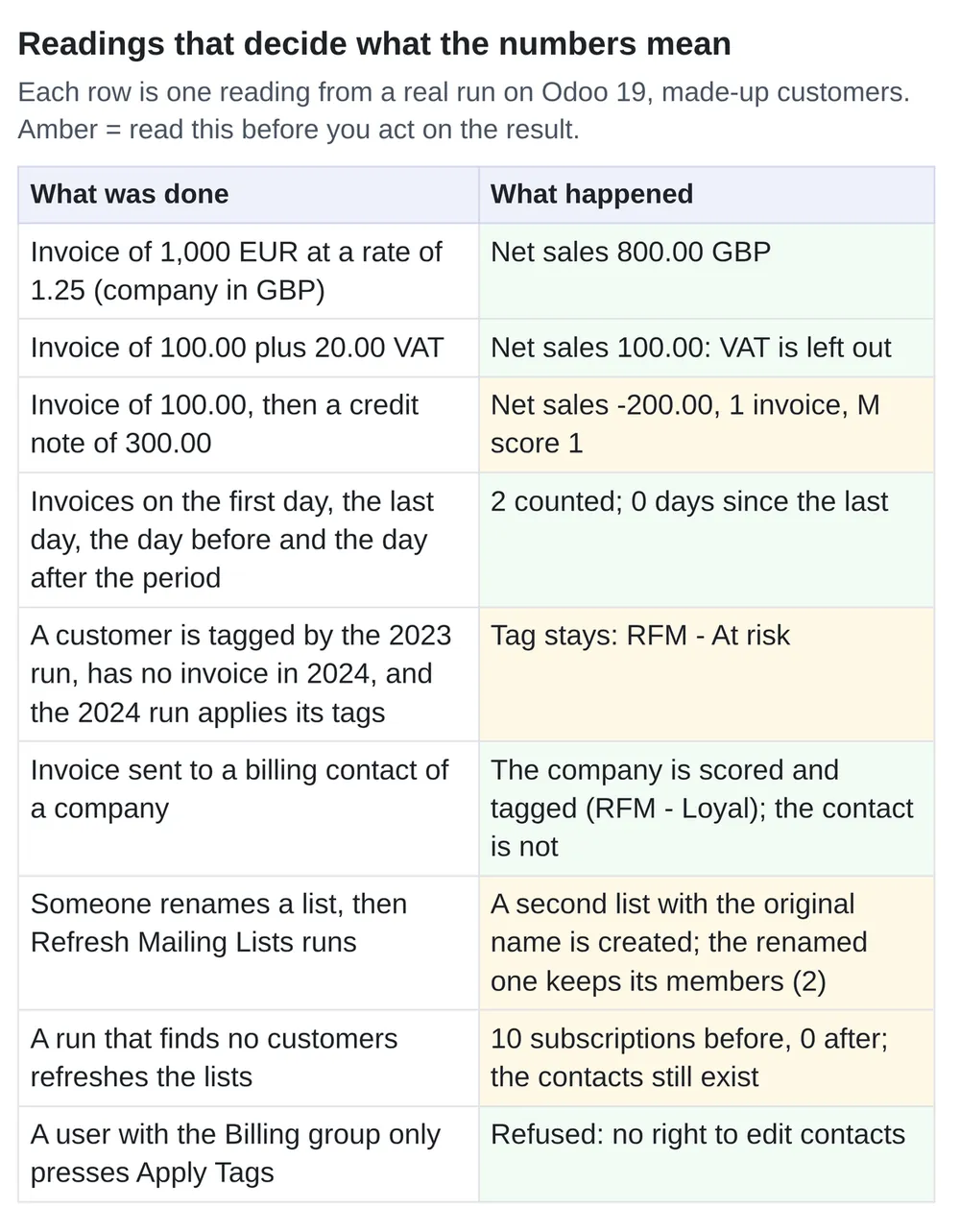
- This is the part to read before pressing Apply Tags or Refresh Mailing Lists. Each line was tested.
- Nine readings from the test run, rendered as a table. Generated from the probe's readings on made-up customers, not a live screen.
- These were measured in the test run or read from the code. None is fixed in this version.
Questions buyers ask
Does it send any email?
No. It fills mailing lists and stops. It makes no network call.
How are the scores worked out?
Recency, frequency and net sales are each ranked among the customers of the run and scored 1 to 5. Frequency and net sales are averaged and, with recency, give one of five segments.
Is a Champion a good customer in absolute terms?
Not necessarily. Scores compare customers with each other inside the run. One customer alone scores 3, 3, 3 and is Loyal.
Can I undo Apply Tags or Refresh Mailing Lists?
No. The app has no undo. Tags and lists have to be changed back by hand or by another run.
What happens to a customer who stopped buying?
A customer with no invoice in the period is not in the run, so Apply Tags leaves its old tag as it is.
Does it remove people I added to the lists myself?
Yes. Refresh makes each list equal to its segment, and a run that finds no customers empties all five lists.
Who can use it?
Users in the Invoicing group can compute. Applying tags also needs the right to edit contacts, and refreshing lists needs mass-mailing rights.
Which customers does it read?
Posted customer invoices and credit notes of the run's company with an invoice date in the period. Contacts roll up to their company.
Requirements
- Odoo 19.0 or 20.0. The App Store sells each version separately, so buy the one that matches your database.
- Odoo.sh or On-Premise only. Third-party apps cannot be installed on Odoo Online (SaaS) databases. Check your hosting before buying.
- Module
mh_rfm_segments, version 19.0.1.0.3, licensed OPL-1.