Sales Stage Checklists
A checklist on every CRM stage and on the quotation: required items must be ticked before the deal moves on, the quotation is sent or the order is confirmed
Request a live demo · Odoo.sh or On-Premise only, not Odoo Online (SaaS).
Every path
a required item stops a forward move from kanban drag, status bar, list edit, the Won button, server actions and imports, and it stops the superuser too (each tried and read)
Quotes
Send and Confirm are refused while a required item is open, one set of items before sending and one before confirming
70
automated tests in the app, none failing, including four browser tours; 9 were added for the fixes and limits on this page
3
defects found while building this page and fixed in this version: an item with no line to tick after a restore, the same after a cancelled quotation goes back to draft, and archived items coming back under one script context
Skips
stages: moving New to Proposition checks the items of New only, not those of Qualified
No
approval by role and no override: anyone who can edit the record can tick any item
In Odoo a salesperson can drag an opportunity to Proposition without having qualified it, and confirm a quotation without checking credit or the customer's purchase order. Sales Stage Checklists adds items to each CRM stage and two steps of the quotation (before sending, before confirming). An item marked required stops the move until somebody ticks it; an item that is not required is a reminder. Who ticked what and when is kept on the record and in the chatter. This page shows it with screenshots of an Odoo 19 database holding a made-up studio (Northgate Fit-outs) and made-up customers, and with tables rendered from real readings of the same runs; each picture says which it is.
It needs the CRM and Sales apps.
How it works
What it keeps, what it changes, what it does not
Each line was tested or read in the code.
1 Items per CRM stage
Use it when a manager defines what must be true before each stage is left.Creates items
Everyone knows the rules of the pipeline, and nothing makes a salesperson follow them.
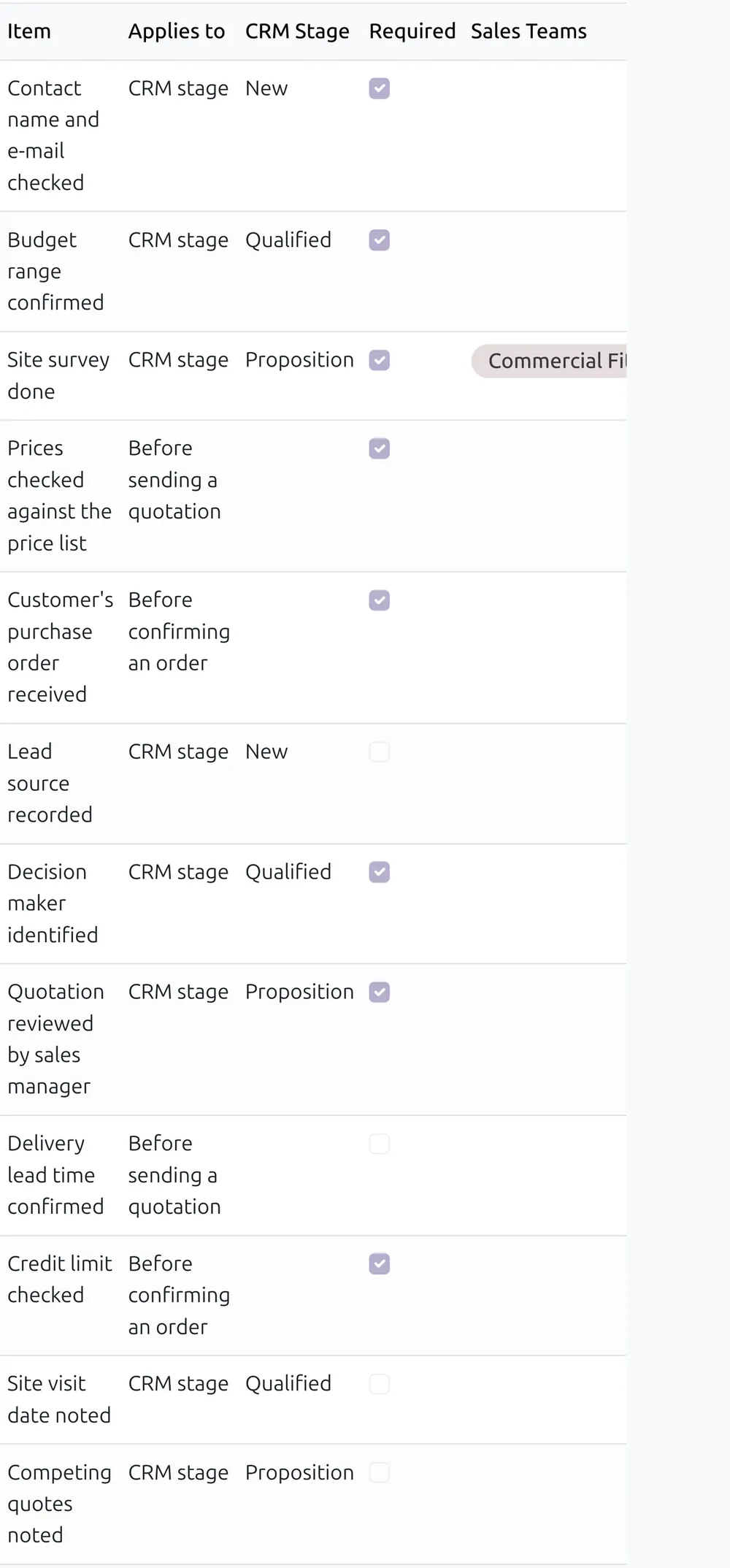
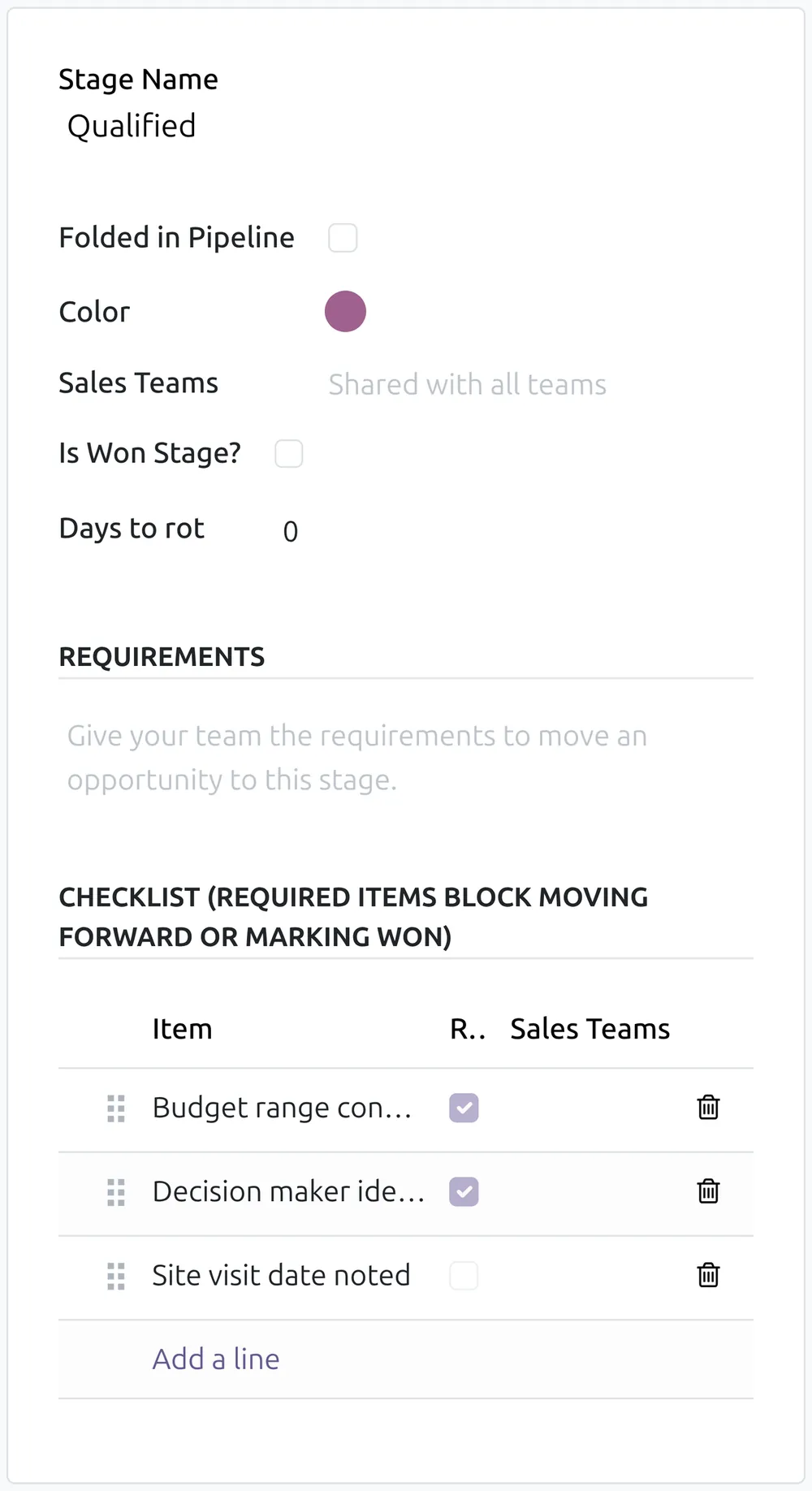
Sales > Configuration > Checklist Items lists every item with what it applies to (a CRM stage, before sending a quotation, before confirming an order), its stage, whether it is required and the sales teams it is limited to; in the picture it is a made-up studio with eight stage items and four quotation items. The same items for one stage can be edited on the stage form itself, in the Checklist section under Requirements.
An item has no condition on amount, product, customer or field values; it scopes by sales team and company only. Item names can be translated; that was not tested.
The list of items (columns: item, applies to, stage, required, sales teams). Real Odoo screen (Odoo 19).
The stage form with its Checklist section. Real Odoo screen.
2 The checklist on the opportunity
Use it when the salesperson sees what is still open and ticks it.Records who and when
A checklist kept in somebody's head, or on a side sheet, is not on the opportunity.
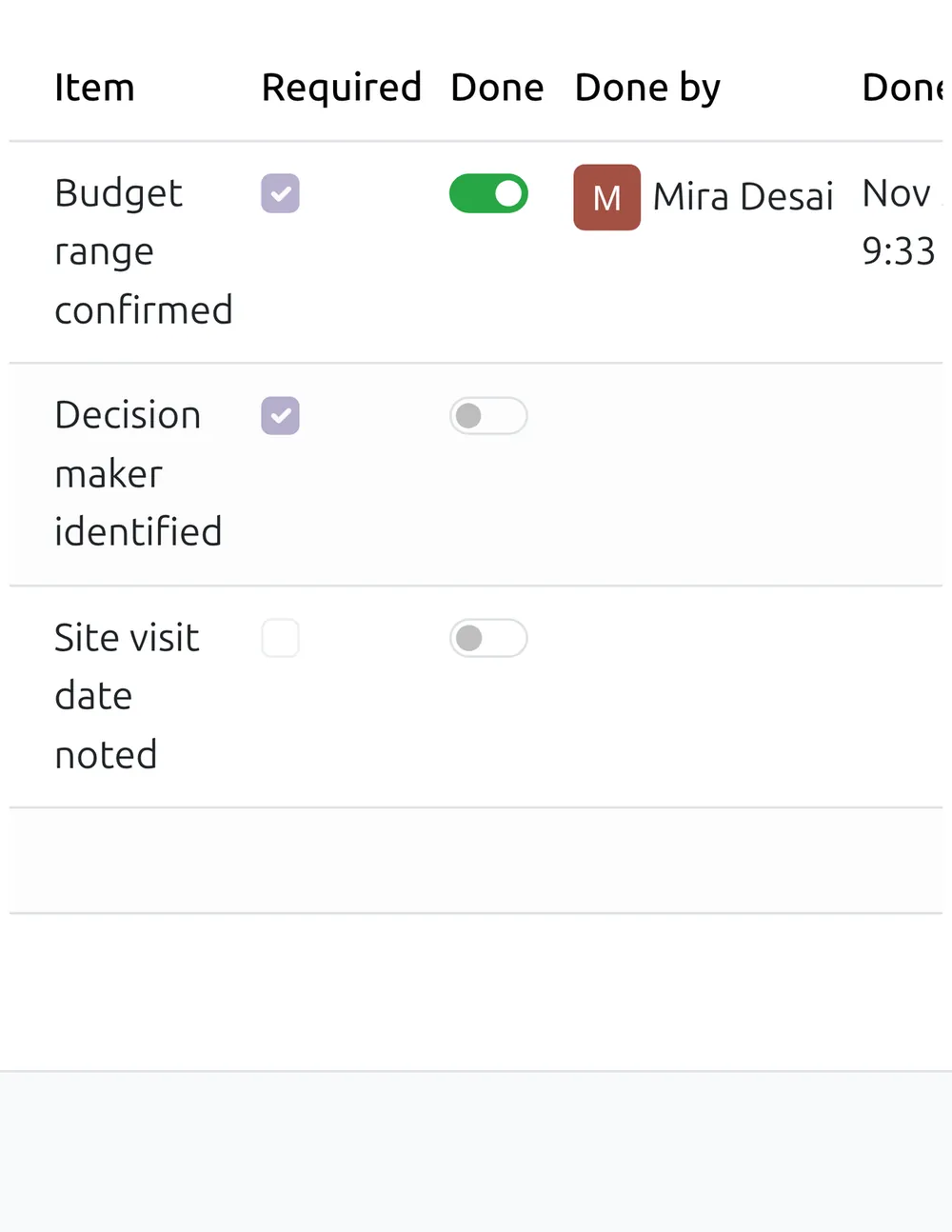
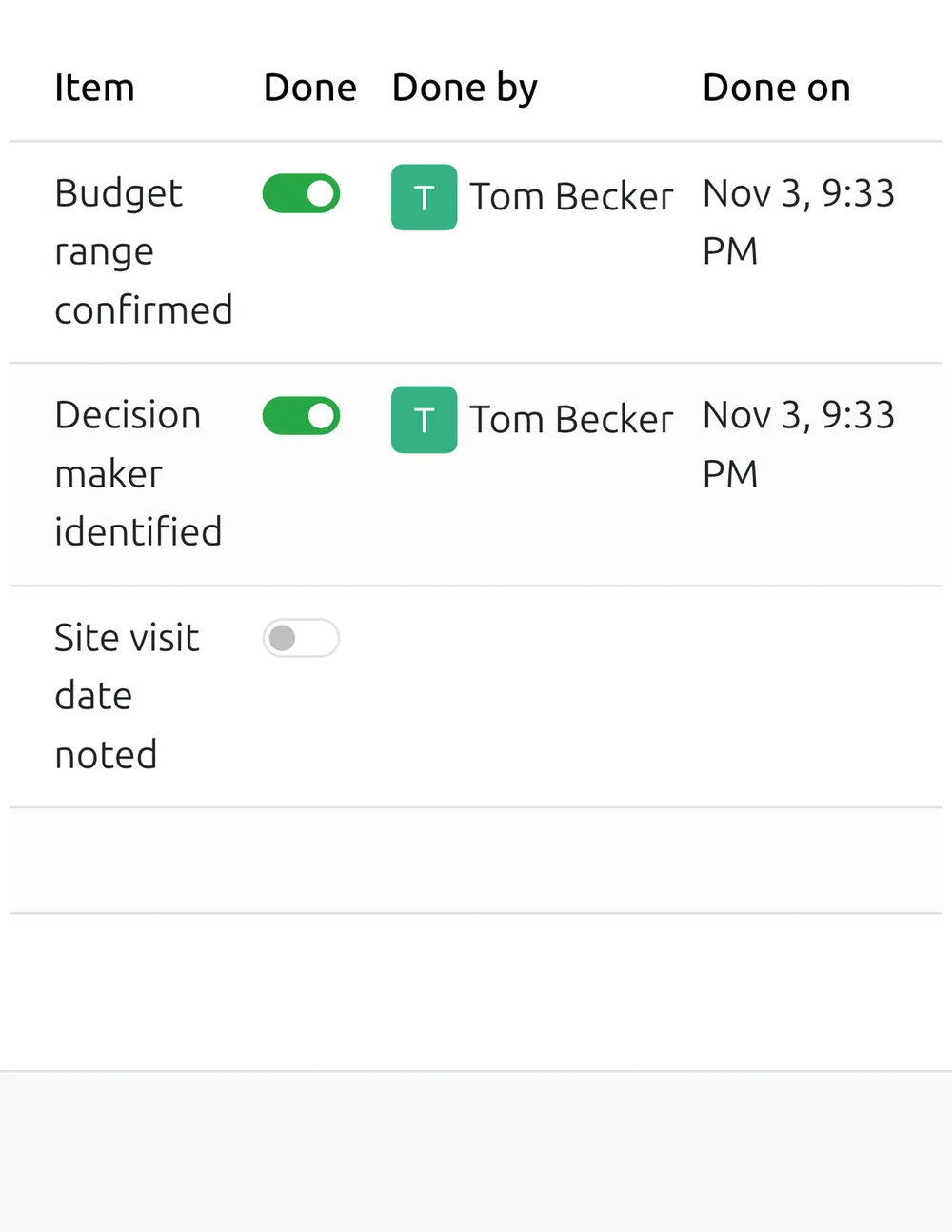
Every opportunity gets a Checklist page with one line per item of its current stage: name, whether it is required, a Done toggle, who ticked it and when, and a progress bar over the required items. The first picture is an opportunity in Qualified with one of two required items ticked (50 %, 1/2); the reminder is on the list and does not count. The second shows an opportunity with both ticked, by another user. Lines of stages the opportunity has left stay on the page greyed out.
Unticking an item of a stage the opportunity has already left changes nothing: the opportunity stays where it is and the line reads unticked.
An opportunity in Qualified: 1 of 2 required items ticked. Real Odoo screen (Odoo 19).
Two items ticked, with who and when. Real Odoo screen.
3 A forward move is refused
Use it when a salesperson cannot slip an opportunity to the next stage with the checks undone.Read-only until ticked
Dragging a card is one click, and nothing asks what was left undone.
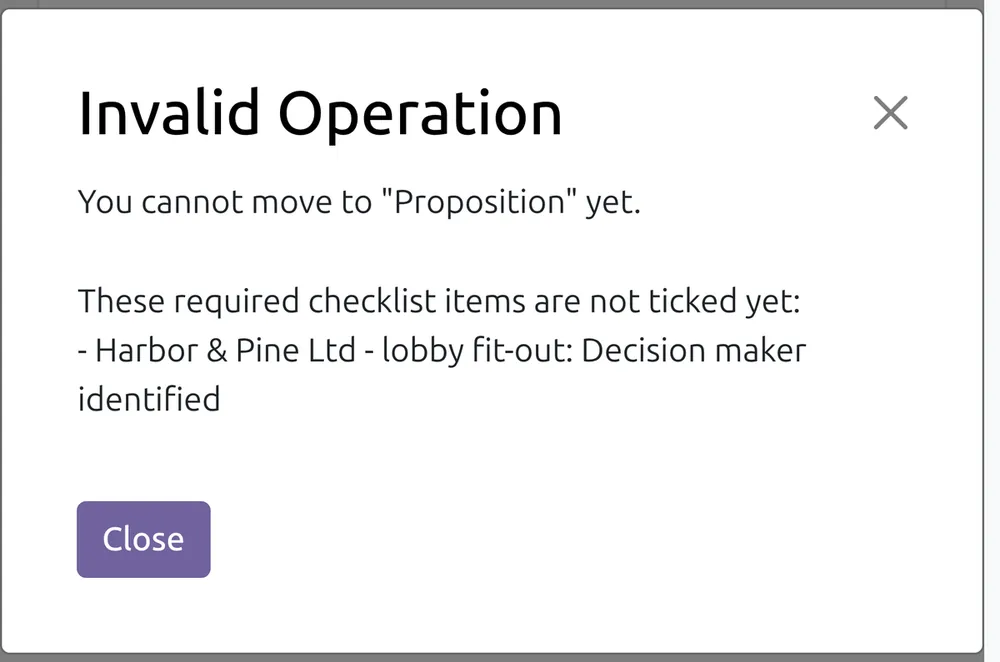
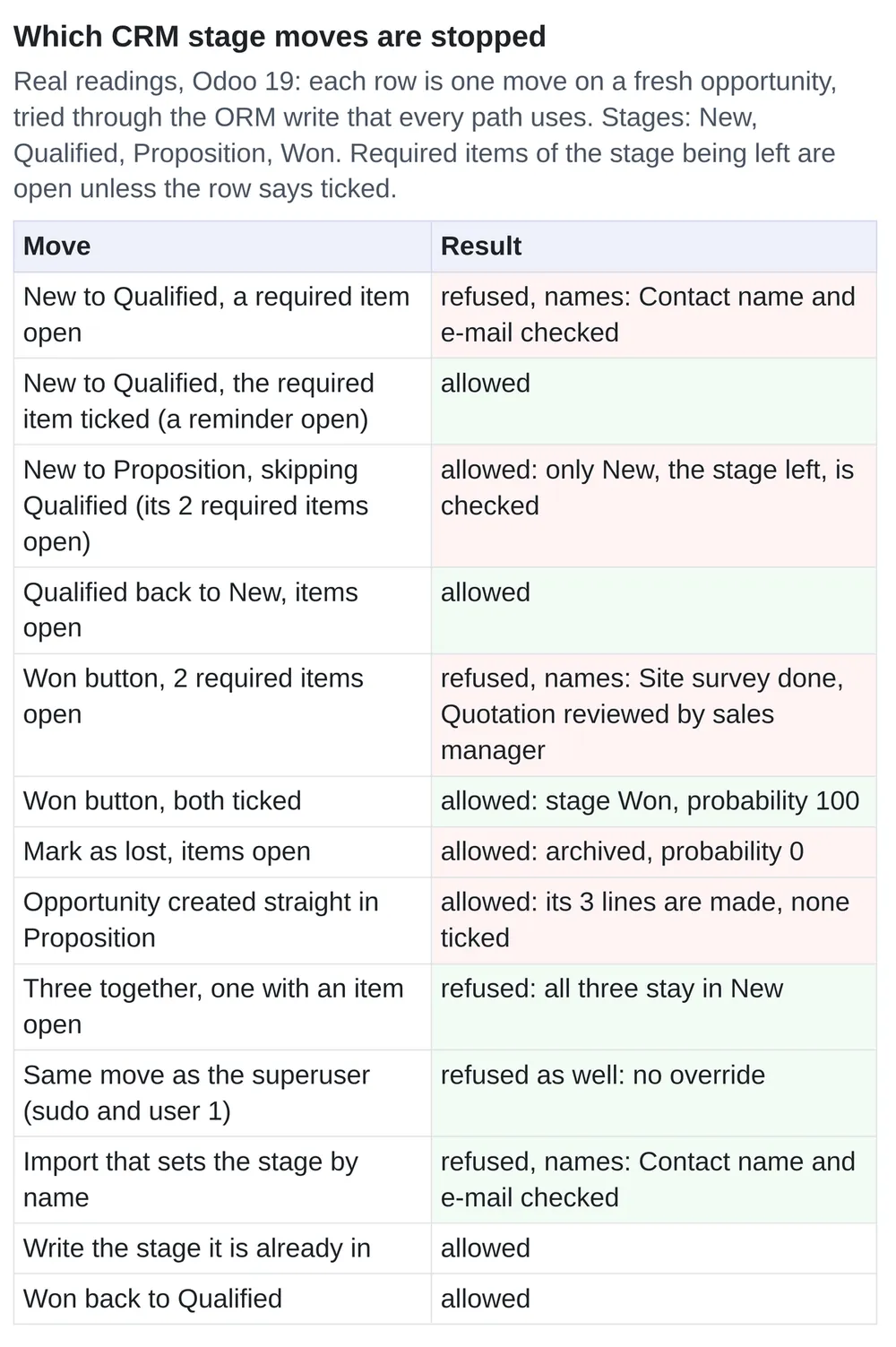
Moving an opportunity to a later stage, or marking it won, while a required item of the stage it is leaving is open is refused with Odoo's message box, which names the opportunity and the open items (up to five records, then a count). The picture is the refusal after clicking Proposition on the status bar. The table below lists thirteen moves and what each did: forward moves, backward moves, the Won button, lost, a batch of three, the superuser, an import by stage name. A batch with one blocked opportunity moves none of them.
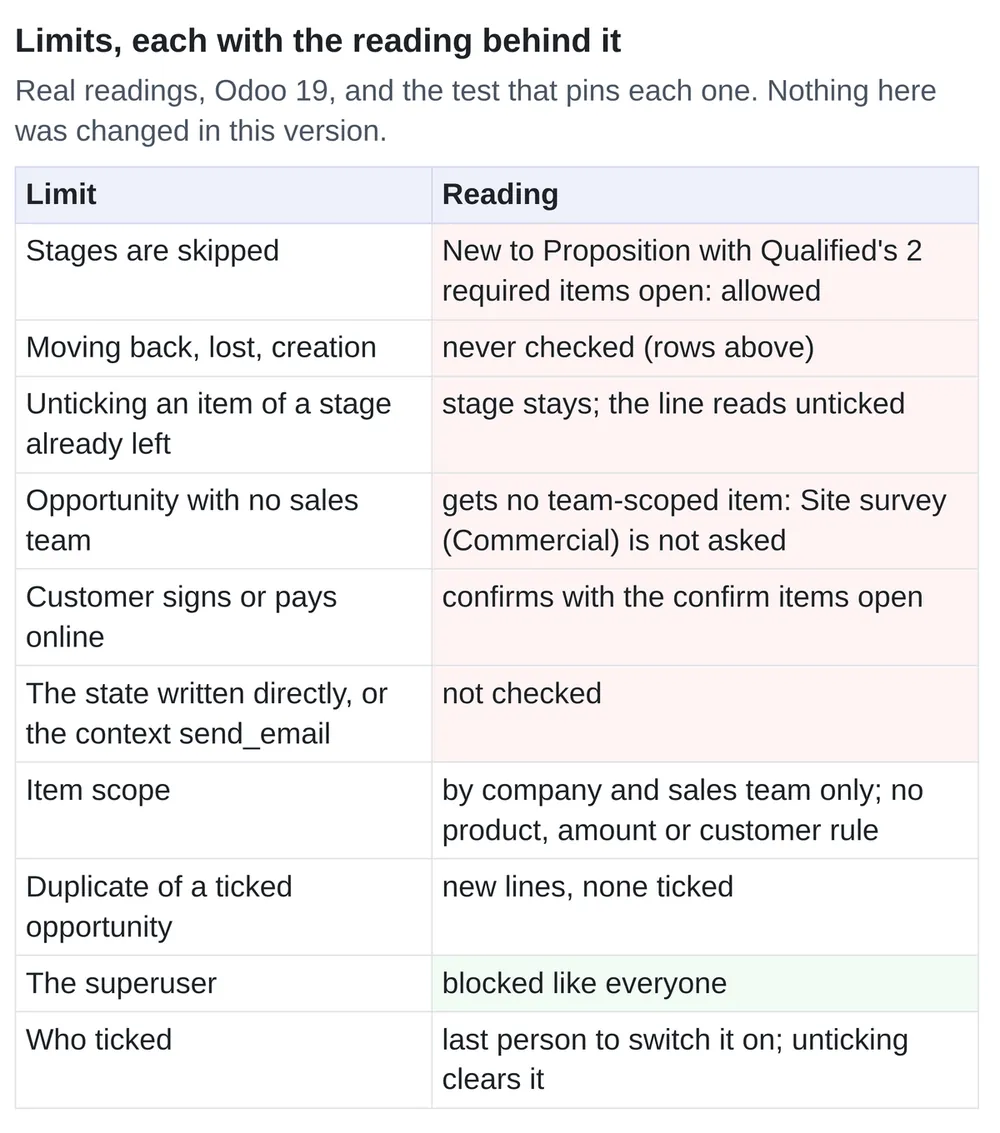
It does not check stages that are skipped: New to Proposition needs the items of New only. Moving back, marking lost, writing the stage an opportunity is already in, and creating an opportunity straight into a later stage are never checked.
The refusal after clicking Proposition. Real Odoo screen (Odoo 19).
Thirteen moves read from the database. Evidence table.
4 Progress on the kanban card and in the list
Use it when the manager sees which opportunities are ready to move.Read-only
A pipeline shows stage and value, and nothing about how ready a deal is.
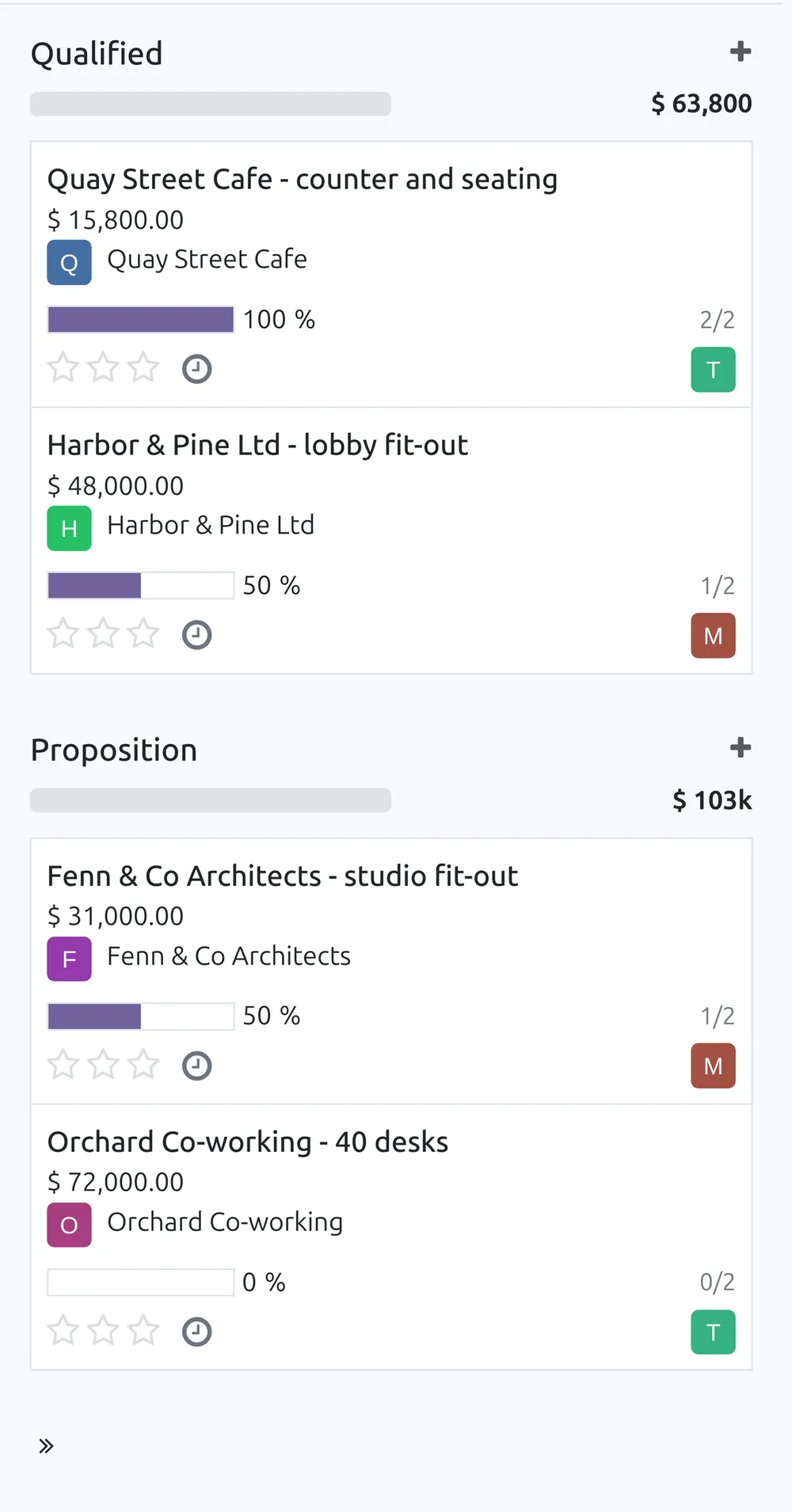
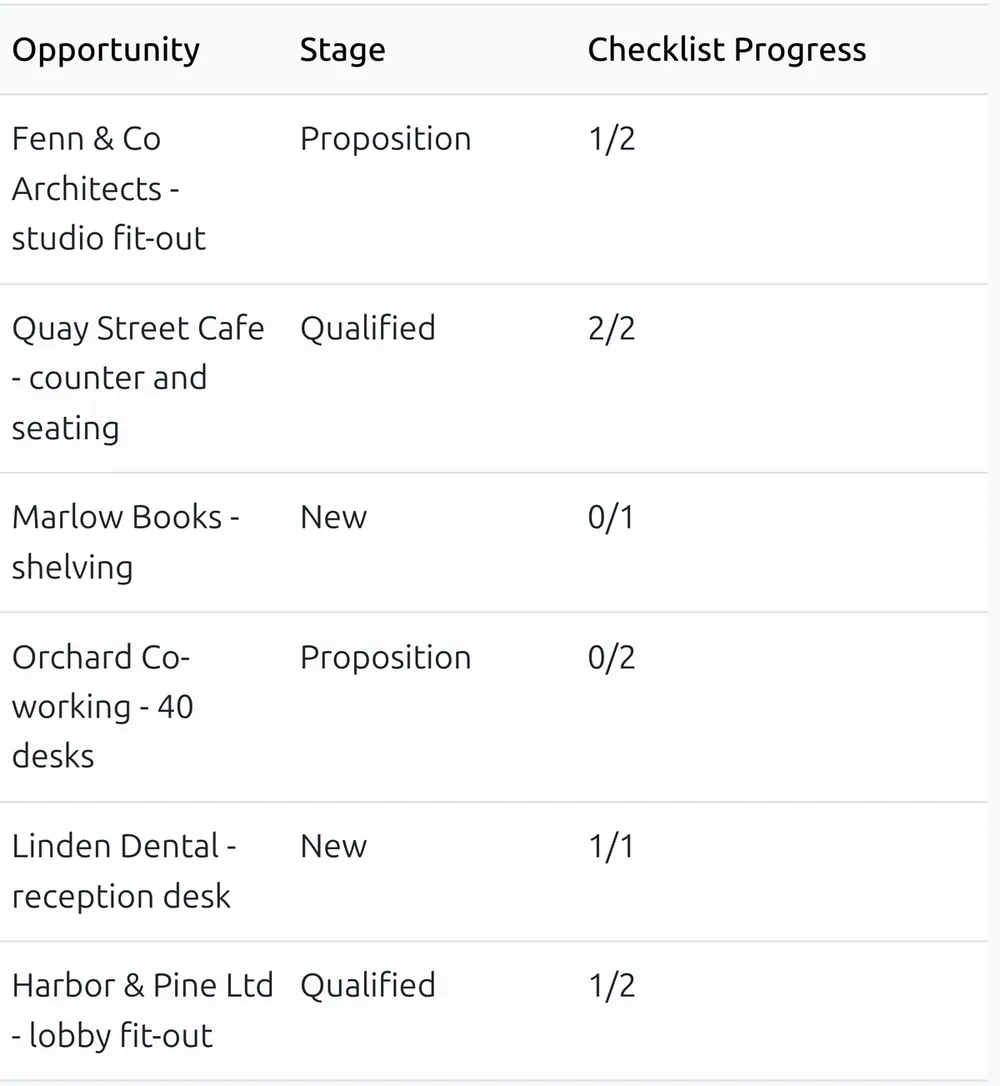
The opportunity kanban card gets a progress bar and a count of the required items ticked (2/2, 1/2, 0/2); the opportunity list gets a Checklist Progress column. Only required items of the current stage count, and an opportunity with none has no bar. The figures were recomputed from the raw database tables for 32 opportunities and matched in all of them (a deliberately shifted reading was flagged 31 of 31). The kanban picture shows the Qualified and Proposition columns of the made-up studio.
The progress is not stored, so it cannot be grouped or filtered on in a list.
Qualified and Proposition columns with progress on each card. Real Odoo screen (Odoo 19); the other columns are hidden to keep the text readable.
The Checklist Progress column. Real Odoo screen; the other columns were hidden to keep the text readable.
5 Quotations: before sending, before confirming
Use it when a quotation cannot go out, or be confirmed, with the checks undone.Read-only until ticked
A quotation is sent and confirmed in one click each, with no record of what was checked.
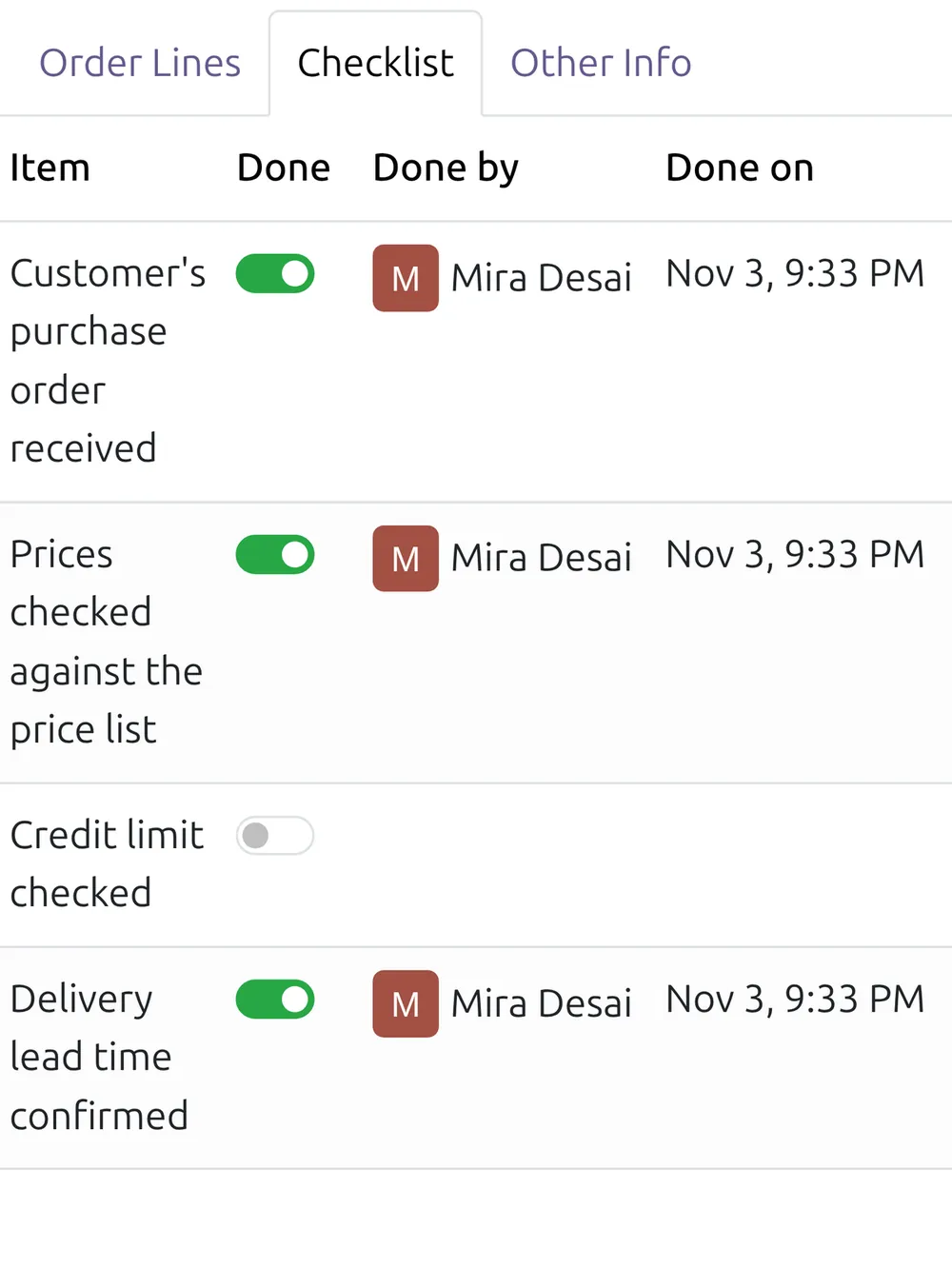
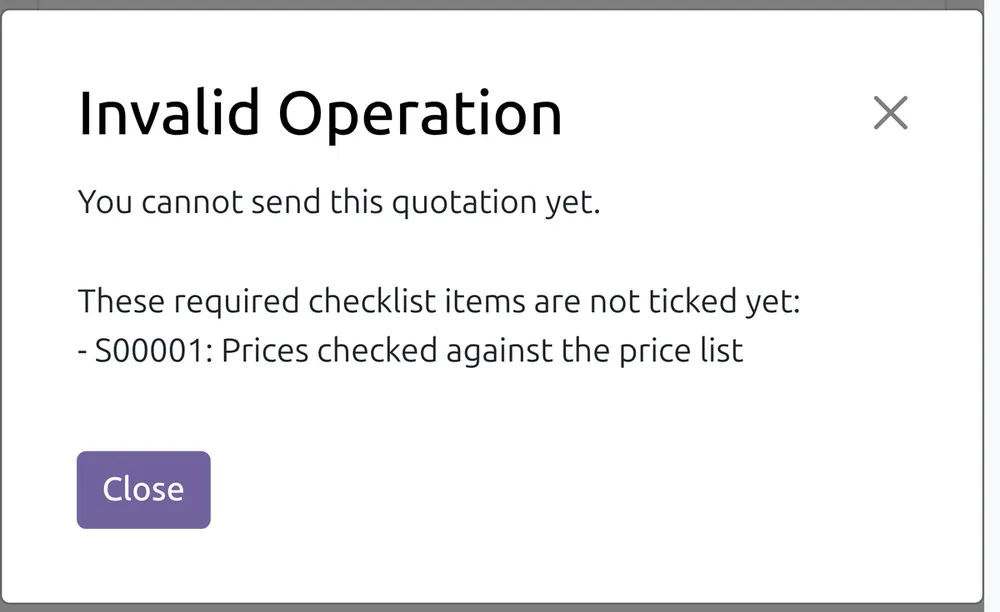
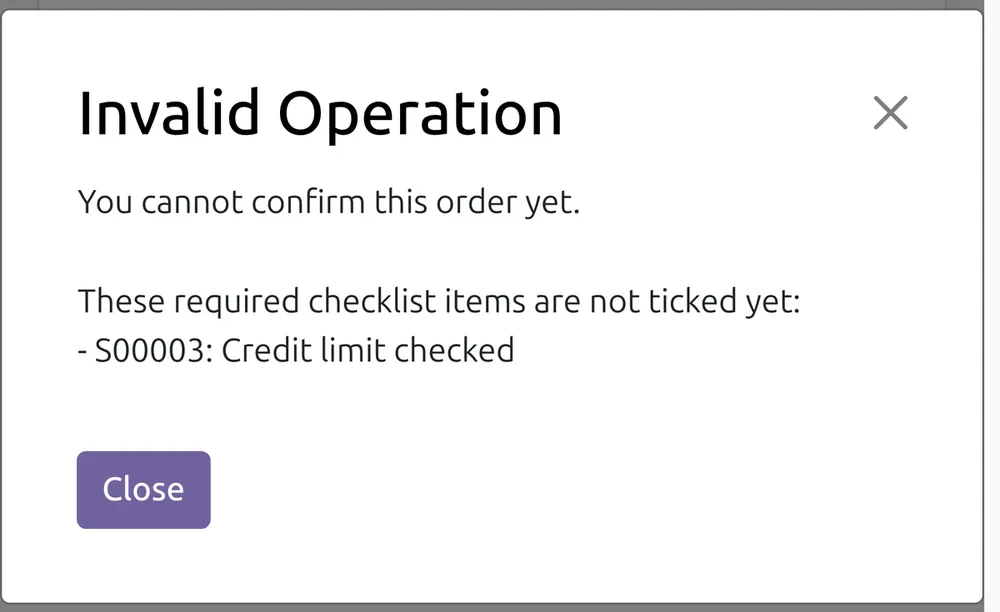
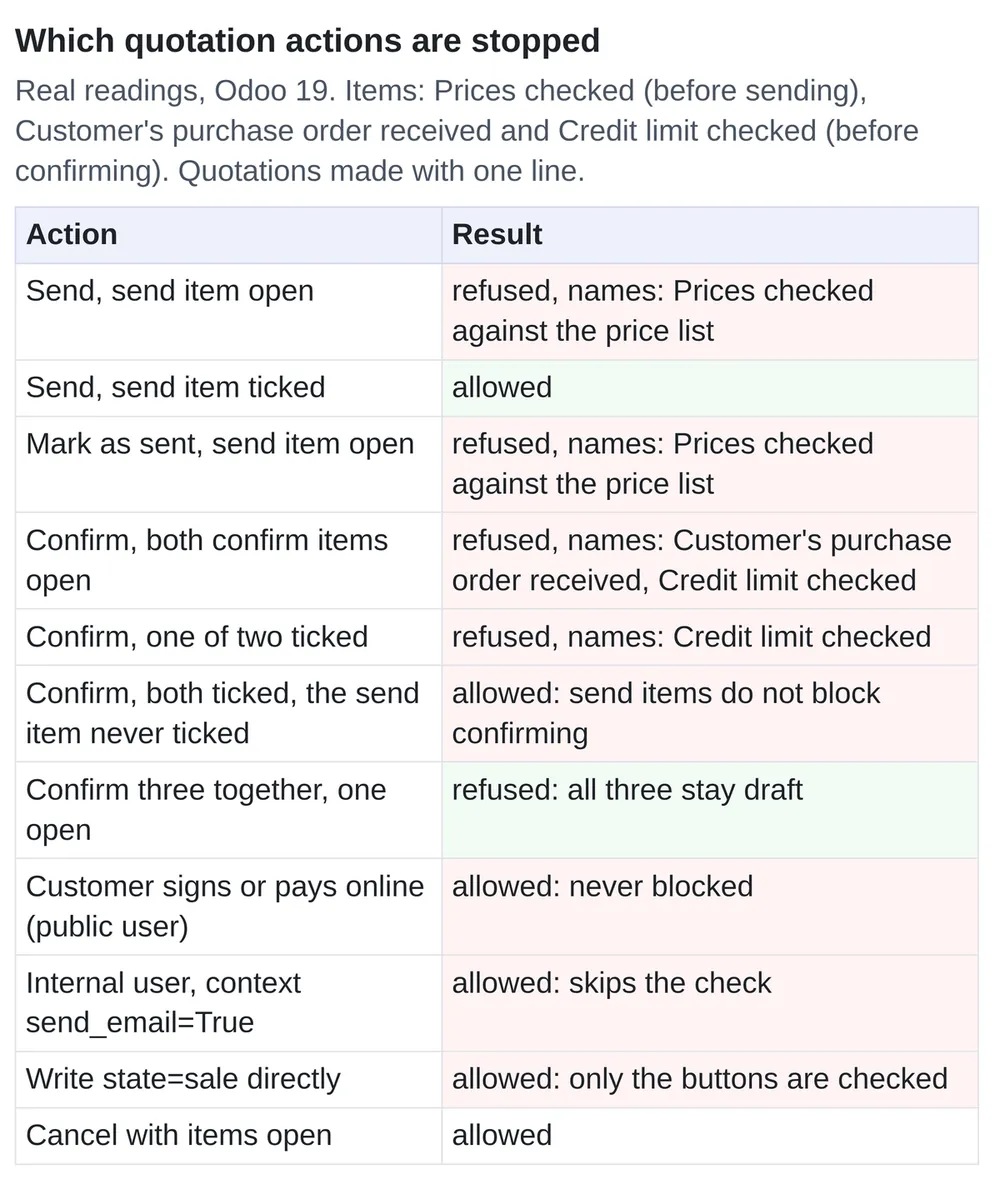
Items for the step Before sending a quotation block the Send button and Odoo's Mark as sent; items for Before confirming an order block Confirm, including the list's mass action and server actions. Send items do not block confirming and confirm items do not block sending. The first picture is a quotation with the purchase order ticked and the credit check open; the next two are the refusals. The table lists twelve actions and what each did.
A customer who signs or pays a quotation online confirms it without the checklist. An internal user acting with the context send_email=True skips the check, and writing the order state directly is not checked. Cancelling is not blocked.
A quotation's Checklist page. Real Odoo screen (Odoo 19).
Send is refused. Real Odoo screen.
Confirm is refused. Real Odoo screen.
Twelve actions read from the database. Evidence table.
6 Who ticked it, and when
Use it when you can see who said a step was done.Writes a chatter note
A tick that leaves no trace is a tick nobody can ask about.
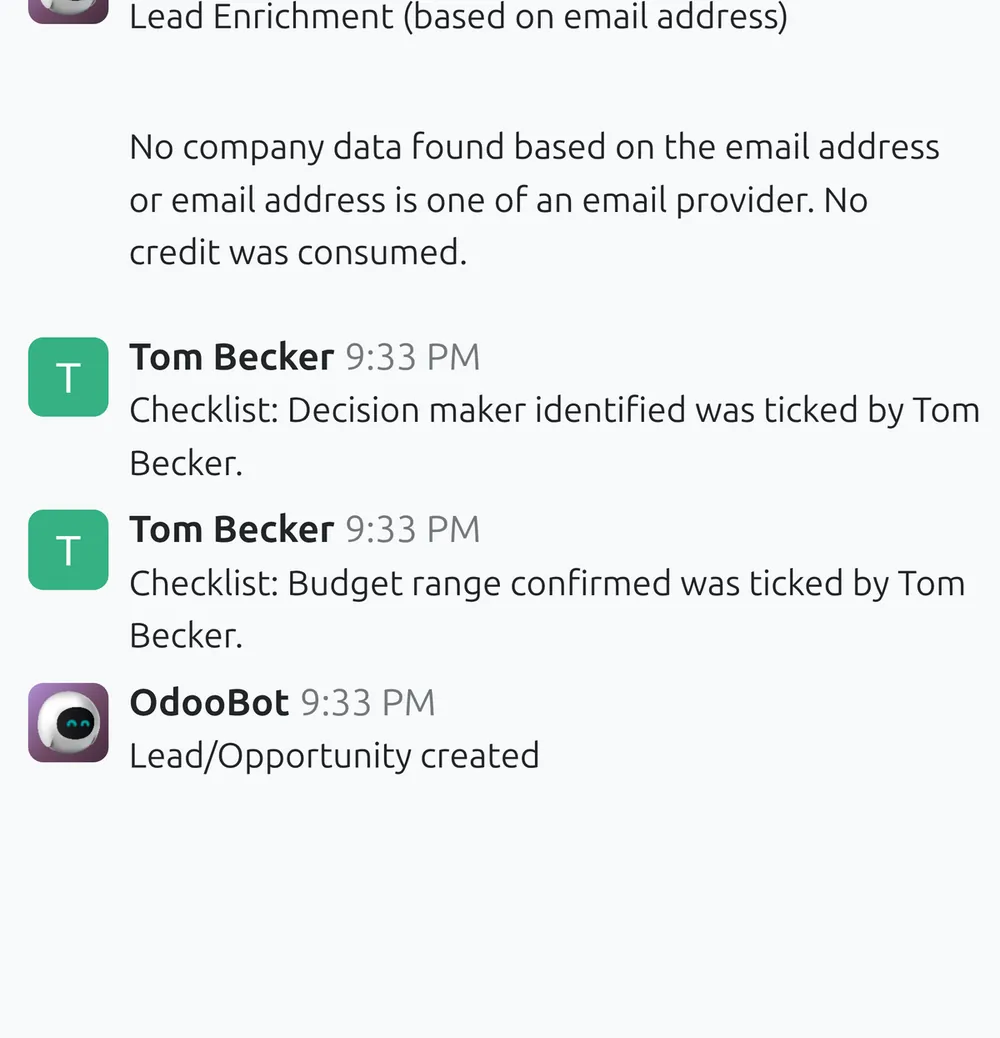
Ticking a line records the user and the time on it; unticking clears them; ticking a ticked line again keeps the first person. Each change also posts a note in the chatter of the opportunity or order: Checklist: Decision maker identified was ticked by Tom Becker. A value sent for Done by is ignored. If Tom ticked an item on Mira's opportunity and Mira unticks and ticks it again, it reads Mira.
It keeps the last person to switch an item on, not a history of every change beyond the chatter notes.
The chatter after two ticks. Real Odoo screen (Odoo 19).
7 Who can do what
Use it when you want to know who can tick and who can edit items.Read-only
A checklist anybody can edit is not a control.
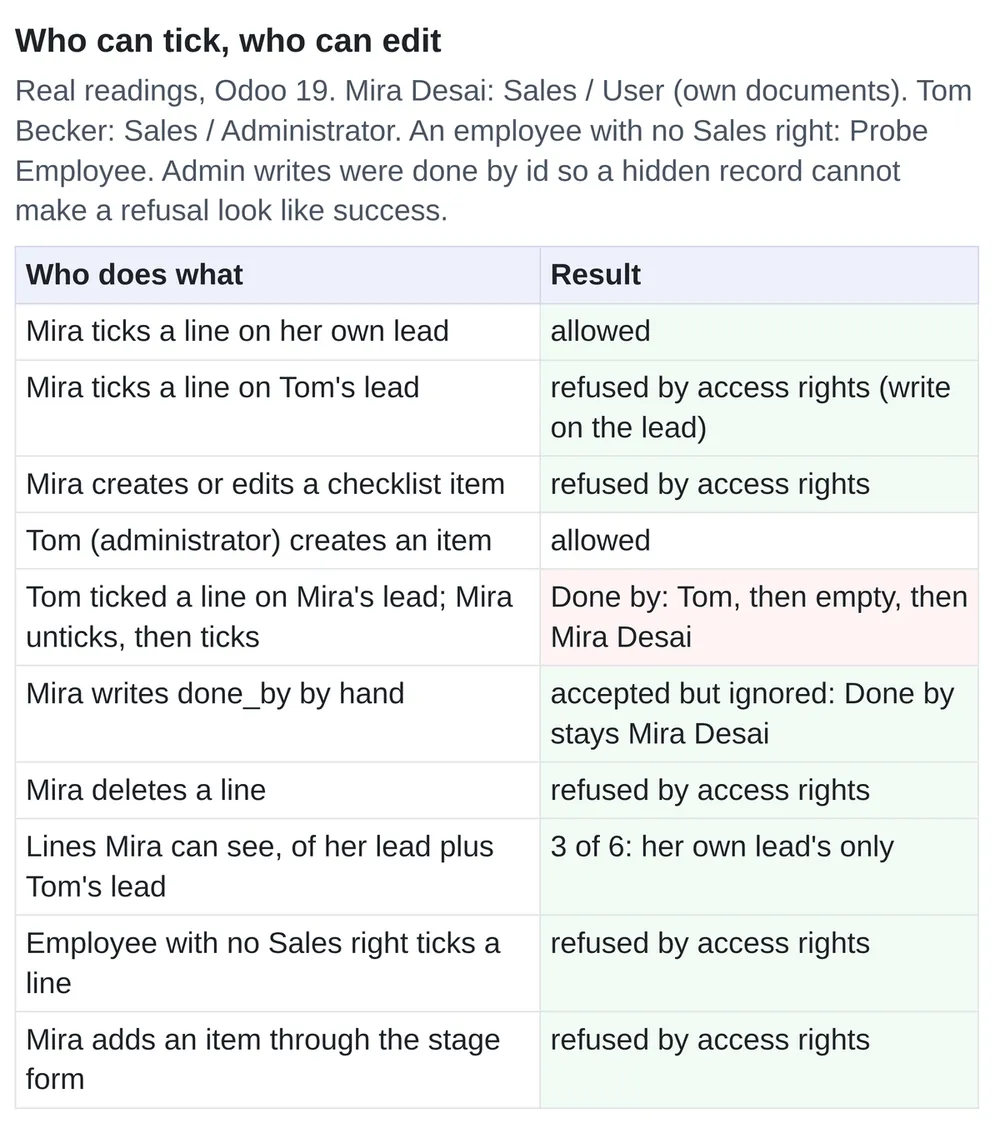
A salesperson ticks lines on opportunities and quotations he can edit, and sees only those lines (own documents, or all with the all-documents right). Only a Sales administrator creates, edits or deletes items. Nobody creates or deletes lines by hand. The table lists ten cases read with a salesperson, an administrator and an employee with no Sales right.
It adds no approval by role: any salesperson who can edit the record can tick any of its items, whoever the item was meant for.
Access cases. Evidence table.
8 Three defects found and fixed
Use it when you want to know what was wrong in the version before.Adds missing lines
A required item with no line to tick blocks the move for good.
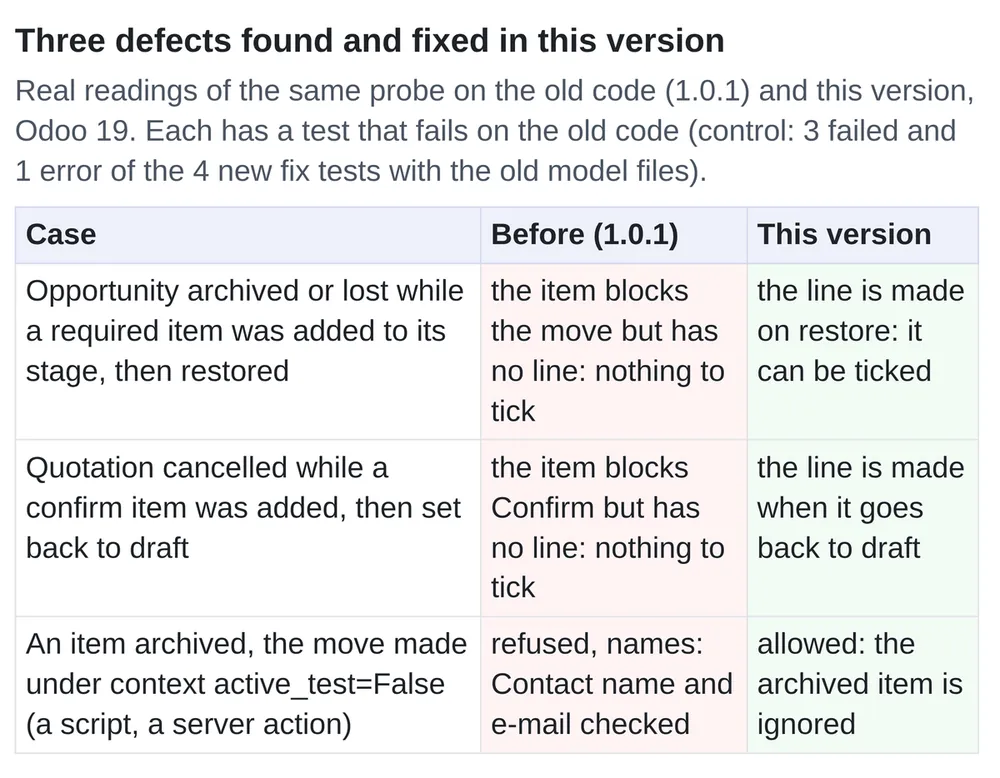
While building this page we found three defects and fixed them in both versions. The table shows each before and after on the same probe. Nothing about stage moves, order states or amounts was changed: the fixes add missing unticked lines and ignore archived items.
These are the defects we found; others may exist. Tests pin each.
The three fixes, before and after. Evidence table.
Checked
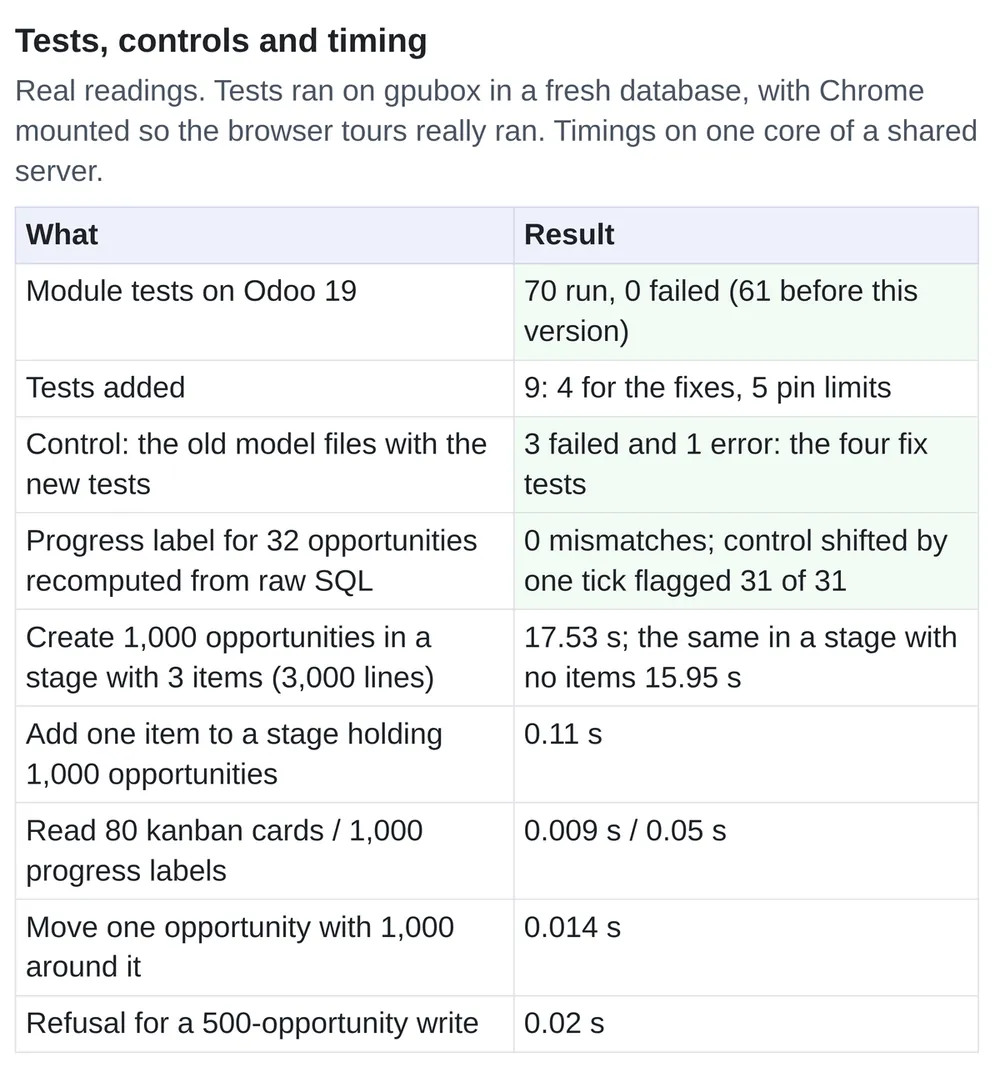
70 automated tests run in each version with none failing, including four browser tours that drag a card, press the status bar and the Won button, edit the list and press Send and Confirm. Nine tests were added for this page: four for the fixes and five that pin limits above. Old model files with the new tests made three fail and one error. The progress figures were recomputed from raw tables for 32 opportunities with no mismatch.
Tests, controls and timing. Evidence table.
What changed in this version
Version 19.1.0.2 fixes three things found while building this page: an item added while an opportunity was archived or lost had no line after the opportunity was restored, so it blocked with nothing to tick; the same for a quotation cancelled and set back to draft; and archived items were counted again when a script ran under active_test=False. No stage move, order state or amount behaviour was changed. It adds nine tests, replaces the screenshots, the icon and the banner, and rewords the description. The demo video and the YouTube card are those of an earlier version and were not re-recorded or checked against the new text.
Screenshots
What it does not do
- Each of these was read in a run on Odoo 19 and is pinned by a test that passes.
- Limits with the reading behind each. Evidence table.
Requirements
- Odoo 19.0 or 20.0. The App Store sells each version separately, so buy the one that matches your database.
- Odoo.sh or On-Premise only. Third-party apps cannot be installed on Odoo Online (SaaS) databases. Check your hosting before buying.
- Module
mh_sales_checklist, version 19.0.1.0.3, licensed OPL-1.