Same-Name File Check
Find the records holding the same file name more than once - the revisions nobody versioned - and what the older copies take up.
Request a live demo · Odoo.sh or On-Premise only, not Odoo Online (SaaS).
Free
App Store price, per Odoo version
19 · 20
Odoo versions, each sold on its own page
Odoo.sh
or On-Premise; not Odoo Online (SaaS)
1.0.1
version of mh_same_name_file_check
A revised contract or drawing rarely replaces the old one. Someone uploads it again, and the record ends up holding contract.pdf three times - nobody sure which one is current, and every old copy still stored. Odoo does not group attachments by file name, so finding these means opening records one by one.
How it works
One list of every repeated file name
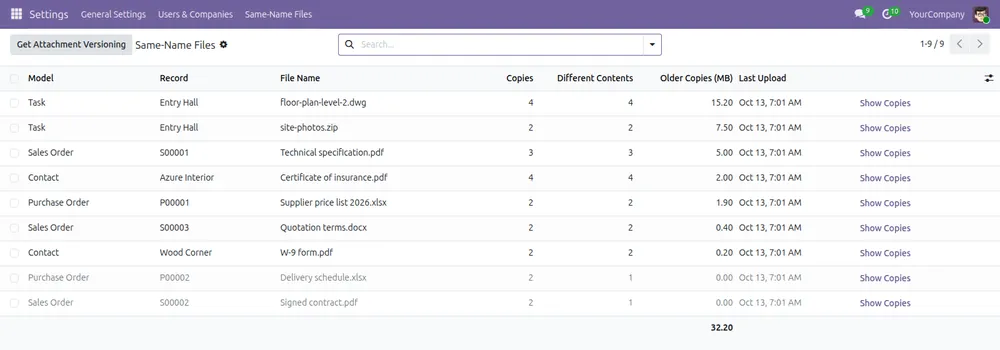
Settings > Same-Name Files shows one row per record that holds the same file name more than once: the model, the record, the file name, how many copies there are and when the last one arrived. Search it by model or group it by model.
Revisions told apart from duplicates
Each row says how many of the copies actually differ. Three different contents under one name are three revisions; two identical copies are a plain duplicate, and those rows are greyed out. A filter shows each kind on its own.
What the older copies take up
Older Copies (MB) is the size of the older contents under that name, each counted once, leaving out the newest. Odoo stores identical files only once, so an identical copy adds nothing to it. The column is totalled at the bottom of the list and per model when grouped.
From the row to the files
Clicking a row opens the record the files are attached to. Show Copies opens Odoo's own attachment list filtered to exactly those copies, with size, author and upload date side by side, where you can open, download or delete each one.
Read-only, and always current
It is one database view over Odoo's attachment table. Nothing is stored, scheduled or changed, so the list is up to date every time it opens.
Who it is for
Administrators of databases where people attach documents to records - quotes, contracts, drawings, certificates - and upload them again when they change. It is also a quick way to see whether versioning would be worth having before you pay for it.
Screenshots
What it does not do
- It changes nothing. It lists; removing an old copy is done by you, in Odoo's own attachment list.
- It matches names exactly. quote.pdf and quote v2.pdf are different names, so a revision uploaded under a new name is not found.
- It does not know why a name repeats. Anything attached to the same record twice under the same name is listed, whether a person uploaded it or Odoo attached it.
- The storage figure is per record. If the same old file is also attached somewhere else in the database, deleting it here does not free that space.
- Some files are out of scope: the values of binary fields such as images, links, and files not yet attached to a record, such as a chatter upload whose message was never sent.
- It does not stop the next copy. That is what the app below is for.
Requirements
- Odoo 19.0 or 20.0. The App Store sells each version separately, so buy the one that matches your database.
- Odoo.sh or On-Premise only. Third-party apps cannot be installed on Odoo Online (SaaS) databases. Check your hosting before buying.
- Odoo 19 and 20, Community or Enterprise. No other module needed - it covers attachments from every app. The menu is under Settings, for Settings administrators only; in a multi-company database each row belongs to the company of its newest copy, and administrators see only their own companies' rows.
- Third-party apps install on Odoo.sh or On-Premise only - they cannot be installed on Odoo Online.
- Module
mh_same_name_file_check, version 19.0.1.0.1, licensed OPL-1.