Shipping Method Checker
Shipping method not showing? See why each delivery method is available or hidden for an address: country, state, zip, weight, tag and price rules
Request a live demo · Odoo.sh or On-Premise only, not Odoo Online (SaaS).
Free
App Store price, per Odoo version
19 · 20
Odoo versions, each sold on its own page
Odoo.sh
or On-Premise; not Odoo Online (SaaS)
1.0.1
version of mh_shipping_method_checker
A customer writes "your shipping method is not showing". Odoo hides delivery methods using rules spread over several tabs - country, state, zip prefix, weight, volume, product tags, price rules and website publication - and the only message anyone ever sees is "No shipping method is available". This app tells you which rule hid which method.
How it works
What it does
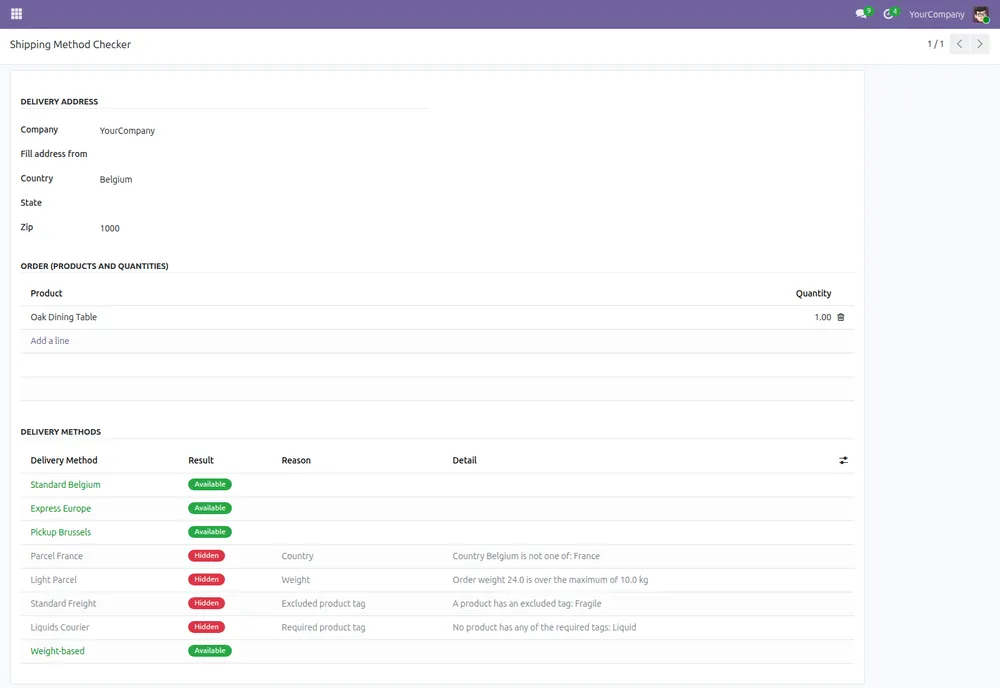
One screen, under Sales > Configuration > Shipping Method Checker. Type a delivery address (or pick a customer to fill it in), add the products and quantities, and every active delivery method is listed as Available or Hidden. The list updates as you change the address or the basket.
The reason is written out. A hidden method says what hid it, in words: "Country France is not one of: Belgium", "Zip 90210 does not start with any of: 10, 75", "Order weight 20.0 is over the maximum of 10.0 kg", "A product has an excluded tag: Fragile", "No product has any of the required tags: Liquid".
It uses Odoo's own rules, not a copy of them. The Available / Hidden answer is Odoo's own delivery.carrier _is_available_for_order(), the method the website checkout uses to decide which methods to offer, run on a draft order that is never saved. The reason is read from Odoo's own address, tag, weight and volume checks in the order Odoo applies them, so the explanation cannot drift from what the shop really does. The module's tests compare every row with Odoo's answer for really saved sales orders, on Odoo 19 and 20.
Price rules are covered too. A "Based on Rules" method is hidden by Odoo when no price rule fits the order. The checker reports that case as "Price rules".
Website publication is shown when the Website app is installed. An optional Website column (switch it on from the column menu) says whether the method is published and therefore shown at website checkout, or published but hidden for this order, or not published.
Who it is for
Shop owners and support staff who get "why can't I choose this delivery method?" tickets, and whoever sets up delivery methods and wants to test them against a real address before customers do.
Screenshots
What it does not do
- It does not price a shipment, call a carrier API or change any delivery method. For "Based on Rules" methods it tells you when Odoo finds no price rule for the order, but it does not say which rule would apply or what the shipping would cost. Weight and volume come from the products' own weight and volume fields times the quantity you enter; there is no field to type a weight directly. It explains Odoo's own rules only: if another app hides a method with its own rule, such as a customer-specific restriction, the row says "Hidden by another rule" because none of Odoo's checks explains it. It lists the delivery methods of the selected company that you are allowed to see, and it saves nothing.
Requirements
- Odoo 19.0 or 20.0. The App Store sells each version separately, so buy the one that matches your database.
- Odoo.sh or On-Premise only. Third-party apps cannot be installed on Odoo Online (SaaS) databases. Check your hosting before buying.
- Odoo 19 and 20 Community or Enterprise. Needs the Delivery app (Sales). Third-party apps install on Odoo.sh or On-Premise only - they cannot be installed on Odoo Online (SaaS).
- Module
mh_shipping_method_checker, version 19.0.1.0.1, licensed OPL-1.