Task PDF Report
Print a task as a PDF from the task form: description, assignees, deadline, subtasks and timesheets on one sheet, with a sign-off box.
Request a live demo · Odoo.sh or On-Premise only, not Odoo Online (SaaS).
Free
App Store price, per Odoo version
19 · 20
Odoo versions, each sold on its own page
Odoo.sh
or On-Premise; not Odoo Online (SaaS)
1.0.2
version of mh_task_pdf_report
Odoo's Project app has no printable task. You can print timesheets, but there is nothing to hand to the person doing the work, or to the customer who has to sign it off. This app adds a Task Sheet (PDF) entry to the Print menu of the task form and of the task list, and prints the task as Odoo already holds it.
How it works
What it does
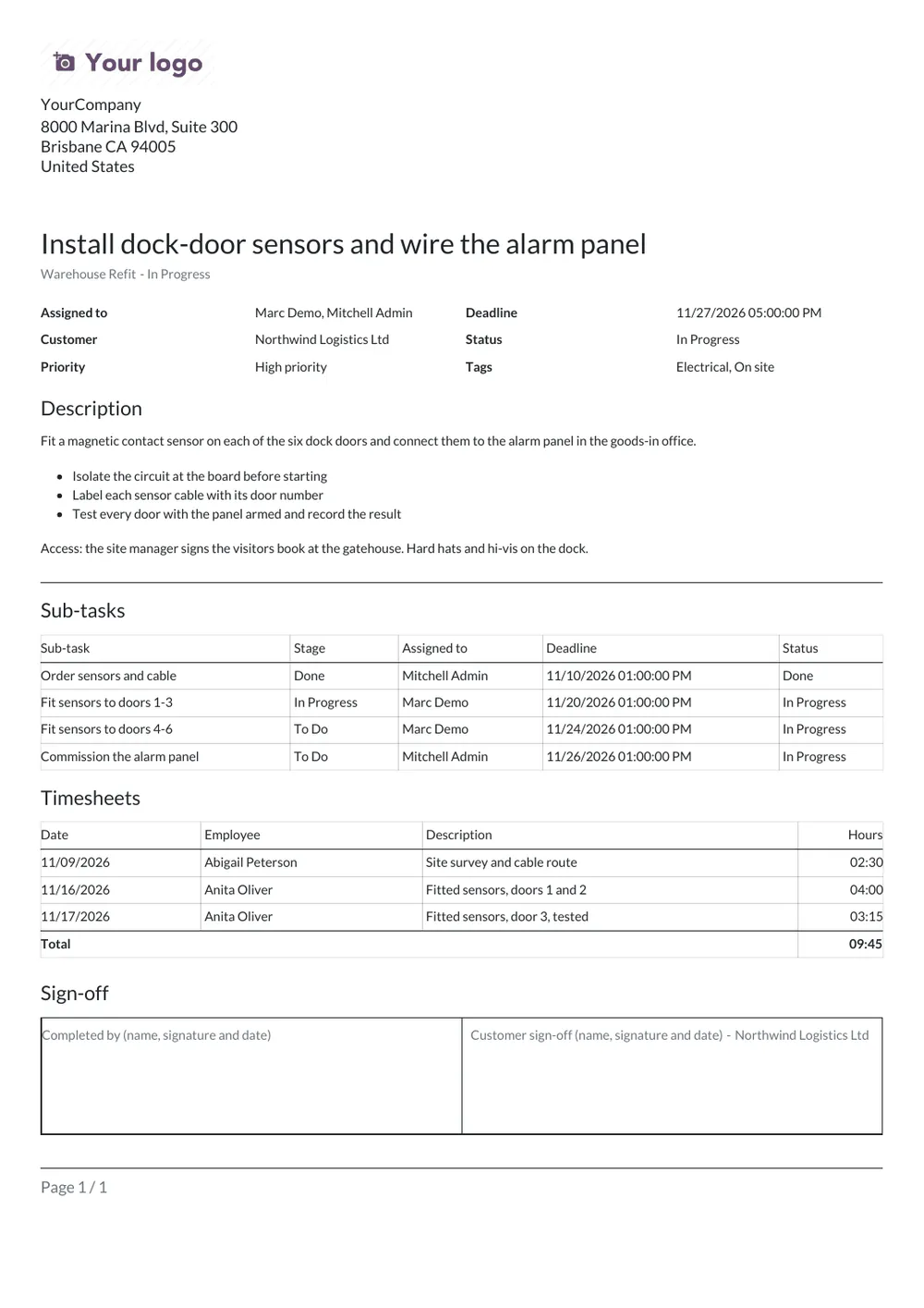
The sheet carries the title, project and stage; who the task is assigned to, the deadline, the customer, the status, the priority and the tags; and the description as written in the task.
Sub-tasks are listed with their stage, assignees, deadline and status. When the Timesheets app is installed and you may read timesheets, the timesheet lines are listed oldest first with their total in hours.
Sign-off box
At the foot of the sheet are two boxes to fill in by pen: completed by and customer sign-off, each with room for name, signature and date, and the customer's name on the second when the task has one.
Several tasks at once
Select tasks in the list and print once: every task starts on its own page. The sheet prints in your company's document layout, so the letterhead is the one you already use.
Who it is for
Field and service teams who hand a job sheet to a technician and get it signed on site, project managers who file a printed record of a finished task, and anyone who needs a task on paper for a customer.
Screenshots
What it does not do
- It does not shrink a long description to fit one page: the sheet is one page for an ordinary task and runs onto a second page when the description or the timesheets are long. It does not print the chatter, attachments, custom task properties or dependencies, and it prints only the first level of sub-tasks. It does not collect the signature on screen: the box is for pen and paper. It stores nothing and adds no fields, menus or settings. Without the Timesheets app the sheet has no timesheet section.
Requirements
- Odoo 19.0 or 20.0. The App Store sells each version separately, so buy the one that matches your database.
- Odoo.sh or On-Premise only. Third-party apps cannot be installed on Odoo Online (SaaS) databases. Check your hosting before buying.
- Odoo 19 and Odoo 20, Community or Enterprise, with the Project app. Timesheets is optional and switches on the timesheet section. Third-party apps install on Odoo.sh or On-Premise only - they cannot be installed on Odoo Online (SaaS).
- Module
mh_task_pdf_report, version 19.0.1.0.2, licensed OPL-1.