Timesheet Hours Guard
Timesheet limit: set a daily hour limit and refuse timesheets over it, dated in the future or too old. Timesheet hours limit per employee.
Request a live demo · Odoo.sh or On-Premise only, not Odoo Online (SaaS).
Free
App Store price, per Odoo version
19 · 20
Odoo versions, each sold on its own page
Odoo.sh
or On-Premise; not Odoo Online (SaaS)
1.0.1
version of mh_timesheet_hours_guard
How it works
What it does
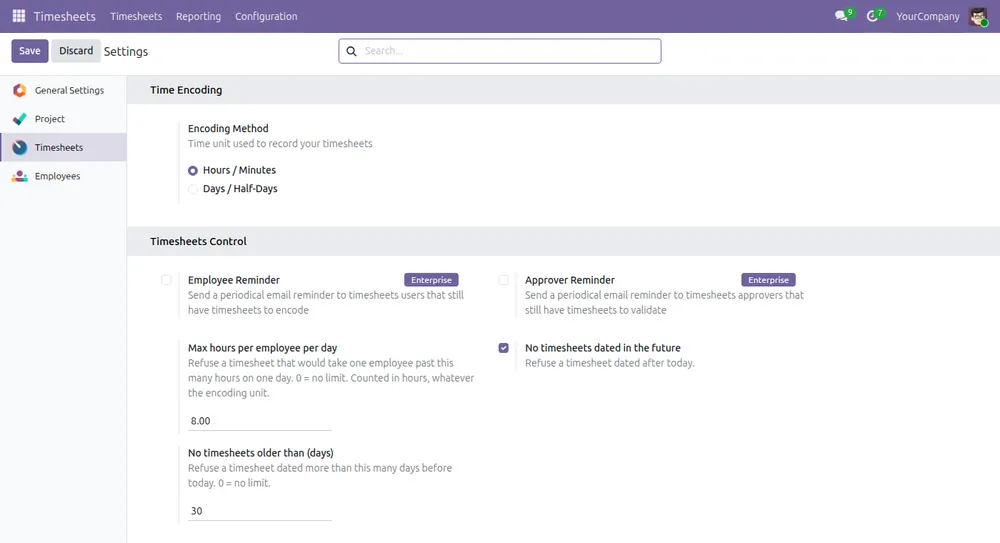
Odoo accepts any timesheet: 40 hours on one day, a date next month, a line from last year. Nothing stops the wrong entry from being saved. This app adds three company settings under Settings, Timesheets, Timesheets Control, and refuses the timesheet that breaks them.
Hours limit per day
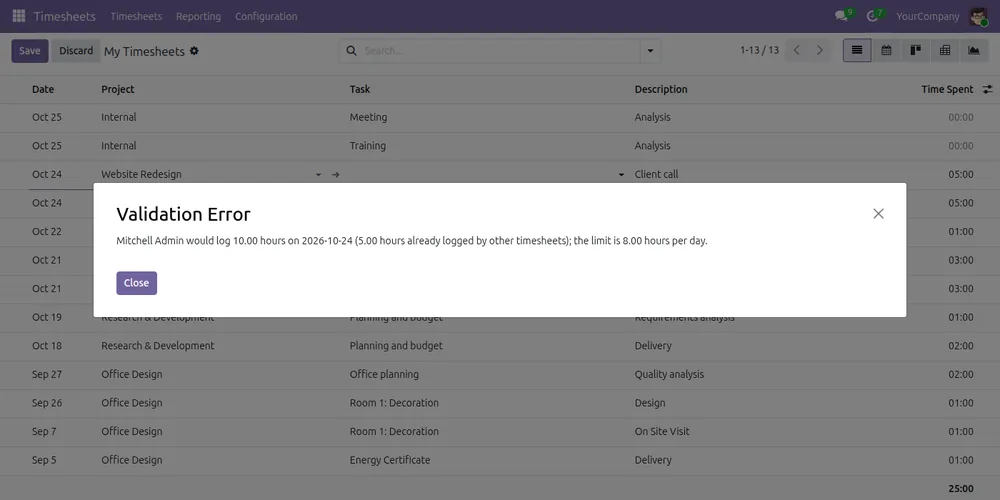
A timesheet that would take one employee past N hours on one day is refused. The default is 24 hours; set it lower, or 0 to turn it off. The message names the employee, the day, the hours that would be logged and the hours already logged by other timesheets. If the company encodes timesheets in days, the message shows days.
No future dates, no old dates
Two more switches: refuse a timesheet dated after today (off by default), and refuse one dated more than N days before today (0 means off, the default). The oldest day you allow is still accepted; the day after it is not.
Every way in meets the same rule
The rule is enforced where the timesheet is saved, so the list view, the task form, the calendar, an import and the API all meet it. A batch of lines is counted together. Editing the date, the employee or the hours of an existing line is checked again, and an unrelated edit, such as a new description, is not.
Per company
Each company has its own three settings, and a timesheet is judged by the settings of its own company. Employees are counted one by one: two employees, or two companies, never share a daily budget. An employee with no user, logged for by a manager, is limited the same way.
Works on its own, and next to Timesheet Approval
It needs only the Timesheets app. It is also tested installed together with Timesheet Approval: the daily limit still applies, and a week that is submitted or approved stays locked by that app.
Screenshots
What it does not do
- It does not send reminders, approve timesheets, lock weeks, or set limits per project or per task. It does not handle overtime or payroll.
- The daily limit is a plain number of hours per employee. It does not read the employee's working schedule or time off.
- Only timesheets (lines with a project) are counted and checked. Hours are counted as Odoo stores them, with the project time unit read as hours.
- Code running as superuser, such as scheduled actions or sudo, is not blocked.
- Timesheets already in the database are not checked until someone changes their date or employee or makes them longer. Reducing an over-booked day is always allowed.
Requirements
- Odoo 19.0 or 20.0. The App Store sells each version separately, so buy the one that matches your database.
- Odoo.sh or On-Premise only. Third-party apps cannot be installed on Odoo Online (SaaS) databases. Check your hosting before buying.
- Odoo 19 and 20 Community or Enterprise, with the Timesheets app (hr_timesheet). Third-party apps install on Odoo.sh or On-Premise only - they cannot be installed on Odoo Online (SaaS).
- Module
mh_timesheet_hours_guard, version 19.0.1.0.1, licensed OPL-1.