Template Text Check
Request a live demo · Odoo.sh or On-Premise only, not Odoo Online (SaaS).
Free
App Store price, per Odoo version
19 · 20
Odoo versions, each sold on its own page
Odoo.sh
or On-Premise; not Odoo Online (SaaS)
1.0.1
version of mh_template_text_check
Mail template hard-coded company name, phone, email and URL check - lists every email template that spells out a company detail instead of using a placeholder
Mail templates get copied from one company to the next, and somebody types the company name, phone number, email address or website straight into the subject, the sender or the body. It looks fine until a second company sends the email and the customer reads the first company's name and phone number. Odoo has no screen that finds these.
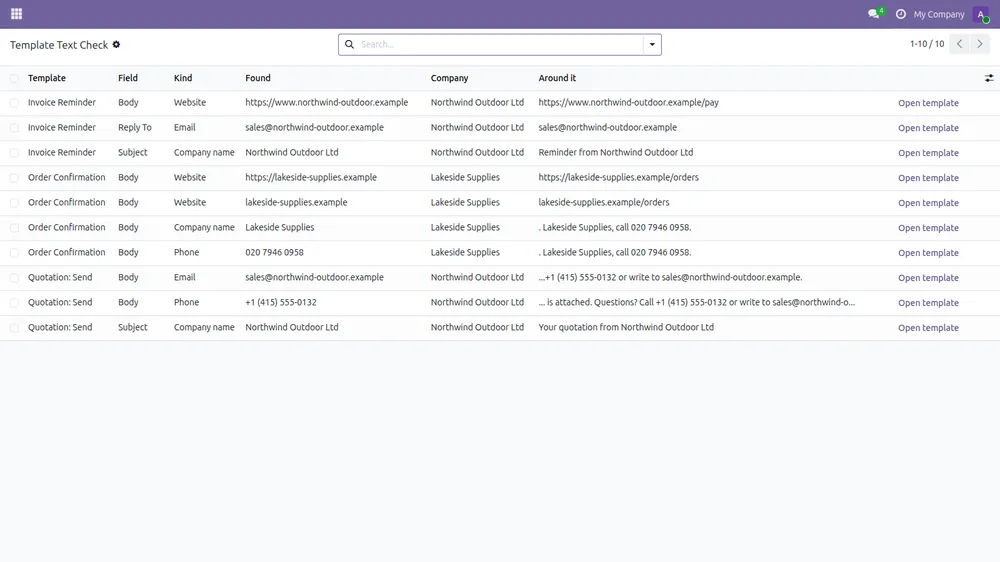
Open Settings > Technical > Email > Template Text Check. The app reads the subject, Send From, To, Cc, Reply To and body of every active mail template, in every active language, and lists each place where the literal text of one of your companies appears: the template, the field, what was found, which company it belongs to and the text around it.
Four kinds of hit
Company name, email address, phone number and website, matched against the real details on the company records you can see. A template that mentions a customer or another brand is not flagged.
Placeholders are left alone
Anything Odoo fills in when the email is sent is skipped: {{ ... }} expressions in the subject and address fields, and in the body every t-out, t-esc, t-field and t-if expression, including the sample text Odoo keeps inside a t-out element. A template that uses {{ object.company_id.name }} or t-out="object.company_id.phone" is clean, even when the sample text inside it is a real company name.
Phone numbers by digits, not by spelling
+1 555 123 4567, (555) 123-4567 and tel:+15551234567 are the same number. A number that merely contains the same digits as part of a longer one is not a hit.
Filter, group, open
Filter by kind, group by template, company or field, search by what was found, and open the template from the row. Each scan replaces your previous results, and they are visible to you only.
Screenshots
What it does not do
- It does not edit templates, make a copy for each company or choose a template when an email is sent. It reads and lists, nothing else.
- It reads only the companies you are allowed to see, and only active templates. It does not look inside the Python of an expression, so a company name typed as a string inside {{ ... }} is not found. It does not scan attachments, report PDFs, the "To (Partners)" field or the layout Odoo wraps around an email. It matches exact spellings: another address at your company's domain, or "Acme Widget Co" when the company is "Acme Widgets", is not a hit.
Requirements
- Odoo 19.0 or 20.0. The App Store sells each version separately, so buy the one that matches your database.
- Odoo.sh or On-Premise only. Third-party apps cannot be installed on Odoo Online (SaaS) databases. Check your hosting before buying.
- Odoo 19 and 20, Community or Enterprise, with the Discuss (mail) app. Third-party apps install on Odoo.sh or On-Premise only - they cannot be installed on Odoo Online. Reading the list needs the Email Template Editor right, which is Odoo's own setting.
- Module
mh_template_text_check, version 19.0.1.0.1, licensed OPL-1.