Unapplied Payments
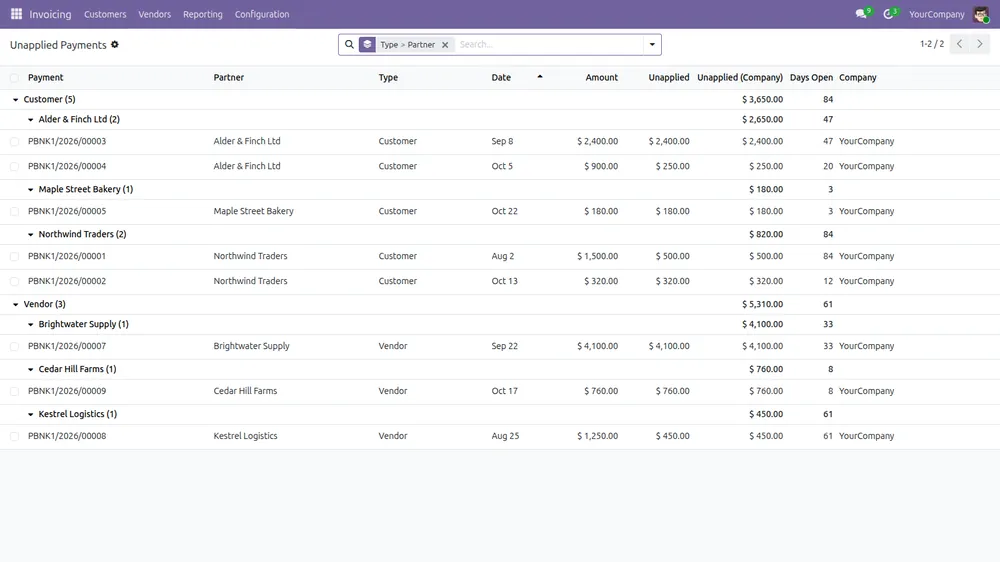
Unapplied payments list: unallocated and unreconciled payment amounts still open per customer and vendor, with days open. Opens the payment. Read only.
Request a live demo · Odoo.sh or On-Premise only, not Odoo Online (SaaS).
Free
App Store price, per Odoo version
19 · 20
Odoo versions, each sold on its own page
Odoo.sh
or On-Premise; not Odoo Online (SaaS)
1.0.1
version of mh_unapplied_payments
A customer pays 1,500 against a 1,000 invoice, or pays before there is an invoice at all. The extra sits on the receivable account as a payment that was never fully applied. Odoo's Payments list has a Reconciled filter, but no column that says how much of a payment is still open and no list of only the payments that are. Odoo 19 and 20 Community and Enterprise.
How it works
What it does
Adds Reporting > Management > Unapplied Payments, in the Invoicing or Accounting app: one list of every posted customer and vendor payment that still has an amount open. Columns: payment, partner, type, date, payment amount, unapplied amount, the unapplied amount in company currency, and days open. Click a row to open the payment.
It opens grouped by type, then partner. Filter customer or vendor payments, payments older than 30 or 90 days, or a payment date range. A group row shows the oldest age in the group and the company-currency total.
Where the number comes from
The unapplied amount is the open balance of the payment's own journal item on the receivable or payable account: the same figure Odoo reconciles with. It is not a stored copy and cannot go stale; the list reads it live every time. It is shown in the payment currency, and in company currency, which is the one that adds up. Customer and vendor money are different things, so the list has no grand total across both.
Screenshots
What it does not do
- It does not apply or reconcile anything. It is read only and changes no amount. To open a payment and match it, use Odoo's own screens.
- It does not look at bank statement matching. A payment can be applied to an invoice and still wait for its bank line, or the other way round. This list is about the receivable or payable side only.
- It does not tell an invoice from a credit note or a manual entry. A payment matched to any of them counts as applied for the part matched.
- It shows only posted payments. Drafts and cancelled payments are not listed, and neither are internal transfers, which do not touch the receivable or payable account.
- It is not an aged receivable report. It does not list unpaid invoices. Odoo Enterprise has its own partner reports; this is a plain list for Community and Enterprise alike.
Requirements
- Odoo 19.0 or 20.0. The App Store sells each version separately, so buy the one that matches your database.
- Odoo.sh or On-Premise only. Third-party apps cannot be installed on Odoo Online (SaaS) databases. Check your hosting before buying.
- Odoo 19 or 20, Community or Enterprise, with Invoicing (account). Third-party apps install on Odoo.sh or On-Premise only - they cannot be installed on Odoo Online (SaaS). Billing and read-only accounting users can open the list; in a multi-company database each user sees only the companies they are logged in to.
- Module
mh_unapplied_payments, version 19.0.1.0.1, licensed OPL-1.