US Breach Deadlines
One incident, every affected US state, and which notification date comes first - from a rule table you keep
Request a live demo · Odoo.sh or On-Premise only, not Odoo Online (SaaS).
12 of 12
state lines (3 incidents) matched an independent recompute of every deadline, Attorney General flag and earliest deadline from the raw tables
5
state rules ship in the table (California, Colorado, Florida, Texas, Washington); the other 57 US states and territories have none until you add them
33
automated tests in the app, none failing; 16 were added for the limits stated on this page
Calendar
days only: no public-holiday or weekend calendar; a deadline can land on a Sunday or on 25 December
0
legal advice or compliance assurance: it adds days to a date from a table you control, and no figure was checked against statute text in this version
Not
a person's To Do list: the hourly reminders are assigned to OdooBot and come back after Done (see the known limits)
When one incident touches residents of several US states, each state can have its own notification deadline. US Breach Deadlines lets you log the incident once, tick the affected states, and shows a deadline per state, the earliest one, and an hourly reminder as a date gets close. The deadlines come from a plain table of rules, one row per state, that you edit yourself: days to notify, and an Attorney General threshold and days. This page walks through it with screenshots of an Odoo 19 database holding a made-up company (Harbor Lane Analytics) and three made-up incidents, and with tables rendered from real readings of the same run; each picture says which it is.
This is a date calculator, not legal advice. It adds a number of calendar days to the date and time you enter. It ships rules for five states only, it was not checked against statute text in this version, and it does not know public holidays. What a law requires, when discovery happens and who must be told are questions for your counsel.
Install it and a Breach Deadlines menu appears with Incidents and State Deadline Rules. It needs only the Discuss (mail) module.
How it works
What it keeps, what it changes, what it does not
Each line was tested or read in the code.
1 Log the incident once and pick the states
Use it when an incident touches customers or staff in several US states and you want one record.Writes the incident
Several states can each have their own clock, and a spreadsheet of them goes out of date the day someone edits one cell.
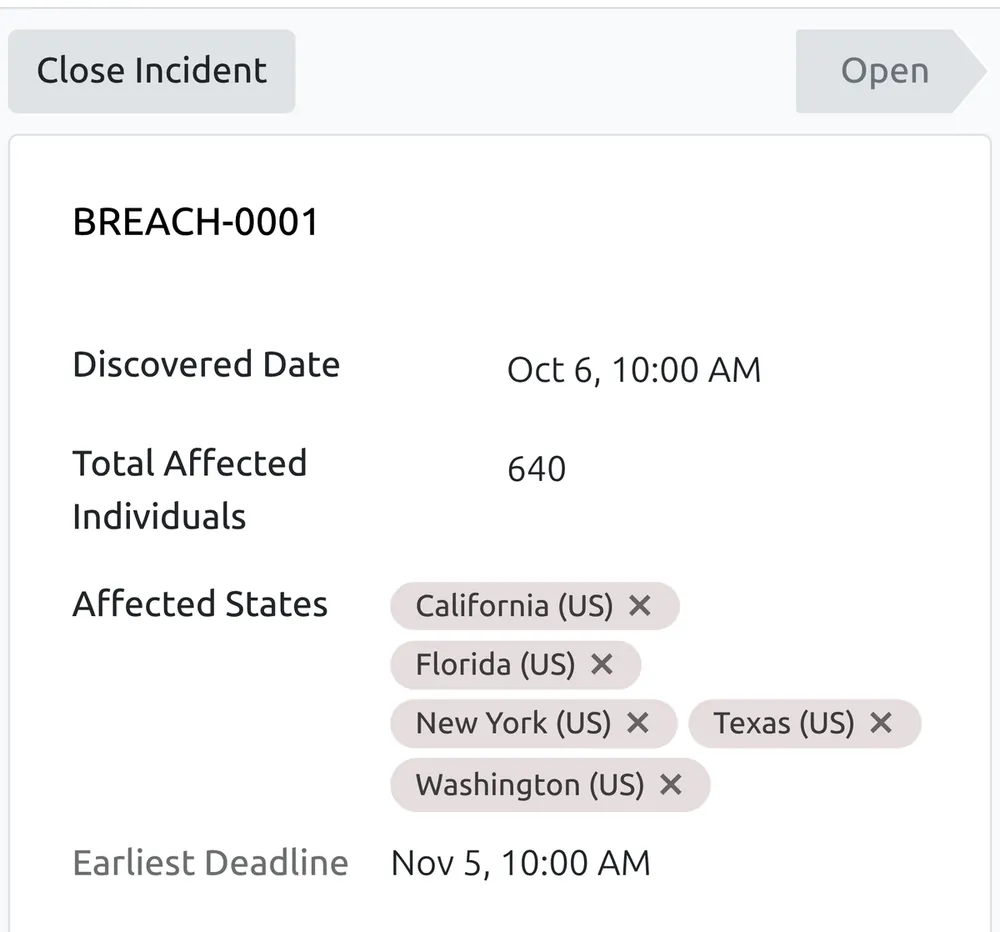
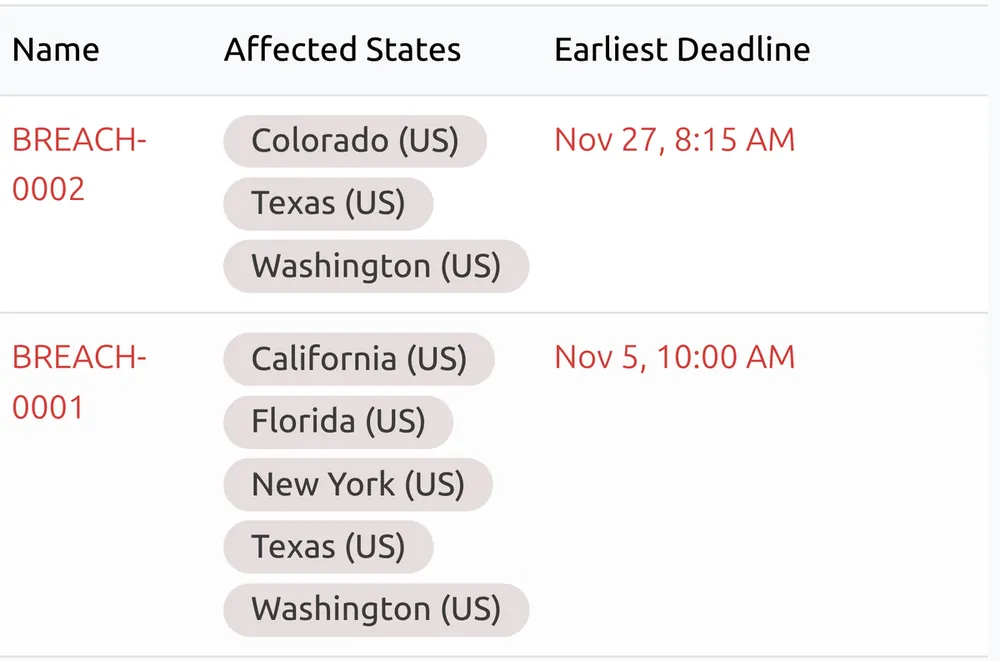
Open Breach Deadlines, Incidents and create an incident: a description, the discovered date and time (now by default), the Total Affected Individuals and the Affected States. Saving makes one line per state. The incident has an Open and a Closed status and a chatter. The first picture is the incident header for the made-up incident BREACH-0001 (640 people, five states); the second lists the open incidents.
The incident number is drawn when the New form opens, so opening New without saving leaves a gap in the numbering.
The incident header. Real Odoo screen (Odoo 19).
Open incidents with their states and earliest deadline (the Odoo list has more columns; this shows three). Real Odoo screen.
2 A rule table you edit
Use it when you want the numbers in a list you control, not in code.Writes when saved
Deadlines change, and a number buried in code is wrong the day a statute is amended.
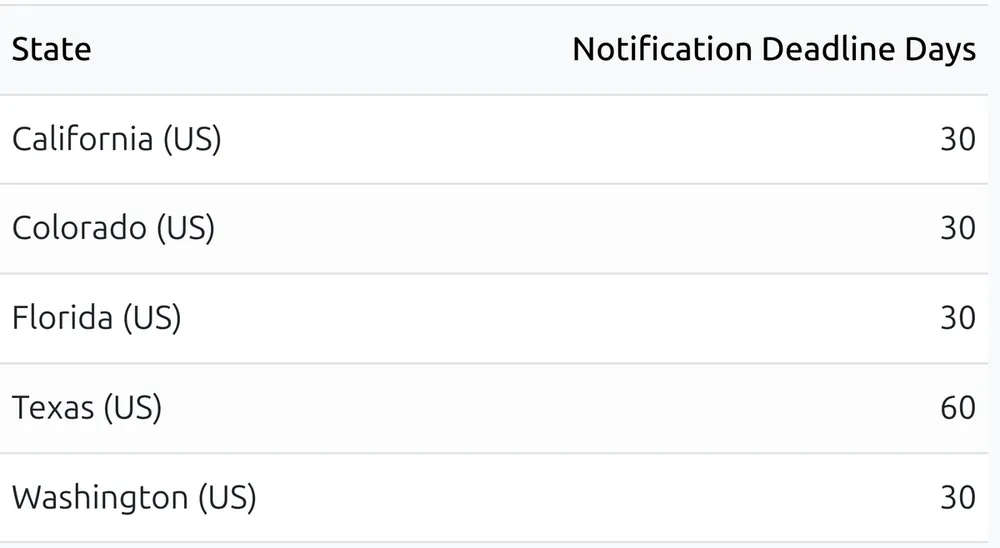
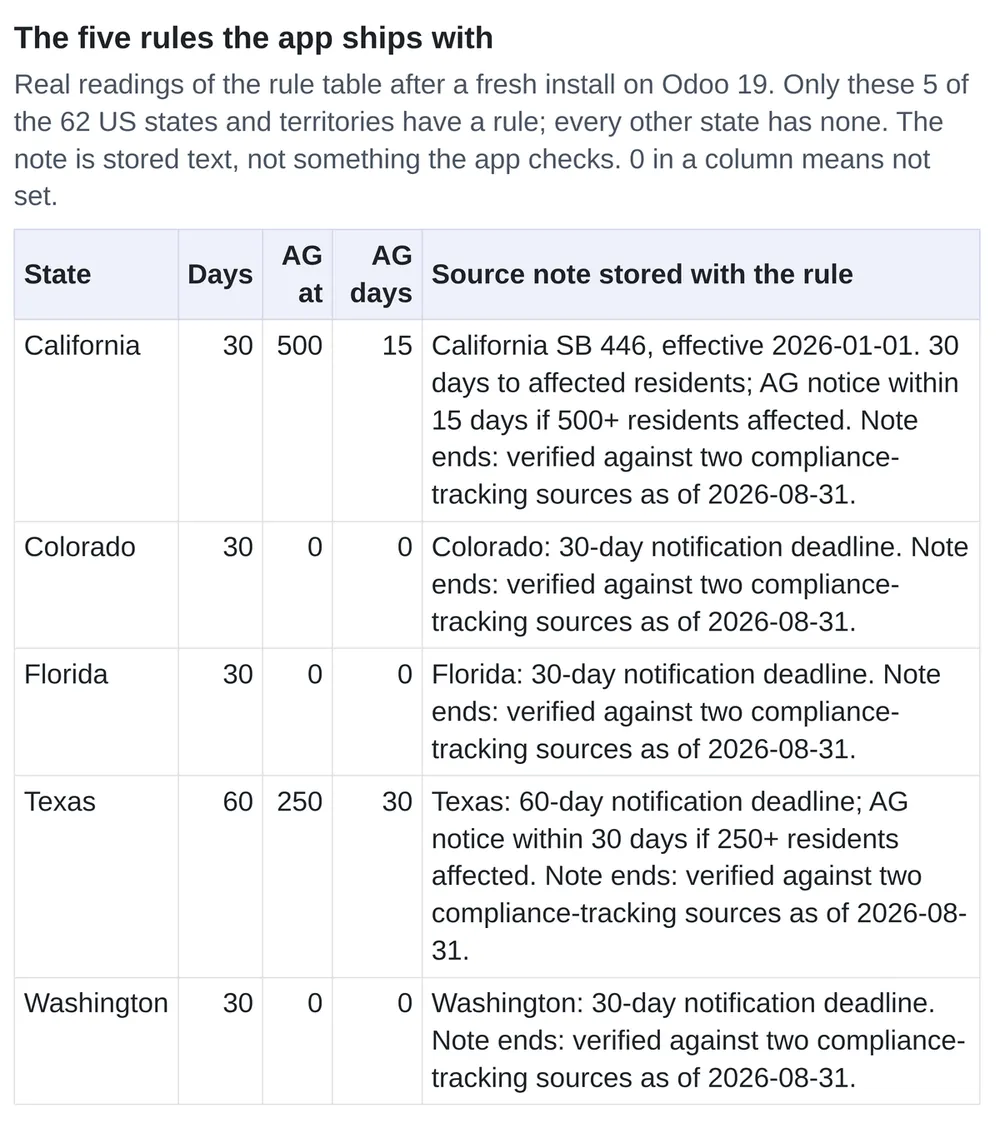
Breach Deadlines, State Deadline Rules is an editable list with one row per state: Notification Deadline Days, the Attorney General threshold (people) and days, and a free-text source note for you to record where a figure came from. Five rows ship with the app; the table below shows them exactly as stored, including the note written at build time. 0 days means no fixed deadline. Editing a rule moves the deadline of every line that already uses it, including lines of closed incidents. A rule added later is not attached to lines that already exist; taking the state off the incident and putting it back attaches it.
It does not check any figure against any law. A state that is not in the table has no deadline, and the table holds 5 of the 62 US states and territories Odoo lists.
The rules list (the Odoo list has more columns; this shows two). Real Odoo screen (Odoo 19).
The five shipped rules as stored. Evidence table.
3 What the calculation does
Use it when you want to see exactly how a date was reached before you rely on it.Read-only
A date on a screen is only useful if you know the rule behind it.
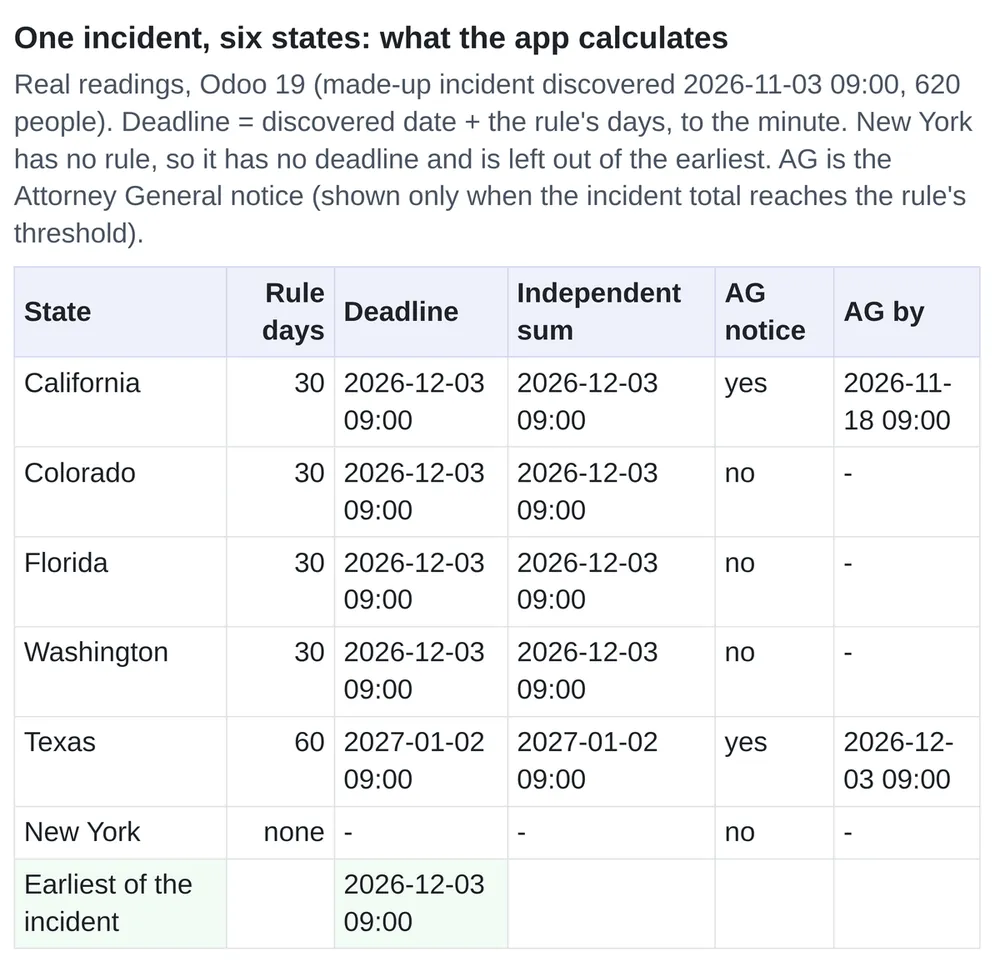
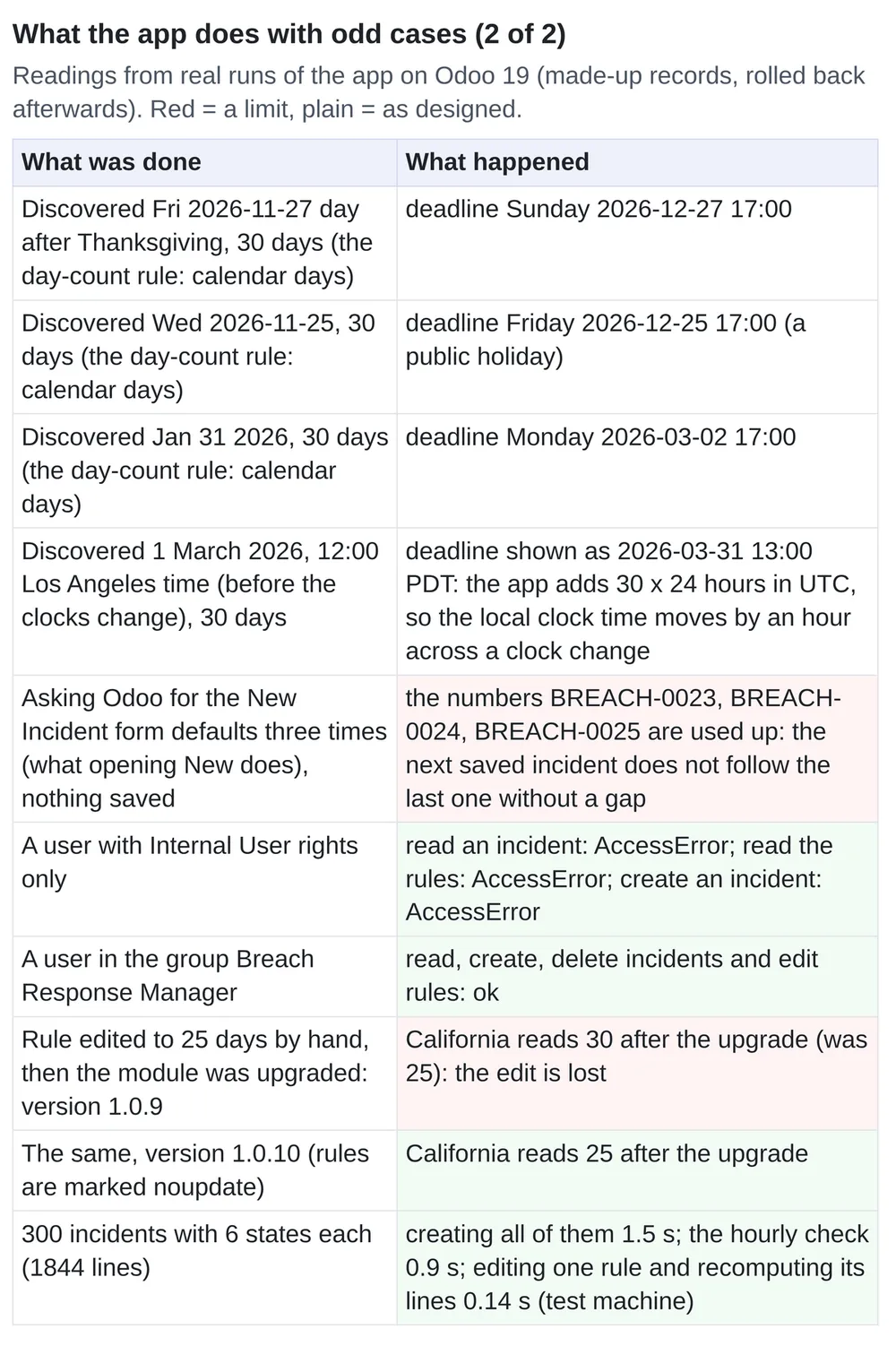
The deadline of a line is the incident's discovered date and time plus the rule's days, counted as calendar days and kept at the same time of day. The app stores it in UTC and shows it in your time zone, so across a daylight-saving change the local clock time moves by an hour (discovered 12:00 in Los Angeles on 1 March 2026 shows 13:00 on 31 March for 30 days). Weekends and public holidays count: a discovery on 25 November with 30 days gives 25 December, a Friday and a public holiday, and the app says nothing about it. The table is real readings for one made-up incident with six states.
It has no calendar of public holidays and no business-day rule, and it does not decide when discovery happened: the date is what you type.
One incident, six states. Evidence table.
4 The Attorney General notice
Use it when a state's rule asks for a regulator to be told above a number of people.Read-only
Some rules add a second duty above a size threshold, and the threshold is easy to miss in a crowded incident.
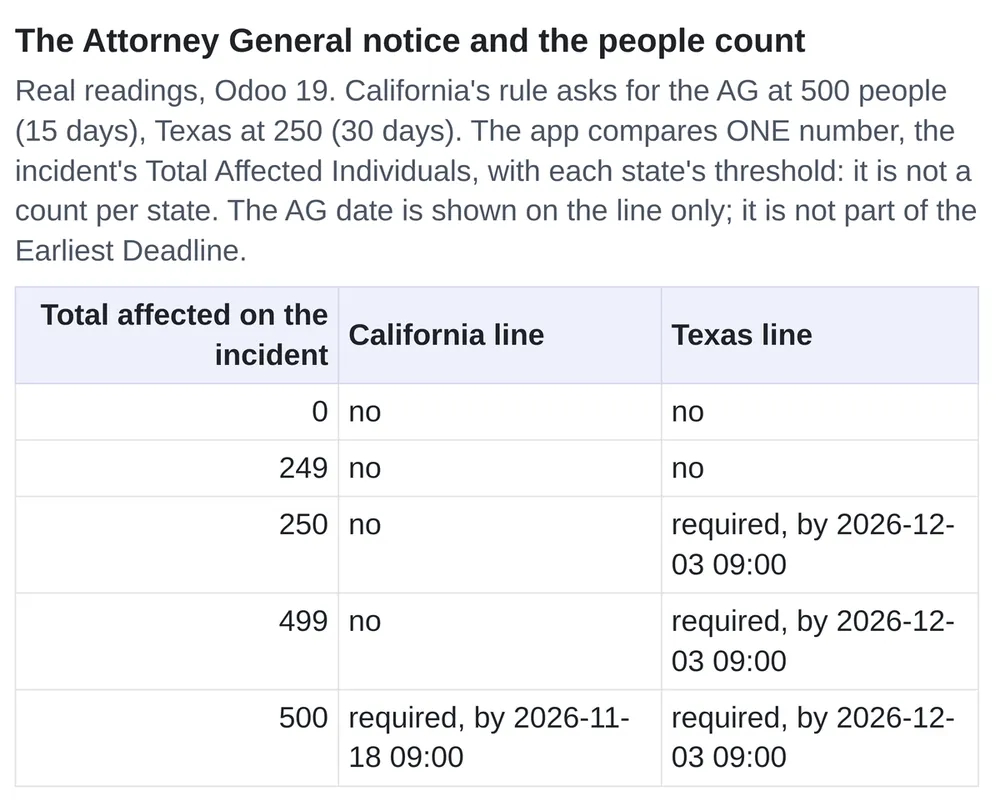
If a rule has an Attorney General threshold above 0 and the incident's Total Affected Individuals reaches it (at or above), the line is flagged as required and gets a date: the discovered date plus the rule's Attorney General days. The comparison uses the one total on the incident for every state; it is not a count of that state's residents. The Attorney General date appears on the line only: it is not part of the Earliest Deadline, has no Notified box and is not read by the reminder.
A threshold above 0 with 0 Attorney General days reads required with no date.
The threshold edges, California at 500 and Texas at 250. Evidence table.
5 Earliest deadline and Mark Notified
Use it when you want to see which state is due first and record that you have notified one.Writes the notified flag
With several clocks running, the question is which one ends first and which are already done.
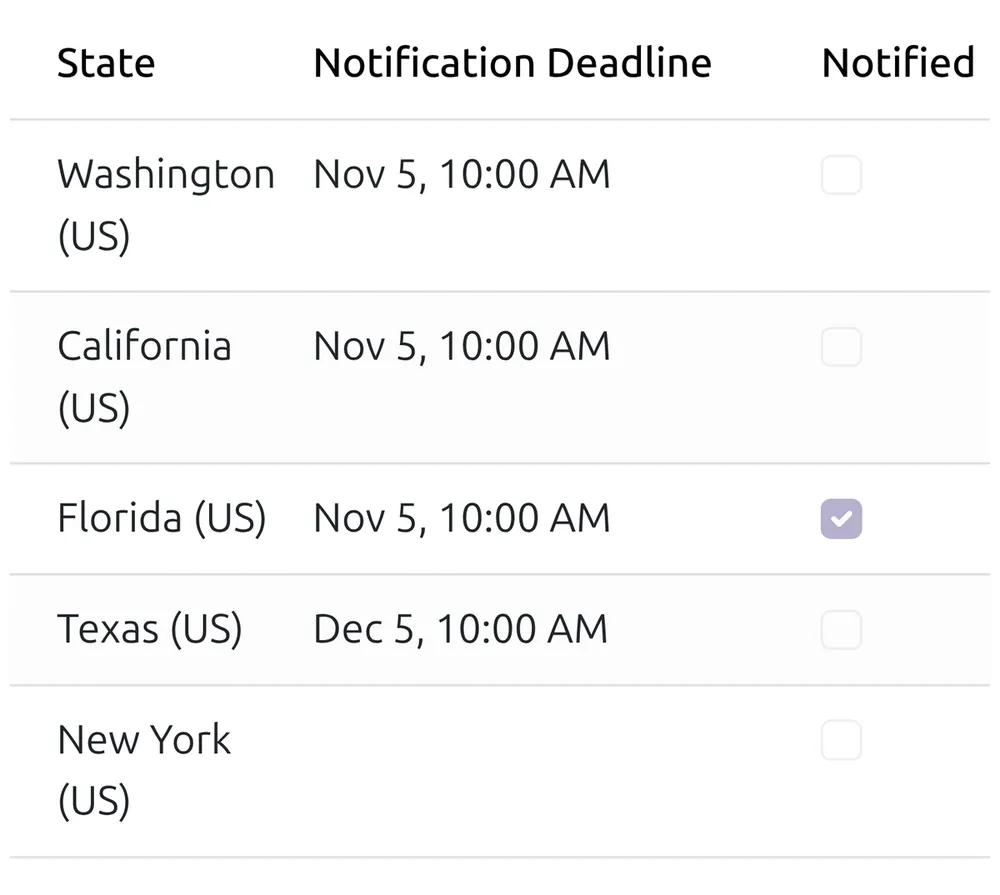
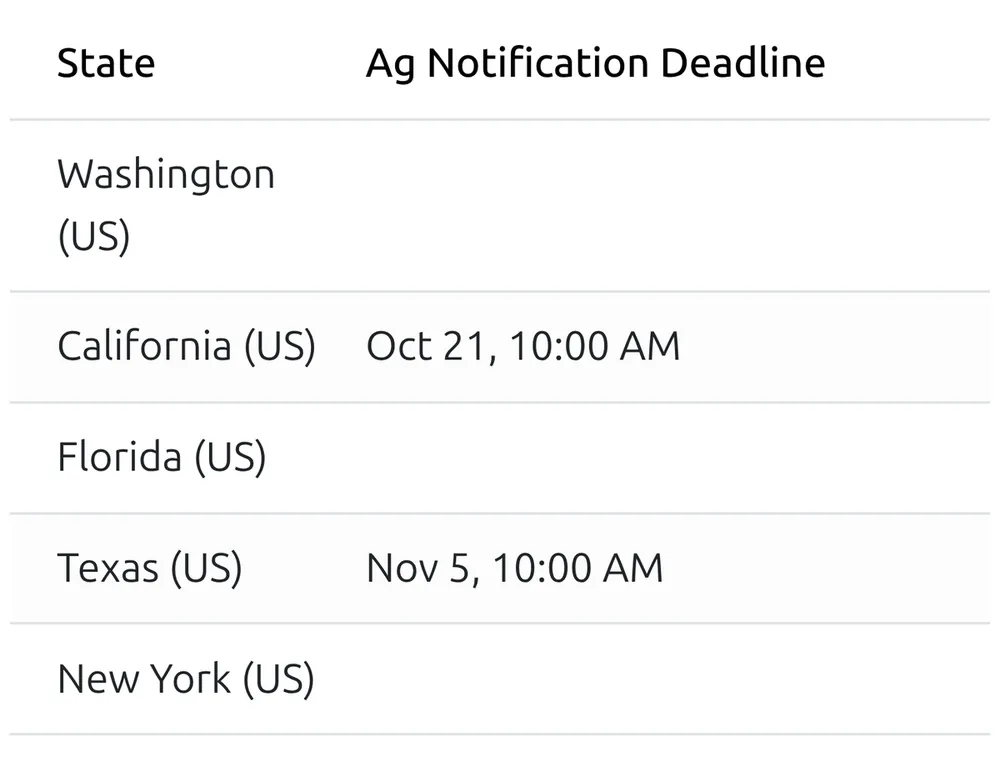
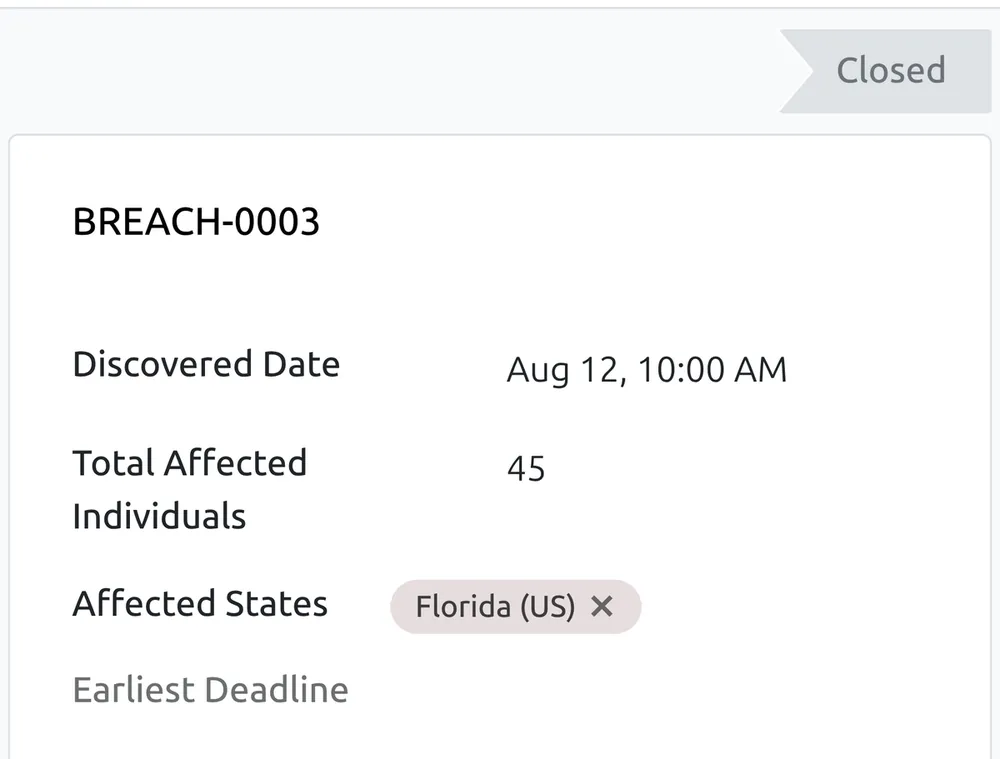
The Earliest Deadline on the incident is the smallest notification deadline among the lines that have one and are not marked notified. Each line has a Mark Notified button that records the date and time and drops the line from the earliest deadline and from the reminders. The first picture lists the deadlines of BREACH-0001 (Florida is marked notified, New York has no rule and so no date); the second lists the Attorney General dates. A closed incident keeps its lines and its earliest deadline (third picture, a closed incident with its state notified).
Ticking the Notified box by hand drops the line from the earliest deadline but leaves the notified date empty; only the button sets the date. A state taken off the incident takes its line and Notified flag with it.
The lines of the incident (the Odoo list has more columns; this shows three). Real Odoo screen.
The same lines, Attorney General dates. Real Odoo screen.
A closed incident. Real Odoo screen.
6 An hourly reminder as a date gets close
Use it when a deadline is within two days or already past and nobody has marked it notified.Creates To Do activities
A deadline you only see when you open the incident is easy to miss.
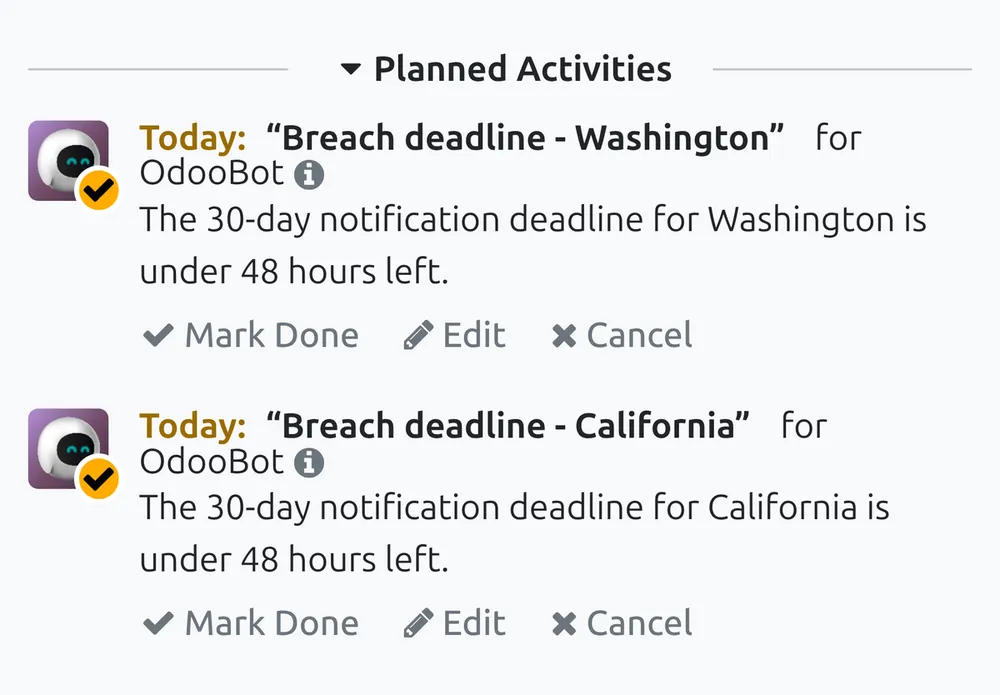
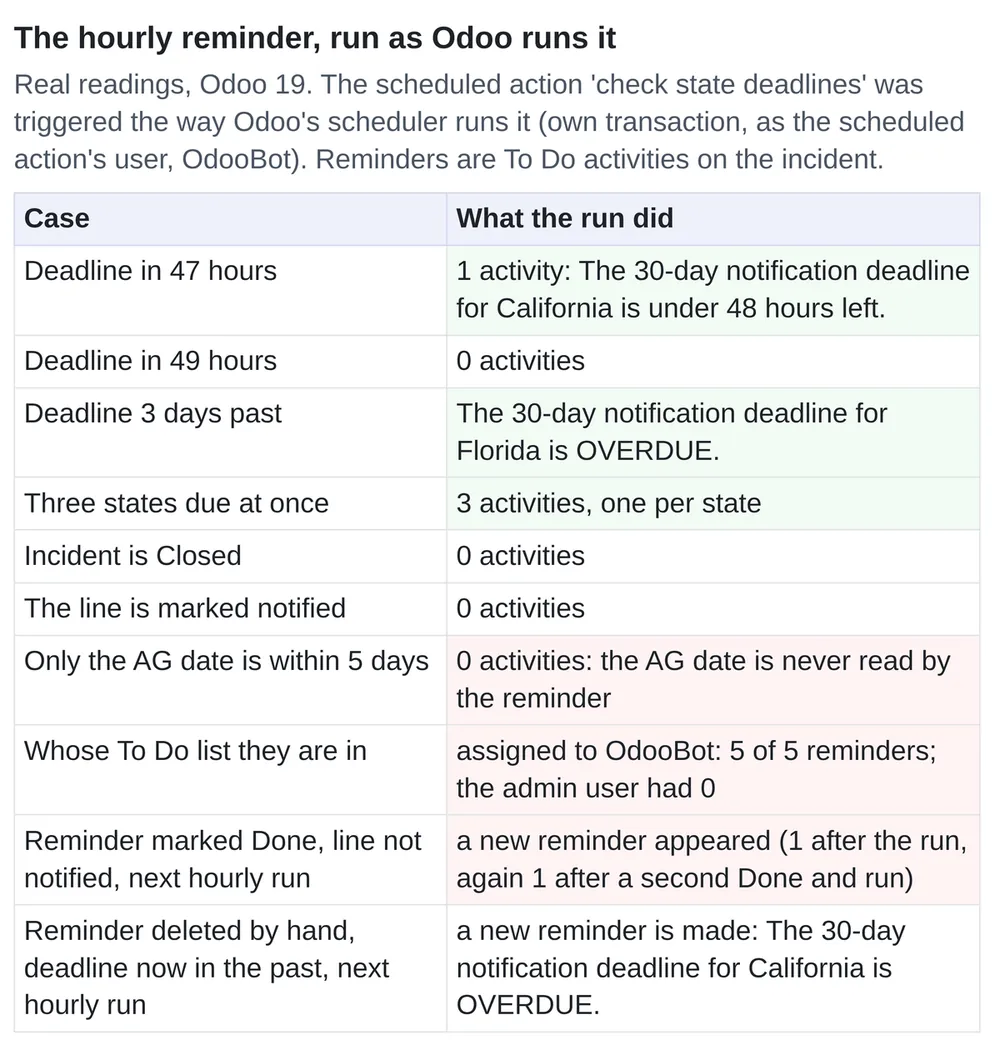
A scheduled action runs every hour. For each open incident it looks at each line that has a deadline and is not marked notified; when the deadline is within the next 48 hours, or already past, it creates one To Do activity on the incident, titled Breach deadline with the state name, unless one already exists. The text says under 48 hours left or OVERDUE as of that moment. We ran Odoo's scheduled action itself; the first picture shows the two reminders it made for BREACH-0001 and the table the other cases.
The reminders are assigned to OdooBot, not to a person, so they do not appear in anyone's own To Do list; they show on the incident. A reminder marked Done is made again at the next hourly run until the line is marked Notified. A closed incident and the Attorney General date get no reminder.
Two reminders made by the scheduled action. Real Odoo screen (Odoo 19).
What the scheduled action did in each case. Evidence table.
7 Checked against the raw tables
Use it when you want to know the arithmetic is right before you rely on it.Read-only
A date is only as good as the sum behind it.
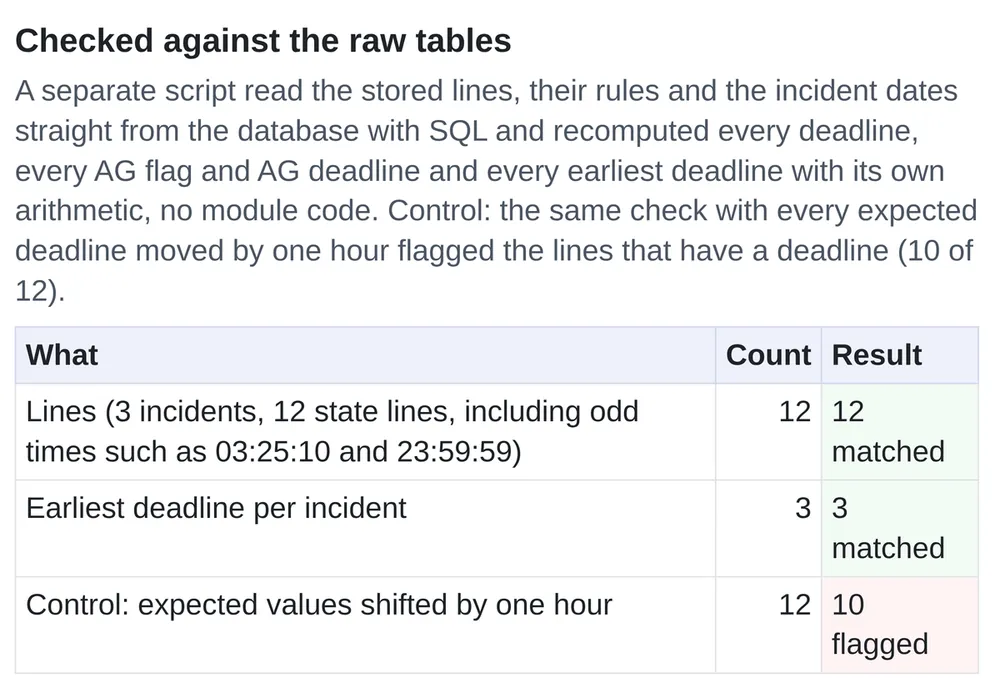
A separate script read the stored lines, their rules and the incident dates straight from the database with SQL and recomputed every deadline, every Attorney General flag and date and every earliest deadline with its own arithmetic and no module code, including discovered times such as 03:25:10 and 23:59:59. All 12 lines and 3 earliest deadlines matched, on Odoo 19 and Odoo 20. As a control the same check with every expected date moved by one hour flagged the 10 lines that have a date.
What was checked. Evidence table.
What changed in this version
Version 1.0.10 makes one change to behaviour: the five shipped rules are marked noupdate, so a module upgrade no longer puts them back to the shipped numbers after you have edited them (on 1.0.9 California edited to 25 days read 30 again after an upgrade). The consequence is that a later release cannot change those rows in a database that already has them. It adds 16 automated tests that pin the limits above, replaces the screenshots, the icon and the banner, and rewords the description: the earlier text said a state without a rule shows as verify manually, which the app does not do, and it made statements about US law that this version does not make. The demo video and the YouTube card are those of an earlier version and were not re-recorded or checked against the new text.
Screenshots
What it does not do
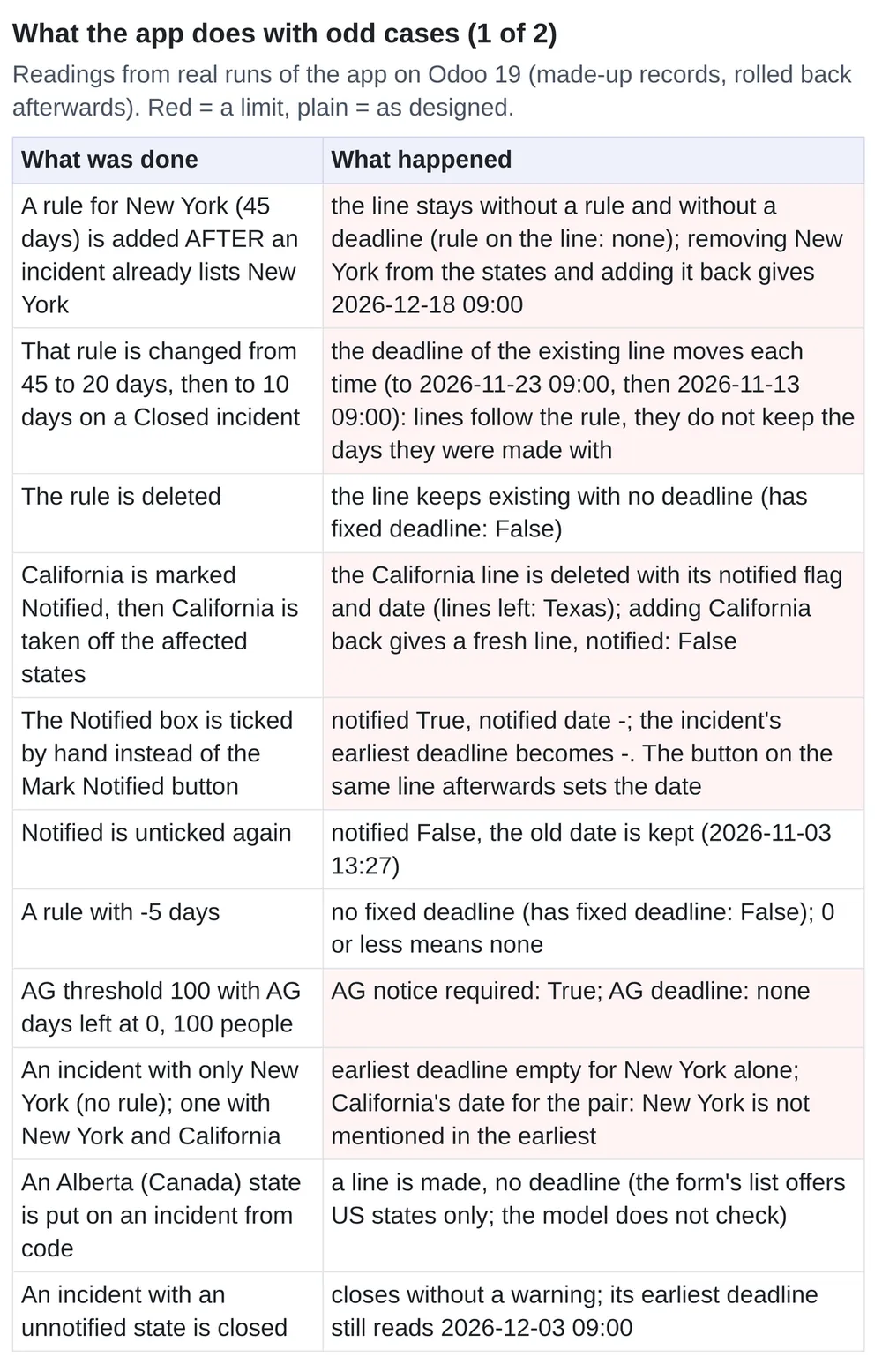
- Each of these was reproduced in a run of the app on Odoo 19 and is pinned by a test that passes. Only the first item of the next section was changed in this version.
- Ten readings from real runs. Evidence table.
- More readings from real runs. Evidence table.
Requirements
- Odoo 19.0 or 20.0. The App Store sells each version separately, so buy the one that matches your database.
- Odoo.sh or On-Premise only. Third-party apps cannot be installed on Odoo Online (SaaS) databases. Check your hosting before buying.
- Module
mh_breach_deadline_calc, version 19.0.1.0.11, licensed OPL-1.