Variant Extra Prices
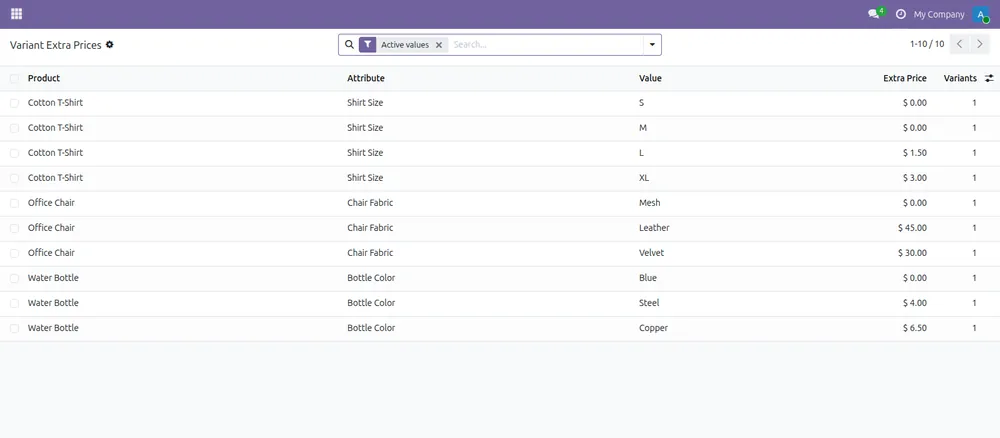
Variant extra price list - every attribute value extra price across all products in one editable list, filtered by attribute or product.
Request a live demo · Odoo.sh or On-Premise only, not Odoo Online (SaaS).
Free
App Store price, per Odoo version
19 · 20
Odoo versions, each sold on its own page
Odoo.sh
or On-Premise; not Odoo Online (SaaS)
1.0.1
version of mh_variant_extra_prices
How it works
The list Odoo never gave you
Odoo stores the extra price of an attribute value (for example +25 for Blue) on each product. To see it you open the product, open the attribute line and read it, one product at a time. There is no list across products and no menu for it. This adds that list under Sales > Products > Variant Extra Prices: one row per product and attribute value, with the extra price you can edit in place.
Find and change prices in bulk
Filter to values that have an extra price, or to those that have none. Search by product, product category, attribute or value. Group by product or by attribute. Select several rows and edit one price cell to set all of them at once.
See how many prices a change touches
Each row shows the number of variants that carry the value, archived variants included, so you know how many variant prices move before you change a number.
Odoo's own field, nothing new stored
The list reads and writes the extra price Odoo already keeps, so what you type is what the variant sells for. Archived products are left out, and you only see the products of your own companies. Saving needs the right to edit products, as it does in Odoo.
Screenshots
What it does not do
- It does not calculate percentages. Every extra here is a fixed amount.
- It does not set a price per variant, change pricelists or touch the website. It edits the extra price of an attribute value, which Odoo adds to the product price.
- It does not total prices sensibly. If you group the list, Odoo adds up the extra prices in each group; that sum has no meaning, so ignore it.
- It does not create attribute values or keep a price history. A change overwrites the old number and nothing records what it was.
- It does not show the Variant Extra Prices menu to everyone. The menu appears for users who have the Variants setting enabled and the Sales salesman right.
Requirements
- Odoo 19.0 or 20.0. The App Store sells each version separately, so buy the one that matches your database.
- Odoo.sh or On-Premise only. Third-party apps cannot be installed on Odoo Online (SaaS) databases. Check your hosting before buying.
- Odoo 19 and 20, Community or Enterprise. Needs the Sales app. Third-party apps install on Odoo.sh or On-Premise only - they cannot be installed on Odoo Online (SaaS).
- Module
mh_variant_extra_prices, version 19.0.1.0.1, licensed OPL-1.