MCP Server for Odoo
MCP server exposing Odoo to Codex and other MCP clients - on the current 2026-07-28 revision, with an explicit list of what each connection may reach
The video below shows MCP Server for Odoo running on a real Odoo 19 database. Want it driven against your own data, or a question answered first? Ask and we will set up a session.
Using Codex? Set it up with the Codex plugin.
What it does
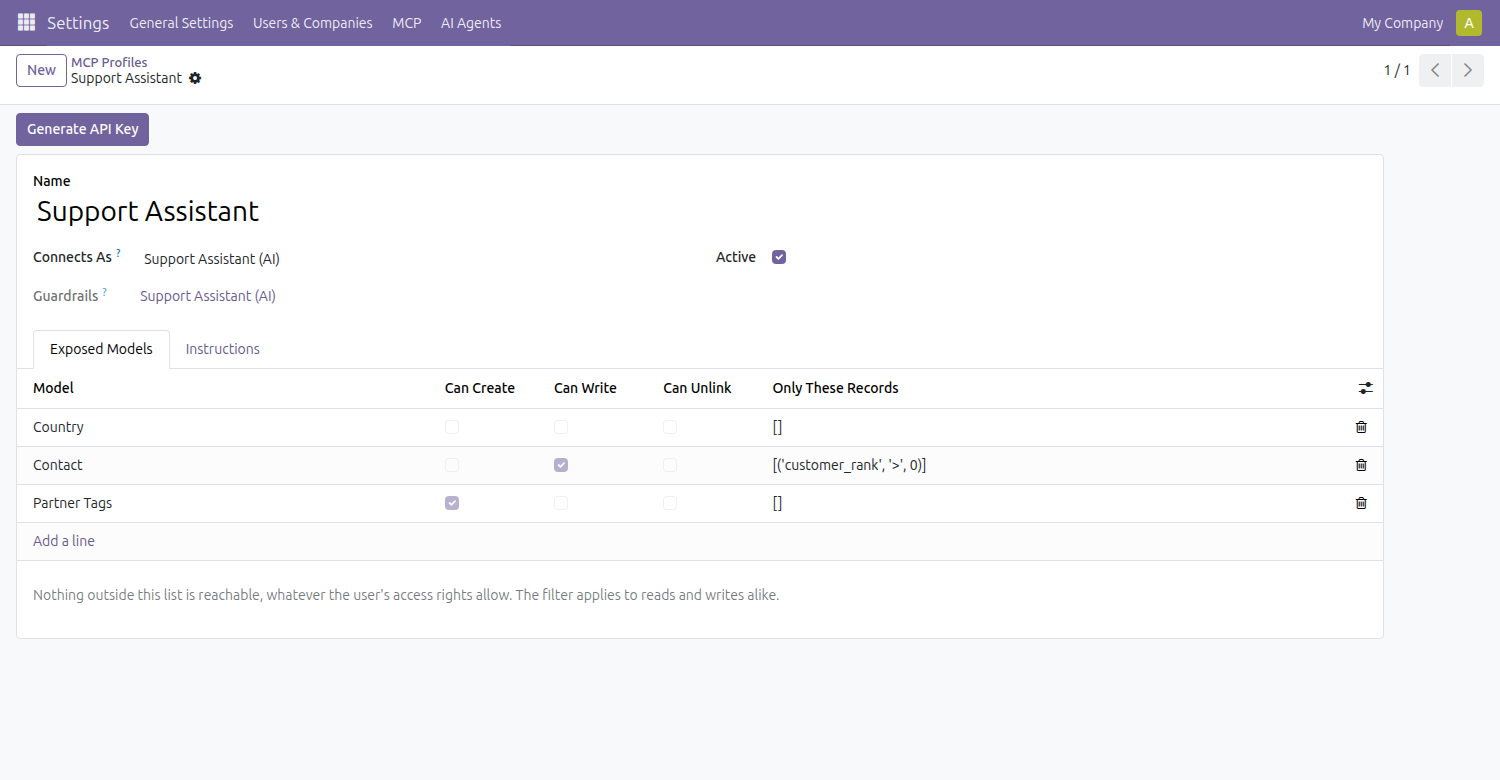
Nothing is exposed until you list it
The free MCP servers for Odoo hand the assistant the ORM and let access rights sort it out. That is reasonable for a person at a keyboard and poor for a model in a loop: access rights say what a user may do, and a model will do all of it. Here a profile names the models one connection may reach and at what access. The tool list the assistant receives is built from that profile, so the permitted models arrive as a fixed set of choices rather than something to find by trying.
The filter holds on writes, not just searches
Narrow a model to the records you mean, and that filter is checked again on every write and delete by id. A filter enforced only on search is decoration: the assistant reads an id once and can change that record forever afterwards.
On the current revision of the protocol
Implements revision 2026-07-28, which removed the initialize handshake, protocol-level sessions and the event stream, and made three request headers required and checked against the body. Clients that still open with the older initialize handshake, such as Codex CLI today, are served too, so the endpoint works with both. A ready-made Codex plugin with read-only Odoo skills is at github.com/Mithahara/odoo-codex-plugin.
Write limits and the change log come from Guardrails
This does not carry its own write cap or record what changed, because that would be a second and weaker copy of an app we already ship. AI Agent Guardrails, which this requires, applies the limit and keeps the previous value of everything altered - and it does that in the ORM, so it holds for anything that login does, not only what arrives over MCP.
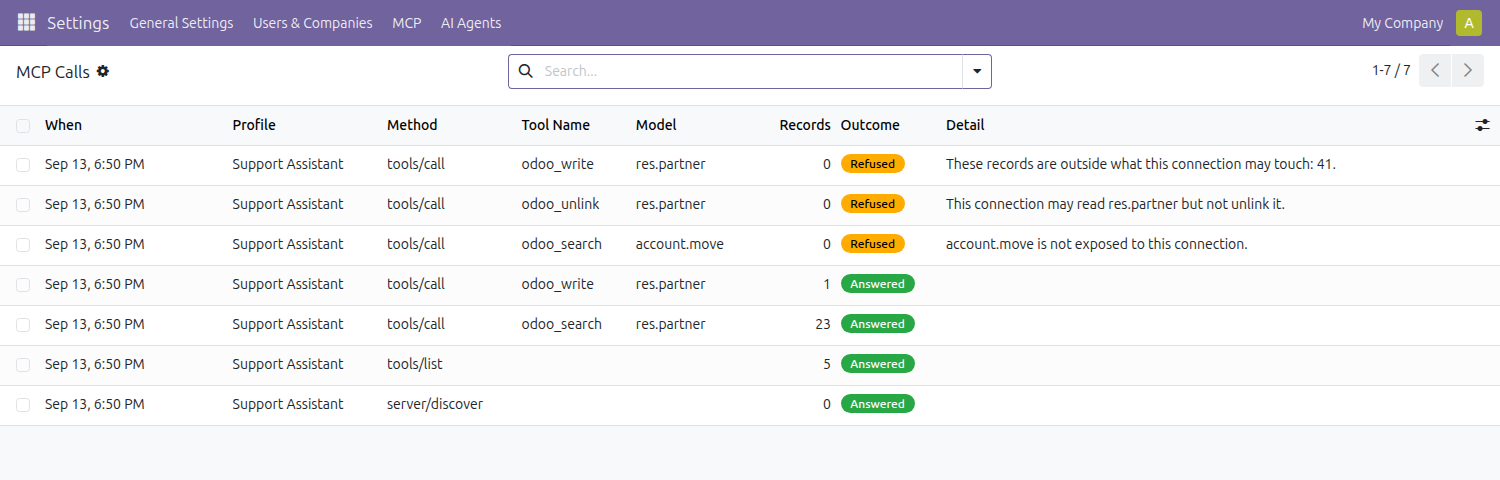
What was asked for, including what was refused
Every call is recorded: the tool, the model, how many records, how long it took, and whether it was answered or refused. The refusals are the entries worth reading, because they are the ones that changed nothing and tell you what the assistant tried to do.
What it does not do
It is not an OAuth 2.1 resource server. The protocol's authorization section expects OAuth with a separate authorization server, discovery metadata and audience-bound tokens. This authenticates with an Odoo API key instead, which the specification allows for HTTP transports but does not describe. If your client insists on the OAuth flow, this is not the server for it.
An ordinary API key opens it too. Keys minted here carry a scope that Odoo's normal RPC authentication refuses, so a key made for MCP cannot be turned around and used to drive XML-RPC. The reverse does not hold: Odoo treats an unscoped key as valid for every scope, so a global key belonging to the same user also works. The profile is the boundary - a login with no profile reaches nothing at all.
It does not stream. Answers come back as one JSON response rather than an event stream. That is what the specification calls for when the result is ready at once, and current clients accept it, but a long-running tool cannot report progress.
Tools only. No prompts and no resources. It does not run reports, post messages or call server actions either: those are ways to make something happen that a per-model permission cannot describe, and they are better refused than half-guarded.
It does not widen anyone's rights. A profile narrows. Where Odoo's own access rules already refuse the user, ticking the box here changes nothing - the two controls compose, and the stricter one wins.
On a multi-database Odoo you must name the database. A stateless request carries no session to read it from, so the database name has to be sent with the connection.
Screenshots
Requirements
- Odoo 19.0, Community or Enterprise.
- Odoo.sh or On-Premise only. Third-party apps cannot be installed on Odoo Online (SaaS) databases — check your hosting before buying.
- Also requires AI Agent Guardrails ($49) — a separate paid app. The App Store price shown above covers both; this app will not install without it.
- Module
mh_mcp_server, version 19.0.1.0.8, licensed OPL-1.
Related apps
Eleven access tools in one app, from who-can-do-what across every model to safe offboarding
See exactly what every user can read, write, create and delete across every model, resolved through group inheritance and record rules
Set the default list view columns for a model and assign them per group, so a team opens the same layout instead of rebuilding it